DSM 7.3 Neue Version 7.3.2 – 86009

  • Ab sofort steht euch hier im Forum die neue Add-on Verwaltung zur Verfügung – eine zentrale Plattform für alles rund um Erweiterungen und Add-ons für den DSM.

    Damit haben wir einen Ort, an dem Lösungen von Nutzern mit der Community geteilt werden können. Über die Team Funktion können Projekte auch gemeinsam gepflegt werden.

    Was die Add-on Verwaltung kann und wie es funktioniert findet Ihr hier

    Hier geht es zu den Add-ons

Weil es staged rollout ist.
 
Auf der DS224+ wurde mir gerade das hier angegebene Update automatisch angezeigt und lief sauber durch.
 
@maxblank , vermutlich weil du bereits auf DSM7.3 gewesen ist oder warst du auch vorher auf DSM7.2 ?
 
Hallo in die Runde,
seit heute Morgen habe ich plötzlich das Problem, dass ich mein DS220+ nicht mehr via QuickConnect erreiche.
Aus dem Netzwerk Zuhause erreiche ich es noch via IP-Adresse.
Hat das was mit dem Update zu tun? Oder könnte es?
 
  • Like
Reaktionen: maxblank
in Bezug auf "SynoCLI Disk Tools". Dies wird wohl bei diesem Paket immer der Fall sein, egal welches Synology-Modell.
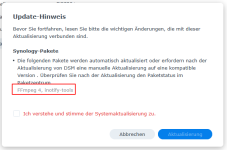
Nö ich habe andere Pakete

1764750095685.png
Anosten wie be anderen auch: SSD-Vlume war weg -> Neusatrt -> alles wieder gut.

Keine Gesichter-Update-Orgie bei Photos, das hatte ich gestern schon installiert.
 
Klar, natürlich hast du andere Pakete. ;)
 
Ich hatte deinen Hinweis so verstanden, dass dieses Paket all DS betrifft ;)
 
  • Like
Reaktionen: maxblank
Nee, hatte ich so nicht gemeint. ;)
 
  • Like
Reaktionen: Kachelkaiser
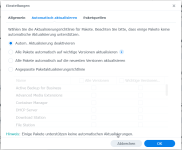
@ctrlaltdelete You have DSM updates set to notify. Did you get a notified and then click update or did DSM update itself?

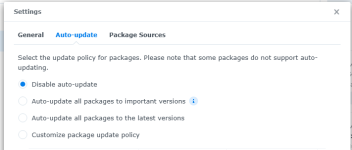
Did you also have packages set to notify (auto-update disabled)?
1764753184958.png

Before I updated from DSM 7.2.2 to 7.3 I setup a shut-down schedule to run syno_hdd_db (as well as my existing boot-up schedule) but I still had to reboot a 2nd time after the DSM update reboot... so the shut-down schedule did not prevent running packages from being updated. I have not updated to 7.3 Update 1 or 7.3.2 yet.

I'm wondering if a companion script that runs at shut-down to stop all packages that are installed on 3rd party NVMe drives would stop the DSM update from "repairing" those packages. This companion script could create a log of packages it stopped so that a modified version of syno_hdd_db could start them at boot-up (which would be after DSM has checked if packages need repairing).

A 2nd idea would be that the companion script also increases the build number of the packages installed on NVMe drives so the DSM update thinks they are compatible version (and log the original build numbers). Then syno_hdd_db would need to restore the original build numbers of those packages - but only after the NVMe volume is back online.

A 3rd idea is the companion shut-down script could disable package center auto-updates - then syno_hdd_db could change it back to it's previous setting.

But the 2nd and 3rd ideas would not work if DSM is repairing packages that are installed but missing (because they are on an NVMe volume that was not mounted on the first boot). I wonder if I can find a way to prevent DSM updates auto repairing missing packages.

A 4th idea is use the companions shut-down script to hide the NVMe packages' /var/packages/<package-name> during shut-down by moving them somewhere else. Then at boot-up syno_hdd_db could move them back if the NVMe volume is back online.

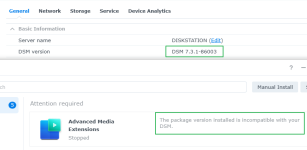
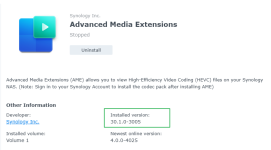
In my videostation_for_722 script it changes the first part of the version number. It changes Advanced Media Codecs version 3.0.1-2004 to 30.0.1-2004 which worked fine in DSM 7.2.2. But DSM 7.3.1 knows it's incompatible. Which is why I was thinking of changing the build number in the companion script. Or I could even get the latest package version number from Synology's website and make the currently installed version appear like the latest version. Then syno_hdd_db would restore the package's original version number (from the companion script's log) after the volume was back online.

1764754889115.png
1764754846721.png

The problem is I only have 2 chances to test this on my DS1821+, plus one chance on my DS925+ which is already on 7.3.1 Update 1. I will probably have to downgrade my DS925+ to 7.3.1 or 7.3 multiple times just to test my ideas 1, 2, 3 and 4 while updating to 7.3.2.

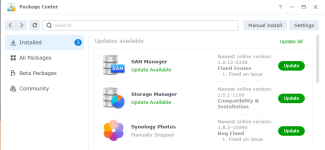
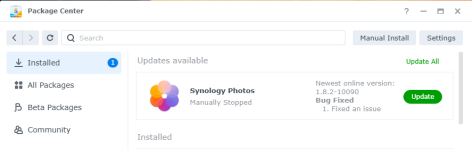
On the DS925+ I had Synology Photos stopped and it did not get updated when I updated to DSM 7.3.1 Update 1. But it's installed on a HDD volume so DSM did not try to "repair" it.

1764754302745.png
 
Yes, it's disabled
 

Anhänge

  • 1764756851826.png
    1764756851826.png
    39,9 KB · Aufrufe: 24
  • Like
Reaktionen: DaveR
Update der 1520+ ist durch. Keine Auffälligkeiten bisher. Photos blieb nach dem Neustart unbeeindruckt, keine Aktivitäten erkennbar.
 
It works... I think.

I created a script to stop all packages that are installed on an NVMe volume. Scheduled it to run as root at shutdown and then updated my DS925+ to DSM 7.3.2. The NVMe packages did not automatically repair or update. But my NVMe volume was mounted after the reboot from the DSM update. So I'm still not sure if it will work if the NVMe volume is missing (requiring a 2nd reboot).

https://github.com/007revad/Synology_HDD_db/blob/develop/syno_hdd_shutdown.sh

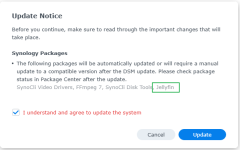
DSM said Jellyfin (which is installed on the NVMe volume) would be updated but it's the same version I had before the DSM update. And just as well because it's installed on the NVMe volume.
1764827270302.png

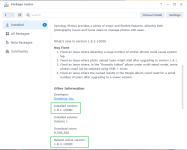
Synology Photos survived and di not automatically update or repair.
1764827319518.png
1764827332868.png
 
Zuletzt bearbeitet:
  • Like
Reaktionen: maxblank und Benie
Auf der 224+ und der 1019+ gerade problemlos durchgelaufen. Vorher waren einige Pakete zum Update bereit. Was mir in dem Zusammenhang auffällt: Seit einiger Zeit werden mir Updates von Paketen angeboten (z.B. Synology Office), die ich gar nicht installiert habe.
 
  • Like
Reaktionen: maxblank
Ich habe das Update bei meiner RS2423+ auch manuell (7.3.2-86009) installiert da die Dienste von außerhalb nicht mehr liefen, und ich zum Glück über den Thread mit dem GeoIP Liste Problem gekommen bin.
Das Update lief durch, Neustart und die Dienste waren wieder erreichbar.
Gut.... aber:
Der Schei* OAuth Service ist wieder installiert worden, einige Profilbilder von den NAS Benutzern sind weg, und... was mir am meisten am Keks geht, in Photos muss ich sehr viele erkannte Personen neu zuordnen......
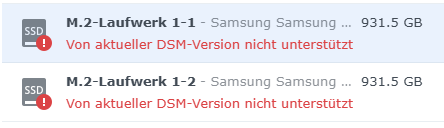
Das M.2 SSD Volumen läuft nach neu zusammenfügen zwar wieder, aber die Meldung ist noch.
1764917703935.png
Wobei mich das nicht ganz so stört. Es funktioniert.

Grüße
 
Run the latest Synology HDD db v3.6.112

This version fixes a bug where in DSM 7.3, 7.3.1 or 7.3.2 the rs2423+_e10m20-t1_v7.db or rs2423+_m2d20_v7.db drive database files weren't edited (even though the script says they were).
 

Additional post fields


Kaffeautomat

Wenn du das Forum hilfreich findest oder uns unterstützen möchtest, dann gib uns doch einfach einen Kaffee aus.

Als Dankeschön schalten wir deinen Account werbefrei.

:coffee:

Hier gehts zum Kaffeeautomat