DSM 7.3 Neue Version 7.3.2 – 86009

  • Ab sofort steht euch hier im Forum die neue Add-on Verwaltung zur Verfügung – eine zentrale Plattform für alles rund um Erweiterungen und Add-ons für den DSM.

    Damit haben wir einen Ort, an dem Lösungen von Nutzern mit der Community geteilt werden können. Über die Team Funktion können Projekte auch gemeinsam gepflegt werden.

    Was die Add-on Verwaltung kann und wie es funktioniert findet Ihr hier

    Hier geht es zu den Add-ons

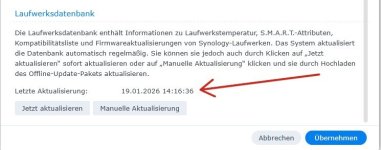
Sieht so aus ! Das automatische Update der Laufwerksdatenbank ist heute Nachmittag gelaufen. Manuell habe ich die eh noch nie Upgedatet.

Edit: auf der DS 920+ Hatte ich bisher diesbezüglich noch nie Probleme.

Upd. Laufwerks Datenbank.jpg
 
DSM used to check for Drive Database updates at midnight, or when a new drive was inserted. DSM 7.3 seems to also check at random times (which may only occur on '25+ models).

@Benie It sounds like you are using a version of syno_hdd_db from before 3.6.115
  • Bug fix for DSM 7.3 not disabling compatible drive database auto update.
 
  • Like
Reaktionen: Benie
That's right, it was probably the version Synology_HDD_db-3.6.112 or Synology_HDD_db-3.6.113. I think I used the version from my DS920+without thinking, hence the slightly older version. I will use the newer version so that this doesn't happen to me again. Thanks for your tips on this.
 
  • Like
Reaktionen: DaveR
Dear @DaveR

What happens with this Script File wich was also in the Zip Synology_HDD_db-3.6.118

"syno_hdd_shutdown.sh"
 
It's for people whose 3rd party NVMe volume does not appear until after a 2nd reboot, after a DSM update.

synopkg in DSM 7.3 seems to have changed to automatically "repair" packages whose volume is missing by installing them on the first available volume (usually a HDD volume). But I noticed that packages that are stopped before the DSM update don't get started after boot-up so they don't get automatically repaired.

syno_hdd_shutdown.sh is for scheduling to run as root at shutdown to prevent DSM updates from "repairing" missing NVMe packages (by installing on them on the HDD volume). It's only needed if you have packages, or shared folders that packages depend on, installed on a 3rd party NVMe volume.

syno_hdd_shutdown.sh is not finished yet, but the first test version accidentally got copied from dev to main. :oops:

When finished syno_hdd_shutdown.sh will:
  1. Check for packages installed on a 3rd party NVMe volume.
  2. Check for other packages that depend on the packages installed on a 3rd party NVMe volume.
  3. Check for packages that depend on a shared folder that is on a 3rd party NVMe volume.
  4. Stop those packages and create a log of the packages it stopped and the NVMe volume number(s).
Then I need to update syno_hdd_db.sh so it:
  1. Checks if there is a log of stopped packages.
  2. Checks if the NVMe volumes those packages need is writable.
  3. If 2 is okay then start the packages listed in the log and delete the log.
 
Thank you for your explanations.

I think I remember that you have already described this problem here in the forum and can now assign it.
Today, when I looked in my DS920+ which version I had saved there (always save the currently used zip file) I remember that I had also this problem with the app installations on a different volume on my DS920+ during the first or second update with 7.3.x. I think this was already fixed with a newer script version (....312, .....313)

The description of the shut_down_script sounds good. Here in Germany we say when we hear something like this: "You're already a clever fox" (Foxes are said to be particularly clever and sophisticated)
 
Ich möchte nur kurz über mein Update von 7.2.2 Update 5 auf 7.3.2 Update berichten. Das Kritische ist, dass ich die M.2-Slots als Volume eingebunden habe. Sonst wäre das Update Standard gewesen.

Bin wie folgt vorgegangen:

1) Dass HDD-Script von DaveR beim Herunter- und Herauffahren eingebunden (mit E-Mail Benachrichtigung, damit man sieht, dass es wirklich läuft).

2) Zusätzlich das neue Scipt von DaveR beim Herunterfahren eingebunden, welches alle laufenden Apps stoppt.

3) Zur Sicherheit alle Apps, die auf Volume2 (M.2) laufen, manuell gestoppt.

4) Update laufen lassen -> Volume2 "defekt". Achtung! Hier keine Apps manuell starten, sondern die Kiste direkt neu starten -> Volume wieder ordentlich eingebunden.

5) Einige Apps starten sich beim Hochbooten automatisch, ohne dass ich einen Weg gefunden habe, dies zu verhindern. Da Volume2 nicht vorhanden ist, die DS aber meint, dass bestimmt Apps vorhanden sein müssen, installieren sich diese dann nicht auf Volume2, weil das zu dem Zeitpunkt noch defekt ist (beim ersten Neustart). Sie sind dann auf Volume1 im "nackten" Zustand (alte Einstellungen nicht mehr vorhanden). Diese Apps nun deinstallieren und auf Volume2 neu installieren und starten. Alte Einstellungen der Apps sind wieder da.

Jetzt läuft bei mir wohl die Indexierung. Mal gucken, wie lange das anhält. Ansonsten sehe ich aktuell keine Auffälligkeiten.
 
Zuletzt bearbeitet:
Ich brauchte einen zweiten Neustart auf der DS920+ (DX517), da der NVME-SSD Speicherpool offline war, wegen nicht unterstützter NVME Module. Es lief wieder diese komische Paketaktualisierung (ich hatte vorher extra im Paketzentrum geschaut, es wurden keine Updates angeboten) während des Neustarts, welcher wohl das Ausführen des hdd_db Scripts verhindert.
Nach dem erneuten Neustart, läuft alles wie gewohnt.
Moin,
mein DS920+ mit DX517 und NVME-SSDs als Cache zeigt jetzt Volume1 abgestürzt nach dem Upgrade, hattest du das auch und was kann ich jetzt tun? Es kann doch nicht alles weg sein!
Ich brauche dringend Unterstützung, da waren ne Menge wichtiger Daten drauf.
Neben Volume1 abgestürzt werden auch die beiden NVMEs mit Fehler: Erkannt! angezeigt. Was kann ich tun?
 
Downloade Dir die neueste Script Date von @DaveR runter und lass diese wieder per Aufgabenplaner laufen und alles wird wieder gut. Bitte auch einen Reebot zum Test durchführen.


https://github.com/007revad/Synology_HDD_db
Habe ich probiert und mittlerweile 2 mal neugestartet, leider werden die NMVEs immernoch als Erkannt mit rotem Ausrufezeichen gezeigt und das Volume1 ist weiter im Status abgestürzt.

Ausgabe der ersten geplanten Scriptausführung beim ersten Neustart:
Code:
Der Aufgabenplaner hat eine ausgelöste Aufgabe abgeschlossen.

Aufgabe: Check HDD DB
Start: Tue, 17 Feb 2026 18:09:35 GMT
Ende: Tue, 17 Feb 2026 18:09:53 GMT
Aktueller Status: 0 (Normal)
Standardausgabe/Fehler:
Synology_HDD_db v3.6.122
DS920+ x86_64 DSM 7.3.2-86009-1
- StorageManager 1.0.1-1100
- SynoOnlinePack_v2 version 1038
- ds920+_host_v7 version 8067

- ds920+_host version 4027

Using options: -n
Running from: /volume2/Synology_HDD_db-main/syno_hdd_db.sh
Running via task scheduler

HDD/SSD models found: 5
HDWD240,KQ000A,4000 GB
ST4000DM004-2CV104,0001,4000 GB
WD40EFAX-68JH4N1,83.00A83,4000 GB
WD40EFPX-68C6CN0,81.00A81,4000 GB
WD40EFZX-68AWUN0,81.00A81,4000 GB

M.2 drive models found: 1
Samsung SSD 970 EVO Plus 2TB,2B2QEXM7,2000 GB

No M.2 PCIe cards found

Expansion Unit models found: 1
DX517

Backed up ds920+_host.db.new
Added [0;33mHDWD240 (KQ000A)[0m to [0;36mds920+_host_v7.db[0m
Edited unverified drives in [0;36mds920+_host_v7.db[0m
Added [0;33mHDWD240$ (KQ000A){Off} to [0;36mds920+_host.db[0m
Added [0;33mHDWD240$ (KQ000A){Off} to [0;36mds920+_host.db.new[0m
Added [0;33mHDWD240$ (KQ000A){Off} to [0;36mdx517.db[0m
Added [0;33mHDWD240 (KQ000A)[0m to [0;36mdx517_v7.db[0m
Edited unverified drives in [0;36mdx517_v7.db[0m
Backed up dx517.db.new
Added [0;33mHDWD240$ (KQ000A){Off} to [0;36mdx517.db.new[0m
Added [0;33mST4000DM004-2CV104 (0001)[0m to [0;36mds920+_host_v7.db[0m
Added [0;33mST4000DM004-2CV104$ (0001){Off} to [0;36mds920+_host.db[0m
Added [0;33mST4000DM004-2CV104$ (0001){Off} to [0;36mds920+_host.db.new[0m
Added [0;33mST4000DM004-2CV104$ (0001){Off} to [0;36mdx517.db[0m
Added [0;33mST4000DM004-2CV104 (0001)[0m to [0;36mdx517_v7.db[0m
Added [0;33mST4000DM004-2CV104$ (0001){Off} to [0;36mdx517.db.new[0m
Added [0;33mWD40EFAX-68JH4N1 (83.00A83)[0m to [0;36mds920+_host_v7.db[0m
Added [0;33mWD40EFAX-68JH4N1$ (83.00A83){Off} to [0;36mds920+_host.db[0m
Added [0;33mWD40EFAX-68JH4N1$ (83.00A83){Off} to [0;36mds920+_host.db.new[0m
Added [0;33mWD40EFAX-68JH4N1$ (83.00A83){Off} to [0;36mdx517.db[0m
Added [0;33mWD40EFAX-68JH4N1 (83.00A83)[0m to [0;36mdx517_v7.db[0m
Added [0;33mWD40EFAX-68JH4N1$ (83.00A83){Off} to [0;36mdx517.db.new[0m
[0;33mWD40EFPX-68C6CN0 (81.00A81)[0m already exists in [0;36mds920+_host_v7.db[0m
Added [0;33mWD40EFPX-68C6CN0$ (81.00A81){Off} to [0;36mds920+_host.db[0m
Added [0;33mWD40EFPX-68C6CN0$ (81.00A81){Off} to [0;36mds920+_host.db.new[0m
Added [0;33mWD40EFPX-68C6CN0$ (81.00A81){Off} to [0;36mdx517.db[0m
[0;33mWD40EFPX-68C6CN0 (81.00A81)[0m already exists in [0;36mdx517_v7.db[0m
Added [0;33mWD40EFPX-68C6CN0$ (81.00A81){Off} to [0;36mdx517.db.new[0m
Updated [0;33mWD40EFZX-68AWUN0 (81.00A81)[0m in [0;36mds920+_host_v7.db[0m
[0;33mWD40EFZX-68AWUN0[0m already exists in [0;36mds920+_host.db[0m
[0;33mWD40EFZX-68AWUN0[0m already exists in [0;36mds920+_host.db.new[0m
[0;33mWD40EFZX-68AWUN0[0m already exists in [0;36mdx517.db[0m
Updated [0;33mWD40EFZX-68AWUN0 (81.00A81)[0m in [0;36mdx517_v7.db[0m
Added [0;33mWD40EFZX-68AWUN0$ (81.00A81){Off} to [0;36mdx517.db.new[0m
Added [0;33mSamsung SSD 970 EVO Plus 2TB (2B2QEXM7)[0m to [0;36mds920+_host_v7.db[0m
Added [0;33mSamsung SSD 970 EVO Plus 2TB$ (2B2QEXM7){Off} to [0;36mds920+_host.db[0m
Added [0;33mSamsung SSD 970 EVO Plus 2TB$ (2B2QEXM7){Off} to [0;36mds920+_host.db.new[0m

Backed up synoinfo.conf

Support disk compatibility already enabled.

Support memory compatibility already enabled.

NVMe support already enabled.

Enabled M.2 volume support.

Disabled drive db auto updates.

DSM successfully checked disk compatibility.

You may need to [0;36mreboot the Synology[0m to see the changes.


Von synology2

 
Zuletzt bearbeitet:
Ich habe die DS920+ jetzt einmal heruntergefahren und DS920+ und DX517 20 Sekunden vom Strom getrennt und dann wieder eingeschaltet, leider ohne Erfolg. NMVEs immer noch als Erkannt mit rotem Ausrufezeichen gezeigt und das Volume1 ist weiter im Status abgestürzt.
 
Hast du denn das Script laufen lassen? Danach ist das Volume mit an Sicherheit grenzender Wahrscheinlichkeit wieder da.
 
2) Zusätzlich das neue Scipt von DaveR beim Herunterfahren eingebunden, welches alle laufenden Apps stoppt.

I have a new version of the shutdown script but I haven't finished testing it yet.
  1. It stops all apps installed on an NVMe volume.
  2. Stops all apps on a HDD volume that depend on an app installed on an NVMe volume.
  3. If run with the -e option, stops all apps installed on a volume in an expansion unit, or depend on apps installed on a volume in an expansion unit.
  4. If run with the -eunits=<eunit-model> option, stops all apps installed on a volume in the specified expansion unit model, or depend on apps installed on a volume in the specified expansion unit model.
3 and 4 are for people who use my Syno_enable_eunit script to use an incompatible Synology expansion unit with their NAS. Like a RX418 on a DS NAS, DX517 on an RS NAS, or an old model DX or RX expansion unit with a recent model DS or RS NAS.

I haven't decided if I need to also stop apps that depend on shared folders on an NVMe volume (or expansion unit volume).

I'm also considering preventing packages from auto updating (for '25+ models):
  1. Get and save the current Package Center Auto Update settings.
  2. Disable Package Center Auto Update.
  3. Then syno_hdd_dd would restore the previous Package Center Auto Update settings once the NVMe volume (and/or expansion unit volume) was back online.
 
Zuletzt bearbeitet:
@DaveR is this already implemented in v3.6.122?
 
Hey, heute hat sich der Synology Support gemeldet und mich gebeten den nicht offiziell unterstützten Arbeitsspeicher ausbauen und sie versuchen jetzt zeitnah nach einer Lösung zu suchen. Der Support schrieb folgendes: ".. we will check the SSD cache status, perform a file system check, and assist with data recovery."
 
  • Like
Reaktionen: DaveR
I'm also considering preventing packages from auto updating (for '25+ models):

For information!

Warning, NVME storage pool/volume critical state has reached me. DSM 7.3.2 , DS1525+, 2x NVMEs 2TB Lexar NM790, on my DS1525+

A few days ago 2025-02-12, Synology apparently renewed the database. Without me turning off the 1525+ or rebooting, the NVME pool was no longer there, script version Synology_HDD_db-3.6.118. I immediately added the version Synology_HDD_db-3.6.121 to the task scheduler, and also added syno_hdd_shutdown.sh. After a reboot the NVME pool was OK again and as you @DaveR #173 described, the apps were all stopped. They no longer started by themselves, I had to start all apps manually.
 
But that's not the new version I am testing. That version just stops all apps installed on a NVMe volume.

So apps on a HDD volume that depend on those NVMe apps could still cause issues like DSM automatically installed the missing NVMe app on the HDD volume. For example, if Synology Application Service is installed on the NVMe volume this new version of syno_hdd_shutdown.sh will stop all Synology apps that depend on Synology Application Service like:
  • Calendar
  • Contacts
  • Spreadsheet
  • SynologyDrive
  • as well as SynologyApplicationService
The currently online version of syno_hdd_shutdown.sh would only stop SynologyApplicationService. As soon as one of Calendar, Contacts, Spreadsheet or SynologyDrive try to start DSM would install SynologyApplicationService on a HDD volume.

For SynologyApplicationService it would not be a problem. But if an app on the NVMe volume had data and settings, and other apps depending on it, that app would lose it's data and settings when DSM installs it on an NVMe volume. You could probably recover the data and settings by uninstalling that app (and the apps that depend on it) then installing that app on the NVMe volume again.
 
Zuletzt bearbeitet:
  • Like
Reaktionen: Benie
A few days ago 2025-02-12, Synology apparently renewed the database.

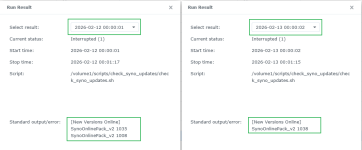
The new SynoOnlinePack became publicly available sometime on the 11th. Then Synology released another new version on the 12th. My script, which runs at midnight each day) noticed them at midnight on the 12th and 13th.

The SynoOnlinePack 1008 is only for the RS2423RP+II which has the same v1000nk kernel as the '25+ models.

1771451238448.png
 
After unpacking the spk files I can see that SynoOnlinepack_v2 1038 was a bug fix because eunit.json was empty in 1035.

1008 was compiled on 20th Nov 2025 but only uploaded to the archive site a few days ago. It looks Synology previously forgot to upload it.
 

Additional post fields


Kaffeautomat

Wenn du das Forum hilfreich findest oder uns unterstützen möchtest, dann gib uns doch einfach einen Kaffee aus.

Als Dankeschön schalten wir deinen Account werbefrei.

:coffee:

Hier gehts zum Kaffeeautomat