Der Aufgabenplaner hat eine ausgelöste Aufgabe abgeschlossen.

Aufgabe: Check HDD DB
Start: Tue, 17 Feb 2026 18:09:35 GMT
Ende: Tue, 17 Feb 2026 18:09:53 GMT
Aktueller Status: 0 (Normal)
Standardausgabe/Fehler:
Synology_HDD_db v3.6.122
DS920+ x86_64 DSM 7.3.2-86009-1
- StorageManager 1.0.1-1100
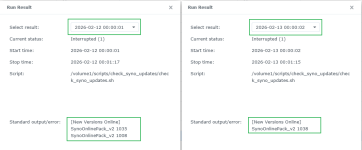
- SynoOnlinePack_v2 version 1038
- ds920+_host_v7 version 8067

- ds920+_host version 4027

Using options: -n
Running from: /volume2/Synology_HDD_db-main/syno_hdd_db.sh
Running via task scheduler

HDD/SSD models found: 5
HDWD240,KQ000A,4000 GB
ST4000DM004-2CV104,0001,4000 GB
WD40EFAX-68JH4N1,83.00A83,4000 GB
WD40EFPX-68C6CN0,81.00A81,4000 GB
WD40EFZX-68AWUN0,81.00A81,4000 GB

M.2 drive models found: 1
Samsung SSD 970 EVO Plus 2TB,2B2QEXM7,2000 GB

No M.2 PCIe cards found

Expansion Unit models found: 1
DX517

Backed up ds920+_host.db.new
Added [0;33mHDWD240 (KQ000A)[0m to [0;36mds920+_host_v7.db[0m
Edited unverified drives in [0;36mds920+_host_v7.db[0m
Added [0;33mHDWD240$ (KQ000A){Off} to [0;36mds920+_host.db[0m
Added [0;33mHDWD240$ (KQ000A){Off} to [0;36mds920+_host.db.new[0m
Added [0;33mHDWD240$ (KQ000A){Off} to [0;36mdx517.db[0m
Added [0;33mHDWD240 (KQ000A)[0m to [0;36mdx517_v7.db[0m
Edited unverified drives in [0;36mdx517_v7.db[0m
Backed up dx517.db.new
Added [0;33mHDWD240$ (KQ000A){Off} to [0;36mdx517.db.new[0m
Added [0;33mST4000DM004-2CV104 (0001)[0m to [0;36mds920+_host_v7.db[0m
Added [0;33mST4000DM004-2CV104$ (0001){Off} to [0;36mds920+_host.db[0m
Added [0;33mST4000DM004-2CV104$ (0001){Off} to [0;36mds920+_host.db.new[0m
Added [0;33mST4000DM004-2CV104$ (0001){Off} to [0;36mdx517.db[0m
Added [0;33mST4000DM004-2CV104 (0001)[0m to [0;36mdx517_v7.db[0m
Added [0;33mST4000DM004-2CV104$ (0001){Off} to [0;36mdx517.db.new[0m
Added [0;33mWD40EFAX-68JH4N1 (83.00A83)[0m to [0;36mds920+_host_v7.db[0m
Added [0;33mWD40EFAX-68JH4N1$ (83.00A83){Off} to [0;36mds920+_host.db[0m
Added [0;33mWD40EFAX-68JH4N1$ (83.00A83){Off} to [0;36mds920+_host.db.new[0m
Added [0;33mWD40EFAX-68JH4N1$ (83.00A83){Off} to [0;36mdx517.db[0m
Added [0;33mWD40EFAX-68JH4N1 (83.00A83)[0m to [0;36mdx517_v7.db[0m
Added [0;33mWD40EFAX-68JH4N1$ (83.00A83){Off} to [0;36mdx517.db.new[0m
[0;33mWD40EFPX-68C6CN0 (81.00A81)[0m already exists in [0;36mds920+_host_v7.db[0m
Added [0;33mWD40EFPX-68C6CN0$ (81.00A81){Off} to [0;36mds920+_host.db[0m
Added [0;33mWD40EFPX-68C6CN0$ (81.00A81){Off} to [0;36mds920+_host.db.new[0m
Added [0;33mWD40EFPX-68C6CN0$ (81.00A81){Off} to [0;36mdx517.db[0m
[0;33mWD40EFPX-68C6CN0 (81.00A81)[0m already exists in [0;36mdx517_v7.db[0m
Added [0;33mWD40EFPX-68C6CN0$ (81.00A81){Off} to [0;36mdx517.db.new[0m
Updated [0;33mWD40EFZX-68AWUN0 (81.00A81)[0m in [0;36mds920+_host_v7.db[0m
[0;33mWD40EFZX-68AWUN0[0m already exists in [0;36mds920+_host.db[0m
[0;33mWD40EFZX-68AWUN0[0m already exists in [0;36mds920+_host.db.new[0m
[0;33mWD40EFZX-68AWUN0[0m already exists in [0;36mdx517.db[0m
Updated [0;33mWD40EFZX-68AWUN0 (81.00A81)[0m in [0;36mdx517_v7.db[0m
Added [0;33mWD40EFZX-68AWUN0$ (81.00A81){Off} to [0;36mdx517.db.new[0m
Added [0;33mSamsung SSD 970 EVO Plus 2TB (2B2QEXM7)[0m to [0;36mds920+_host_v7.db[0m
Added [0;33mSamsung SSD 970 EVO Plus 2TB$ (2B2QEXM7){Off} to [0;36mds920+_host.db[0m
Added [0;33mSamsung SSD 970 EVO Plus 2TB$ (2B2QEXM7){Off} to [0;36mds920+_host.db.new[0m

Backed up synoinfo.conf

Support disk compatibility already enabled.

Support memory compatibility already enabled.

NVMe support already enabled.

Enabled M.2 volume support.

Disabled drive db auto updates.

DSM successfully checked disk compatibility.

You may need to [0;36mreboot the Synology[0m to see the changes.


Von synology2