NVME SSD als Volume nutzen - Erfahrungen

  • Ab sofort steht euch hier im Forum die neue Add-on Verwaltung zur Verfügung – eine zentrale Plattform für alles rund um Erweiterungen und Add-ons für den DSM.

    Damit haben wir einen Ort, an dem Lösungen von Nutzern mit der Community geteilt werden können. Über die Team Funktion können Projekte auch gemeinsam gepflegt werden.

    Was die Add-on Verwaltung kann und wie es funktioniert findet Ihr hier

    Hier geht es zu den Add-ons

oder weil @Hagen2000 eine DS725+ hat? Das würde wiederum die Aussage von @DaveR untermauern.

 
  • Like
Reaktionen: DaveR
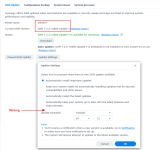
Interesting. My DS925+ with DSM 7.2.2 Update 3 is missing the "Notify me..." option.
1762850681795.png

But my DS1821+ with DSM 7.3.1 has the option... but I thought that was because I had run /usr/libexec/syno-update-settings --set-autoupdatetype-notify but maybe I didn't run the command.
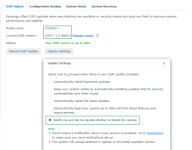
1762850919502.png

My notes from my testing only mention DSM 7.2.2 for 2025 models and DSM 7.3 for all models. Maybe Synology put back the Notify option in DSM 7.3.1?
DSM 7.2.2 - 2025 models
DSM 7.3 - All models

Disable DSM Auto Updates
Removes schedule setting in Control Panel > DSM Update > Settings
/usr/syno/etc/update.conf
{"autoupdate_type":"notify","smart_nano_enabled":true}

Enable DSM Auto Updates
Restores schedule setting in Control Panel > DSM Update > Settings
/usr/syno/etc/update.conf
{"autoupdate_type":"hotfix-security","smart_nano_enabled":true}


Disable Package Center Auto Updates
Shows "Disable auto-update" option in Package Center > Setting > Auto-update
/etc/synoinfo.conf
show_autoupdatetype_notify="yes"

Enable Package Center Auto Updates
Removes "Disable auto-update" option in Package Center > Setting > Auto-update
/etc/synoinfo.conf
show_autoupdatetype_notify="no"


Disable Package Center Auto Updates and DSM Auto Updates
sudo /usr/libexec/syno-update-settings --set-autoupdatetype-notify

Enable Package Center Auto Updates and DSM Auto Updates
sudo /usr/libexec/syno-update-settings --unset-autoupdatetype-notify
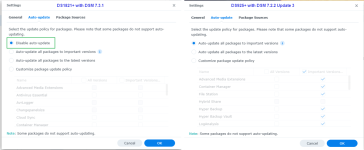
Package Center > Settings > Auto Update
1762851556453.png
 
  • Like
Reaktionen: Kachelkaiser
or they replaced one bullshit topic (HDD) with another in the x25 series 🙃
 
I just checked the DSM 7.3 synoinfo.conf for a few models.
  • Only the 2025 models have show_autoupdatetype_notify="no"
  • Other models have show_autoupdatetype_notify="yes"
In the DSM 7.2.2 synoinfo.conf
  • Only the 2025 models have show_autoupdatetype_notify="no"
  • Other models did not have show_autoupdatetype_notify at all.
I haven't checked DSM 7.3.1 yet. I need to download 122 DSM pat files, extract them, copy and rename 122 synoinfo.conf files to <model>_<DSM-build>_synoinfo.conf and then search which ones contain show_autoupdatetype_notify="no"

So far I'm sure it's only 2025 models that have had the Notify option disabled.
 
  • Like
Reaktionen: Kachelkaiser
DS1522+:
Code:
root@DS1522:~# cat /etc/synoinfo.conf | grep show_autoupdatetype_notify
show_autoupdatetype_notify="yes"
 
  • Like
Reaktionen: DaveR
  • Haha
Reaktionen: DaveR
After checking DSM 7.3.1 for all 122 models that can use DSM 7.3.1 here are the results:

DSM Auto Update

Models with DSM updates "autoupdate_type = hotfix-security" and "smart_nano_enabled = true"

DSM 7.2.2 - 2025 models only
DSM 7.3 - All models
DSM 7.3.1 - All models

Disable DSM Auto Updates
Removes schedule setting in Control Panel > DSM Update > Settings
File: /usr/syno/etc/update.conf
Contains: {"autoupdate_type":"notify","smart_nano_enabled":true}

Enable DSM Auto Updates
Restores schedule setting in Control Panel > DSM Update > Settings
File: /usr/syno/etc/update.conf
Contains: {"autoupdate_type":"hotfix-security","smart_nano_enabled":true}

Note: "autoupdate_type":"hotfix-security" means Synology can force a DSM auto update regardless of what auto update setting you have chosen. All they have to do is mark the DSM update as hotfix-security. They've already previously marked a DSM update as a security hotfix even though it did not contain any security hotfixes!?!?


Package Center Auto Update

Models with Package update notify option hidden: "show_autoupdatetype_notify = no"

DSM 7.2.2 - 2025 models only
DSM 7.3 - 2025 models only
DSM 7.3.1 - 2025 models only

Disable Package Center Auto Updates
Result: Shows "Disable auto-update" option in Package Center > Setting > Auto-update
File: /etc/synoinfo.conf
Setting: show_autoupdatetype_notify="yes"
sudo synosetkeyvalue /etc/synoinfo.conf show_autoupdatetype_notify yes

Enable Package Center Auto Updates
Result: Removes "Disable auto-update" option in Package Center > Setting > Auto-update
File: /etc/synoinfo.conf
Setting: show_autoupdatetype_notify="no"
sudo synosetkeyvalue /etc/synoinfo.conf show_autoupdatetype_notify no


How to Enable/Disable Notify for DSM and Package Center Auto Updates

The following changes the settings in synoinfo.conf and update.conf (if I remember correctly :) )

How to disable Package Center Auto Updates and DSM Auto Updates
Result: Shows the Notify option already ticked (enabled)
sudo /usr/libexec/syno-update-settings --set-autoupdatetype-notify

How to enable Package Center Auto Updates and DSM Auto Updates
Result: Hides the Notify option and sets it unticked (disabled)
sudo /usr/libexec/syno-update-settings --unset-autoupdatetype-notify

 

Additional post fields


Kaffeautomat

Wenn du das Forum hilfreich findest oder uns unterstützen möchtest, dann gib uns doch einfach einen Kaffee aus.

Als Dankeschön schalten wir deinen Account werbefrei.

:coffee:

Hier gehts zum Kaffeeautomat