DSM 7.3 Neue Version 7.3.2 – 86009

  • Ab sofort steht euch hier im Forum die neue Add-on Verwaltung zur Verfügung – eine zentrale Plattform für alles rund um Erweiterungen und Add-ons für den DSM.

    Damit haben wir einen Ort, an dem Lösungen von Nutzern mit der Community geteilt werden können. Über die Team Funktion können Projekte auch gemeinsam gepflegt werden.

    Was die Add-on Verwaltung kann und wie es funktioniert findet Ihr hier

    Hier geht es zu den Add-ons

Btw. I've created another post this afternoon and answered your question already, but it says that the post is hidden and needs an approval. Not sure why this happen or what triggered it.
That's for spam prevention. Once you have posted 50 messages the forum software will stop requiring the admin to approve new posts.
 
I got more information about the disabled TRIM function from the support after I made clear that the approach is questionable.

The answer I got 2 days ago can be found in this new kb article as well:

https://kb.synology.com/en-global/D...lable_only_for_SSDs_in_the_compatibility_list


However, the answer is not satisfiying for me. Its nice that they epxlain the technical backgrounds, but still do not cover the fact that they introduce this software-site complete block of any 3rd party SSD, without have updated the compatibility list beforehand or work on this.
 
Das ist aber doch ein gut begründeter technischer Grund. Der sollte zwar für ein 1-Bay-NAS nicht relevant sein, aber es zeigt auch, dass Synology das nicht willkürlich macht. Die SSD-Hersteller werben ja eigentlich damit, dass ihre SSDs auch ohne TRIM-Unterstützung eigenständig eine Garbage-Collection durchführen können. Vielleicht kann man ja damit leben.
 
That knowledge base article looks like the "TRIM and RAID data integrity" section was stolen from somewhere online because Synology don't offer RAID TP. Since onl parity RAID types are affected by SSDs using Method 2 TRIM maybe DSM should allow TRIM for RAID 1 and RAID 10 (instead of just blocking all 3rd party SSDs).

The "kernel commit" link in the Notes section of that article is from 2017. Maybe Synology should use newer kernels :rolleyes:

And I believe the article was created after @shardsofwar contacted Synology Support. I've added it to waybackmachine so I can track future changes to that page.

Since Synology says that only SSDs in the compatible drive list can have TRIM enabled I checked the compatible drive list for a DS720+ (from before Synology reduced the list to only include Synology drives). If you click on the "View +" link in the Notes column for each drive you can see which ones don't support TRIM.

BrandClassModelTRIM Support
IntelEnterpriseD3-S4610Yes
SamsungEnterpriseSM883This drive doesn't support TRIM
SeagateEnterpriseNytro 1551This drive doesn't support TRIM
SeagateIN THEIronWolf 110Yes
 
Hi Dave, I wanted to leave a short feedback after I read some articles (more confusing than enlightening :confused:) about the usage of SSDs in a RAID: Not only a trim command after which affected data blocks are read with zeros (DZAT) is important (especially for parity-based RAID systems), but also a functioning power loss protection. Perhaps this is why not all models from the table are marked as supported.
 
  • Like
Reaktionen: DaveR
Power loss protection is required in a mission critical server, especially for a read/write cache with pinned metadata. For a home or small business NAS if you have an UPS that is properly configured in DSM you don't need SSDs with power loss protection. To make things more confusing there are 2 different types of power loss protection (hardware PLP and firmware PLP). And some expensive SSDs may have both types of PLP. It's not clear which type of PLP Synology Enterprise SSDs and NVMe drive use - or if the Synology NAS SSDs and NVMe drives even have PLP. Most NVMe drives with firmware PLP only come in 22110 size but Kingston do make (expensive) NVMe drives with PLP in the 2280 size.

I believe the WD and Seagate NAS series of SSDs and NVMe drives have hardware PLP.

You will never see SSD or NVMe drives that don't have PLP in the compatible drive list for Synology's enterprise NAS models.

Since we are talking about SSDs in RAID, SSD and NVMe drives can have more than 1 drive go offline at the same time due to the TBW reaching the limit at the same time. In the business and enterprise NAS models Synology has RAID-F1 which is RAID for flash drives with 1 drive redundancy. Basically RAID 5 but DSM forces one drive to get written to more than the others. Once that drive dies and gets replaced DSM forces a different drive to get written to more than the others.

If you are creating a storage pool with 3 or more SSDs, or NVMe drives, you can enable the option to use RAID-F1 with https://github.com/007revad/Synology_SHR_switch
 
Zuletzt bearbeitet:
Das ist aber doch ein gut begründeter technischer Grund. Der sollte zwar für ein 1-Bay-NAS nicht relevant sein, aber es zeigt auch, dass Synology das nicht willkürlich macht. Die SSD-Hersteller werben ja eigentlich damit, dass ihre SSDs auch ohne TRIM-Unterstützung eigenständig eine Garbage-Collection durchführen können. Vielleicht kann man ja damit leben.

Die Erklärung zum technischen Hintergrund der Entscheidung liefert aber keine Antworten zum fragwürdigen Vorgehen. Die eigentliche Problemstellung wird daher für mich nicht zufriedenstellend geklärt oder adressiert.

Wenn ich als Hersteller eine derartige Sperre in Form von Kompatibilitätslisten einführe, ist es meine Pflicht diese Listen zu pflegen. Das gilt im Besonderen für alte / verkaufte Produkte.

Es fehlt ein Zeitplan von Seiten des Produktmanagements, der Entwicklung oder der QA, wann Fremdprodukte geprüft und die Kompatibilitätslisten angepasst werden. Es sieht für mich auch nicht so aus als ob man das überhaupt anstrebt.

Ich habe keine großen Hebel und werde natürlich wenig ausrichten, aber dennoch werde ich mich wohl mal an der Verbraucherschutz wenden und diese Vorgehensweise bemängeln.
 
  • Like
Reaktionen: Flessi
Hi DaveR,

And I believe the article was created after @shardsofwar contacted Synology Support. I've added it to waybackmachine so I can track future changes to that page.

I think so too. ;)

DSM should allow TRIM for RAID 1 and RAID 10 (instead of just blocking all 3rd party SSDs).

I agree. However, they could also just make sure to test hardware and take care of their compatibility list (especially for specific NAS related hardware), but I think they are not really interessted to do so.


In their response to me they mentioned a SSD trim policy. (>> The SSD trim policy purely works based on the compatibility list). Is there a specific SSD trim policy ? I haven't found anything searching for those buzz words. When this policy was released?


Last but not least they asked me to fill out the Compatibility List Suggestion form. But this looks not very promissing to me.
 
Ich kann deinen Ärger nachvollziehen, zumal Du vorab nicht informiert worden bist, sondern von der Einschränkung nach dem Update überrascht worden bist. Vielleicht schaust Du dir ja mal das Skript von DaveR an, das benutzen viele hier im Forum erfolgreich.
 
  • Like
Reaktionen: Benie
Bei mir läuft das Script vom @DaveR schon ewig und seit 1,5 Jahren 2 Samsung EVO 870 mit täglichem TRIM
 
  • Like
Reaktionen: DaveR und Benie
Auch auf neuester Hardware, DS1525+, mit dem Script keine Probleme seit dem 1. Start mit Script gelaufen.
 
How many Downloads?
 
Unfortunately GitHub does not provide a download count for the automatically generated source code zip or tar.gz files. Or the number of downloads via curl or wget.

On my repos where I have added downloadable resources I can see how many downloads those resources have had.

Syno DSM Extractor GUI
2845 views
695 downloads
0.24 downloads per view

DTC GUI for Windows
3152 views
592 downloads
0.19 downloads per view

So combining the 2 gives an average of 0.2146 downloads per view.

If we multiply syno_hdd_db's 1,050,709 views by 0.2146 we get an estimate of 225,000 downloads.
 
Der Synology Support hatte mir gegenüber eine SSD Trim Policy erwähnt. Ich habe aber keine spezifische SSD Trim Policy gefunden.

Gab es eine solche Information/Policy? Hat jemand einen Link? Und wann wurde diese Policy veröffentlicht? Für Infos wäre ich dankbar.
 
  • Like
Reaktionen: Benie
Thanks. I have expected something they have published years ago. Not like the kb article they have created after I contacted them and told them that it is questionable and against consumer protection. Well, that just confirms what I have suspected.
 
Neue Schikane von Synology ? Oder meint man es nur gut mit uns ? :ROFLMAO:
Warnung, NVME Speicherpool / Volumen kritischer Zustand hat mich heute erreicht. DSM 7.3.2 , DS1525+, 2x NVMEs 2TB Lexar NM790

EDIT: Die Meldung dazu hies, "Laufwerk x auf DS1525Plus steht nicht auf Synology-Kompatibilitätsliste, Ihres Synology DS Modells" , Edit: Ende

Raid war dennoch in Ordnung, auch keine sonstige Probleme. Synology_HDD_db Script von @DaveR ist installiert. Läuft gewöhnlich beim herrunter.- und hochfahren der DS. Habe bisher auch keine Probleme gehabt.
In diesem Fall habe ich mit der DS1525+ einen Neustart gemacht danach wieder alles ganz normal, Warnung war wieder weg. Hoffentlich muß ich jetzt nicht alle 4 Wochen (solange läuft die DS1525+ erst, da erst vor kurzem gekauft) deshalb einen Reboot durchführen :(

Speicherpool  Volumen Kritischer Zustand.jpg
 
Zuletzt bearbeitet:
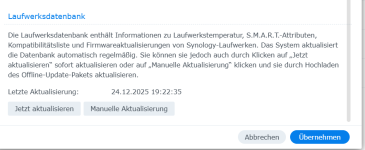
Wodurch kam das? Syno Update der HDD DB?
 

Anhänge

  • 1768843825797.png
    1768843825797.png
    25,9 KB · Aufrufe: 26

Additional post fields


Kaffeautomat

Wenn du das Forum hilfreich findest oder uns unterstützen möchtest, dann gib uns doch einfach einen Kaffee aus.

Als Dankeschön schalten wir deinen Account werbefrei.

:coffee:

Hier gehts zum Kaffeeautomat