Synology OpenSpeedTest

System Tasks Synology OpenSpeedTest 1.0.5

Keine Rechte zum Download
  • Ab sofort steht euch hier im Forum die neue Add-on Verwaltung zur Verfügung – eine zentrale Plattform für alles rund um Erweiterungen und Add-ons für den DSM.

    Damit haben wir einen Ort, an dem Lösungen von Nutzern mit der Community geteilt werden können. Über die Team Funktion können Projekte auch gemeinsam gepflegt werden.

    Was die Add-on Verwaltung kann und wie es funktioniert findet Ihr hier

    Hier geht es zu den Add-ons

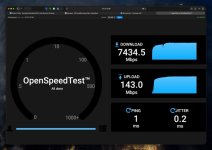
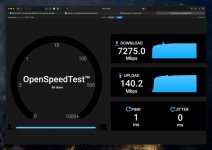
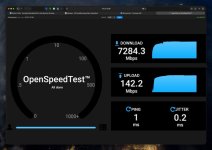
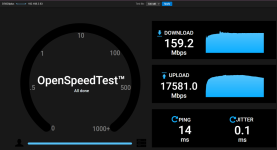
Hi Dave, just tried. It makes no difference - between 250MB and 2GB, the upload speed remains at approximately. 140 Mbps.
 

Anhänge

  • 1,5GB.jpeg
    1,5GB.jpeg
    43,4 KB · Aufrufe: 6
  • 500MB.jpeg
    500MB.jpeg
    44 KB · Aufrufe: 5
  • 250MB.jpeg
    250MB.jpeg
    43,3 KB · Aufrufe: 5
  • 2GB.jpeg
    2GB.jpeg
    43,8 KB · Aufrufe: 6
  • Like
Reaktionen: DaveR
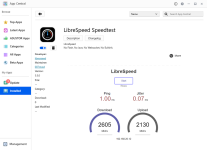
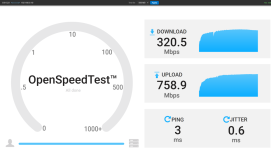
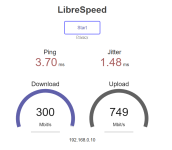
I just made an Asustor package for Libra Speedtest. This seems more accurate for me on my Asustor NAS with 2.5GbE. I'll make a Synology package which may be more accurate for everyone than OpenSpeedTest.

1775361658386.png
 
  • Like
Reaktionen: Synchrotron
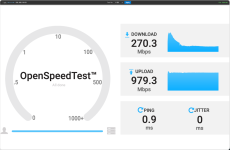
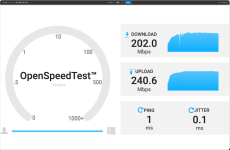
I have nearly the same results as OpenSpeedTest

1775472739443.png 1775472783716.png
I think the Upload is too high in both cases.
 

Anhänge

  • 1775476942731.png
    1775476942731.png
    69 KB · Aufrufe: 6
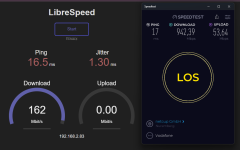
Links Libre Speed Test und rechts Oakla Speed Test aus dem selben Netz. Um zu zeigen, das der Libre nicht stimmen kann.
Edit: Screenshot Open Speed test
Vielleicht ist aber auch mein Pihole das Problem, die IP 192.168.2.83 ist der Pihole
 

Anhänge

  • 1775484079309.png
    1775484079309.png
    88,6 KB · Aufrufe: 3
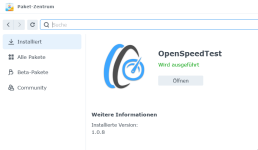
Und das Paket Open Speedtest lässt sich auch nicht deinstallieren im Paketzentrum?
Edit: Nach einem erneuten Installieren, konnte ich es auch deinstallieren :cool:
 

Anhänge

  • 1775484331429.png
    1775484331429.png
    37,2 KB · Aufrufe: 1
Zuletzt bearbeitet:
Ich habe auch Zweifel an dem Resultat des Open Speed Test.

Zwei Szenarien der Verbindung mit jeweils 1000MB Datei.

a.) Client Host direkt mit Diskstation verbunden (hier lokale Client Host IP: 192.168.134.51) Hier HTTP ohne Verschlüsselung ! ! !
1775490129991.png

b.) Client Host über Proxy im lokalen Netzwerk mit Diskstation verbunden (hier Proxy Host IP: 192.168.132.105) Hier HTTPS ! ! !
1775490154258.png


Dass es über den Proxy langsamer ist als die direkte Verbindung war zu erwarten. Aber dass ein Download bei direkter Verbindung so stark vom Upload abweicht ist ungewöhnlich.


Zum Vergleich habe ich den Test über SMB gemacht, hier auch die direkte Verbindung von Client Host zu Server Host.
In beiden Fällen jeweils links der Upload von Client Host zum NAS, rechts der Download vom NAS zum Client Host.
Hierbei erreicht man das mögliche Maximum seiner Hardware nämlich in meinem Fall 1000Mbit/s.

a.) Testdatei 1000MB
1775490320864.png 1775490326316.png

b.) Testdatei 4000MB
1775490351424.png 1775490370816.png


Man vergleicht hier Äpfel mit Birnen, denn Open Speed Test läuft über HTTP/HTTPS und somit per Design mit mehr Protokoll-Overhead wobei SMB für Dateiübertragungen optimiert ist und das Netzwerk effizienter nutzt.

Für mich ist der Open Speed Test eine schöne Spielerei, aber kein Indiz dafür was eure Hardware bzw. Infrastruktur tatsächlich übertragen kann.
Auch andere Protokolle wie SFTP, rsync via SSH sind hier nicht mit der Performance mit SMB zu vergleichen denn hier bremst die Verschlüsselung den Datentransfer deutlich ab.

Wenn man ernsthaft die Datenübertragungsraten seiner Infrastruktur testen möchte dann verwendet man am besten andere Methoden und nicht solche Spielereien.
 
PiHole, proxies, VPNs, Ad Blockers etc are all going to interfere with the results of both Libre speed test and Open speed test.

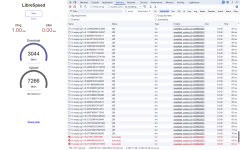
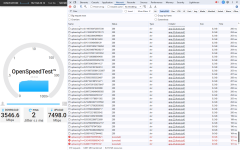
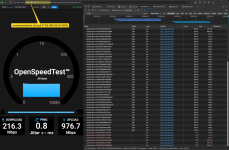
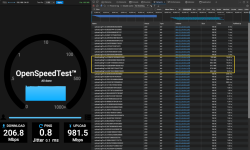
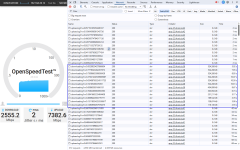
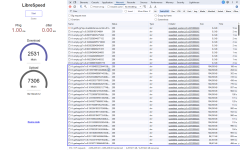
In chrome if you click on "Ctrl + Shift + i" to open Developer Tools then select "Network > Fetch/XHR" then run the speed test you should see all Status 200 or Canceled). Anything else means something is blocking the packets. If there are lots of errors the size or time columns may show 0.0 kB or 0.N ms which will result in incorrect speeds being calculated. Other browsers should have something similar to chrome's developer tools.

1775508154716.png

1775508365543.png
 
But then tell me, why you will not see nearly the same transfer speeds for both directions?
I would expect that both will reach its maximum.

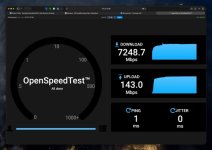
This is my result with edge.

1775509629108.png

As I mentioned that I would expect as well for the Downlaod nearly 1000Mbps!
SMB do achieve the speeds (as shown from my pictures before) with ~112MB/s but the browser with Open Speed Test will not.
Why shall I rely on that result when I am aware the hardware can provide more speed?
 
Becasuse you asked about the values, this is what I am getting reported from OpenSpeedTest. I did not checked with LibreSpeed.

1775514484310.png

But you might answer as well my questions from my previous post.
a.) But then tell me, why you will not see nearly the same transfer speeds for both directions?
b.) Why shall I rely on that result when I am aware the hardware can provide more speed?

 
The html page uses CGI POST and GET:
  1. CGI POST to send data to the server (the NAS).
  2. CGI GET to download the test file from the NAS to the browser.
CGI GET is reading the file from the drives in the NAS (unless it's cached in the NAS' memory). CGI POST is probably sending data to the NAS' memory.

Libre Speedtest gives me similar upload and download speeds on 3 different Synology NAS, with 1GbE, 2.5GbE and 10GbE. See the screenshots here https://github.com/007revad/Synology_Libre_Speedtest

For Open Speedtest the test file size you select make s a big difference. And running it the next day with the same test file size can give very different results.

Personally I've found Libre Speedtest is much more consistent and more accurate than Open Speedtest.

I wouldn't rely on the results to show what the hardware is capable of (like iPerf3 or SMB transfers). It's actually showing what CGI POST and CGI GET (and your browser) is capable of to/from the http server on the NAS.
 
Yeah I know, but the fact is that this is not clear for everyone!

And therefore I think a lot of people rely on the result of this Web based test because it is a nice and cool tool. But then they are starting to investigate time to analyze there setup because the transfer speed does not show the expacted values from the specification.

The result shows as you correctly mentioned what CGI POST and CGI GET (and your browser) is capable of to/from the http server on the NAS.
But this must be communicated correctly to the end users.

And yes I am also aware about that this is not up to you, becasue you have just published the bundled package that can be used out of the box on the NAS after installation via the package manager.
 

Additional post fields


Kaffeautomat

Wenn du das Forum hilfreich findest oder uns unterstützen möchtest, dann gib uns doch einfach einen Kaffee aus.

Als Dankeschön schalten wir deinen Account werbefrei.

:coffee:

Hier gehts zum Kaffeeautomat