Problem mit Erweiterungseinheit RX1217

  • Ab sofort steht euch hier im Forum die neue Add-on Verwaltung zur Verfügung – eine zentrale Plattform für alles rund um Erweiterungen und Add-ons für den DSM.

    Damit haben wir einen Ort, an dem Lösungen von Nutzern mit der Community geteilt werden können. Über die Team Funktion können Projekte auch gemeinsam gepflegt werden.

    Was die Add-on Verwaltung kann und wie es funktioniert findet Ihr hier

    Hier geht es zu den Add-ons

With personal delivery to Australia? ;)
"Shipping" a person to Australia costs as much as 1.5 WD Gold 20TBs. I assume you'd want somewhere to sleep and eat, and then get "shipped" back to Germany? :ROFLMAO:
 
  • Like
Reaktionen: ctrlaltdelete
Danke für den Thread
bei mir machen 8 22tb red pro den Ärger
In der ds1821+ ohne probleme
nun habe ich je 4 in zwei dx517

Stromausfall, einheit 1 verliert hdd3
rebuild, sind noch keine daten drauf, alles ok

2 mal syno komplett restart, keine probleme

dann aktiviere ich den tiefschlafmodus für die erweiterungen
und wenn sie, völlig ohne aktivität, aufwachen...ist es glücksspiel
meist geht alles, aber manchmal verliere ich wieder das volume
2 mal war es slot 3, dann aber slot 2
immer nur in der ersten dx517, die zweite hatte bisher keine verlorenen HDDs nach aufwecken oder neustart

mir kommt es vor, als wartet die syno nicht lange genug, bis die platten wieder da sind
da es aber WD sind, hilft mir das script nicht

gibt es Lösungen für Red Pro?

falls jemand eine liste erstellt
22TB Red Pro und DX517 scheint suboptimal zu sein
 
Try setting NCQ to 1 for the drives in the DX517s

First get the list of DX517 drive device names via SSH:
Bash:
sudo syno_disk_dump | grep "^Eunit disk info: DX517\$" -A 5 | tail -n+2 | head -n5 | cut -d: -f2 | cut -f1 | xargs

Then for each device name run this command (replace /dev/sata9 with the device name found with the previous command)
Bash:
sudo syno_disk_ctl --ncq-off /dev/sata9
 
  • Like
Reaktionen: ChaosEmpire
Wow, very smart solution, to disable NCQ!
@DaveR How did you find that out?
 
Wouldnt disabling NCQ slow down the complete disk during work?
the issue is, it doesnt speed up fast enough for dsm to get detected in time
 
@ChaosEmpire

Your issue could be because the DX517's Silicon Image SiI3826 port multiplier chip does not support native command queuing. So when DSM sends a queue of up to 31 read commands for each drive in the DX517 the drives only get the first command, so DSM assumes there's an issue with the drive.

There's a video here of DSM trying multiples times before it decides on or more of the drives aren't responding.

I just realised you'd need to schedule syno_disk_ctl --ncq-off to run as root at startup because NCQ gets set back to the default "queue depth 31" when DSM boots.
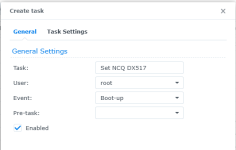
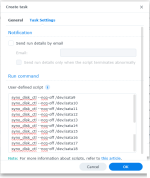
So assuming your DX517 drives /dev/stata9 to /dev/sata9 to /dev/sata18 the scheduled task.

1757813838940.png

1757813855233.png
 
  • Like
Reaktionen: dil88 und ChaosEmpire
thanks for details
so it would make sense to disable ncq in general when using expansion units
 
Disabling NCQ doesn’t “remove” it from the Marvell chip, but it simplifies the command path in DSM – sometimes that’s enough to improve stability with large WD Red Pro drives.
 
  • Like
Reaktionen: DaveR
Big question is, is there some kind of setting in DSM, making it possible to increase the wait time on startup, before declaring a raid as broken, hdd as missing
surely during uptime, this should not be touched, but in the spinup period a little more patience by dsm would help a lot
 
  • Like
Reaktionen: ctrlaltdelete
I just remembered that WD Red Pro HDDs should have pins you can connect a jumper to set Power-Up In Standby (PUIS).

To enable PUIS you connect a jumper between pins 3 and 4. https://support-eu.wd.com/app/answe...rt-for-serial-ata,-eide-drive-jumper-settings

Google search's AI answer:

WD Red Pro HDDs (specifically those built to the SATA 3.3 standard) have Power-Up In Standby (PUIS) functionality, which is enabled by a jumper setting. PUIS allows drives to remain in an idle, non-spinning state until a command is issued by the host controller, significantly reducing the power draw during the initial spin-up of multiple drives in a RAID array.

  • Purpose:
    PUIS is designed to prevent large, instantaneous power spikes that occur when many hard drives spin up simultaneously, which can overload power supplies and potentially damage equipment.
 
  • Like
Reaktionen: ChaosEmpire
The 22TB Red Pro only has 2 Pins side by side (horizontal) , no explanation of this could be found by me
Your link states that newer disks dont have jumpers anymore
 
You could maybe try hdparm but it has no "get" option for "power-up in standby" so I can't see a way to check what the HDD's current setting is. The help also says setting "power-up in standby" is dangerous.

-s Set power-up in standby flag (0/1) (DANGEROUS)

What does sudo hdparm -I /dev/sata9 return?

If I run sudo hdparm -I /dev/sata1 | grep power on my Seagate HDDs I get:

Code:
root@DISKSTATION:~# hdparm -I /dev/sata1 | grep power
        Advanced power management level: disabled
                SET_FEATURES required to spinup after power up
                Device-initiated interface power management

If I run sudo hdparm -I /dev/sda | grep power on my WD HDDs I get:

Code:
Dave@WEBBER:~$ sudo hdparm -I /dev/sda | grep power
           *    SET_FEATURES required to spinup after power up
           *    Host-initiated interface power management
                Device-initiated interface power management
 
WD 22TB Red Pro
sudo hdparm -I /dev/sg1 | grep power

Advanced power management level: disabled
* SET_FEATURES required to spinup after power up
* Host-initiated interface power management
Device-initiated interface power management


Seagate Exos X18
sudo hdparm -I /dev/sg5 | grep power
* SET_FEATURES required to spinup after power up
Device-initiated interface power management


----------------
Features displayed for the WD Red Pro
Commands/features:
Enabled Supported:
* SMART feature set
Security Mode feature set
* Power Management feature set
* Write cache
* Look-ahead
* Host Protected Area feature set
* WRITE_BUFFER command
* READ_BUFFER command
* NOP cmd
* DOWNLOAD_MICROCODE
Advanced Power Management feature set
Power-Up In Standby feature set
* SET_FEATURES required to spinup after power up
SET_MAX security extension
* 48-bit Address feature set
* Device Configuration Overlay feature set
* Mandatory FLUSH_CACHE
* FLUSH_CACHE_EXT
* SMART error logging
* SMART self-test
* Media Card Pass-Through
* General Purpose Logging feature set
* WRITE_{DMA|MULTIPLE}_FUA_EXT
* 64-bit World wide name
* URG for READ_STREAM[_DMA]_EXT
* URG for WRITE_STREAM[_DMA]_EXT
* WRITE_UNCORRECTABLE_EXT command
* {READ,WRITE}_DMA_EXT_GPL commands
* Segmented DOWNLOAD_MICROCODE
* unknown 119[6]
unknown 119[7]
* Gen1 signaling speed (1.5Gb/s)
* Gen2 signaling speed (3.0Gb/s)
* Gen3 signaling speed (6.0Gb/s)
* Native Command Queueing (NCQ)
* Host-initiated interface power management
* Phy event counters
* NCQ priority information
* READ_LOG_DMA_EXT equivalent to READ_LOG_EXT
Non-Zero buffer offsets in DMA Setup FIS
* DMA Setup Auto-Activate optimization
Device-initiated interface power management
In-order data delivery
* Software settings preservation
unknown 78[7]
unknown 78[10]
unknown 78[11]
* SMART Command Transport (SCT) feature set
* SCT Write Same (AC2)
* SCT Error Recovery Control (AC3)
* SCT Features Control (AC4)
* SCT Data Tables (AC5)
* SANITIZE feature set
* OVERWRITE_EXT command
* reserved 69[3]
* DOWNLOAD MICROCODE DMA command
* WRITE BUFFER DMA command
* READ BUFFER DMA command


Power-Up In Standby feature set
* SET_FEATURES required to spinup after power up

Dont know if the first line is just a title for the 2nd row, or a seperate feature..maybe the asterix means activated
 
Zuletzt bearbeitet:

Additional post fields


Kaffeautomat

Wenn du das Forum hilfreich findest oder uns unterstützen möchtest, dann gib uns doch einfach einen Kaffee aus.

Als Dankeschön schalten wir deinen Account werbefrei.

:coffee:

Hier gehts zum Kaffeeautomat





