


- Registriert
- 05. März 2013
- Beiträge
- 2.632
- Reaktionspunkte
- 1.196
- Punkte
- 174
Es gibt eine neue ABfB-Version:
Diese ersetzt die vorherige Version:
Quelle: https://www.synology.com/de-de/releaseNote/ActiveBackup?model=DS918+&os=DSM&version=7_x_series
Das Interessante daran: Nach der (manuellen) Installation ist das Projekt apm-cms und damit die ganzen Container nicht mehr vorhanden.
Code:
 Version: 3.0.0-24638
(2025-05-27)

Compatibility and Installation

    Active Backup for Business 3.0.0 and above requires DSM 7.2 or above.
    The following models are not supported in Active Backup for Business 3.0.0 or above:

    DS214play
    DS216play
    DS415play
    DS416play
    DS418play

Important Note

    Daily backups previously scheduled to run every hour will change to hourly backups.
    To back up a custom volume on Mac, you only need to specify the volume name instead of the entire path. However, if your device has multiple volumes with the same name, all of them will be backed up. Backups configured before the update will continue using the full path unless modified.
    Active Backup for Business tasks will no longer appear in the Task Scheduler in DSM.

What's new

    Added support for centralized management via ActiveProtect appliances. Learn about package features, requirements, and limitations here.
    Updated OpenSSL to version 3.0.0 to enhance connection security. This update applies to personal computers, physical servers, file servers, and virtual machines.
    Added support for throttling failure notifications when the server reaches its storage limit or encounters hypervisor connection issues, preventing excessive notifications.

Fixed Issues (General Issues)

    Fixed an issue where reaching the storage limit might cause backups to freeze and prevent the status from updating.

Fixed Issues (Physical Server)

    Fixed an issue where the system might fail to boot after an instant restore to VMware when the disk was not 4K-aligned.

Fixed Issues (Virtual Machines)

    Fixed an issue where backing up VMware to encrypted or compressed storage might cause a boot failure during instant restores.
    Fixed an issue where Hyper-V backups might fail if the snapshot contains inaccessible virtual disks not directly related to the backup task
    Fixed an issue where restoring multiple virtual machines to different ESXi hosts within the same vCenter might fail.
    Fixed an issue where restores might fail if the selected vSwitch name conflicted with another on the same Hyper-V host.

Anmerkungen:

    This version is released in a staged rollout.
Diese ersetzt die vorherige Version:
Code:
 Version: 3.0.0-24631
(2025-04-07)

This version was replaced by 3.0.0-24638 because the staged rollout of 3.0.0-24631 was paused to fix the following issues:

    Couldn't connect to Synology NAS if Container Manager's default bridge network conflicted with the network environment.
    Couldn't add a new PC/Mac or physical server due to a missing default template.
Quelle: https://www.synology.com/de-de/releaseNote/ActiveBackup?model=DS918+&os=DSM&version=7_x_series
Das Interessante daran: Nach der (manuellen) Installation ist das Projekt apm-cms und damit die ganzen Container nicht mehr vorhanden.


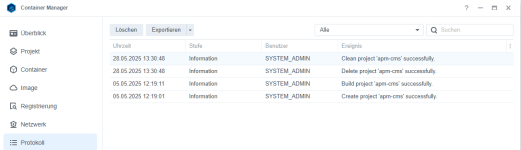


 , ausgesessen um zu sehen was da kommt.





