Systempartition voll - Anleitung zur Prüfung und Säuberung

  • Ab sofort steht euch hier im Forum die neue Add-on Verwaltung zur Verfügung – eine zentrale Plattform für alles rund um Erweiterungen und Add-ons für den DSM.

    Damit haben wir einen Ort, an dem Lösungen von Nutzern mit der Community geteilt werden können. Über die Team Funktion können Projekte auch gemeinsam gepflegt werden.

    Was die Add-on Verwaltung kann und wie es funktioniert findet Ihr hier

    Hier geht es zu den Add-ons

Die DS1618+ bekommt wohl generell nicht das neue Systempartition Layout!
Edit: Synology macht das wohl abhängig von der CPU-/Plattform-Generation
 
Yup, ärgerlich.
 
Wie nutzt du die 2 x 512GB MegaFastro MS150???
 
Hier noch ein paar Hinweise, die ich gefunden habe:

sudo synopartition --list
Code:
Index  Version  1-Bay  Size of Root/Swap/Reserved Partition
   1.        1    YES    273042/  787185/ 273042 sectors (  133/  384/ 133 MB)
   2.        2    YES   4980087/ 1044225/ 257040 sectors ( 2431/  509/ 125 MB)
   3.        3    YES    530082/  787185/  16002 sectors (  258/  384/   7 MB)
   4.        5    YES    722862/  594405/  16002 sectors (  352/  290/   7 MB)
   5.        6    YES   4980087/ 4192965/ 257040 sectors ( 2431/ 2047/ 125 MB)
   6.        7    YES   4980480/ 4194304/ 262144 sectors ( 2431/ 2048/ 128 MB)
   7.        8    YES   4980480/ 4194304/ 260352 sectors ( 2431/ 2048/ 127 MB)
   8.        9    YES  16777216/ 4194304/ 262144 sectors ( 8192/ 2048/ 128 MB)
  10.        1     NO   1574307/  787185/ 273105 sectors (  768/  384/ 133 MB)
  11.        2     NO   4980087/ 1044225/ 257040 sectors ( 2431/  509/ 125 MB)
  12.        6     NO   4980087/ 4192965/ 257040 sectors ( 2431/ 2047/ 125 MB)
  13.        7     NO   4980480/ 4194304/ 262144 sectors ( 2431/ 2048/ 128 MB)
  14.        8     NO   4980480/ 4194304/ 260352 sectors ( 2431/ 2048/ 127 MB)
  15.        9     NO  16777216/ 4194304/ 262144 sectors ( 8192/ 2048/ 128 MB)
  19.      100    YES  41943040/ 4194304/      0 sectors (20480/ 2048/   0 MB)
  20.      100     NO  41943040/ 4194304/      0 sectors (20480/ 2048/   0 MB)

sudo synopartition --check /dev/sata1
Code:
/dev/sata1: partition layout is version 9, list index is 15.

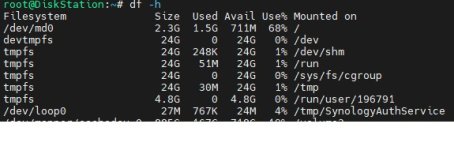
Der letzte Befehl soll das Layout auf meiner DS widergeben. Also 8GB root partition. Tatsächlich sind es aber 2,3GB
Code:
root@UNSERnas:~# df -h
Filesystem              Size  Used Avail Use% Mounted on
/dev/md0                2.3G  1.4G  804M  64% /
 
Die DS1618+ auf der du die HDDs neu Aufgesetzt hast, nutzt wahrscheinlich Version 8 Index 14
 
  • Wow
Reaktionen: RalfPeter
My DS1812+ says it is using version 8 Index 14, and /dev/md0 is 2.3G.

My DS1821+ says it is also using version 8 Index 14, but /dev/md0 is 7.9G.
[CODE}
root@DISKSTATION:~# synopartition --check /dev/sata1
/dev/sata1: partition layout is version 8, list index is 14.
root@DISKSTATION:~# df -h
Filesystem Size Used Avail Use% Mounted on
/dev/md0 7.9G 1.5G 6.3G 20% /[/CODE]

I used migration assistant to migrate data and settings from the DS1812+ to the DS1821+ so whatever hidden metadata Synology uses to say what partition layout is version and list index is being used probably migrated from the DS1812+ - even though it has the 7.9G system partition.

My DS925+ has a 7.7G system partition instead of 7.9G - probably because Synology recently changed to using Btrfs for the system partition instead of the old ext4 and even older ext3.
 
Na prima, jetzt habe ich wieder die kleine root Partition auf meiner DS1621+
Auf meiner 1621+ habe ich die grössere Partition erst nach löschen der vorhandenen Partitionen erhalten. Hänge die Platten an den PC und lösche sie mit Diskpart.
 
  • Like
Reaktionen: DaveR
@DaveR (OT) Cool Outfit !
 
  • Haha
Reaktionen: DaveR

Additional post fields


Kaffeautomat

Wenn du das Forum hilfreich findest oder uns unterstützen möchtest, dann gib uns doch einfach einen Kaffee aus.

Als Dankeschön schalten wir deinen Account werbefrei.

:coffee:

Hier gehts zum Kaffeeautomat