- Registriert
- 05. Jan. 2017
- Beiträge
- 333
- Reaktionspunkte
- 16
- Punkte
- 18
Hallo,
wollte gerade eine NVME (ehemals Cache) als Volumen einrichten.
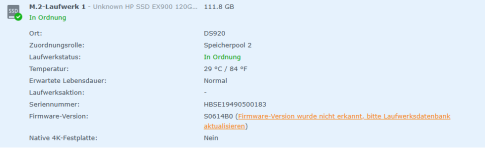
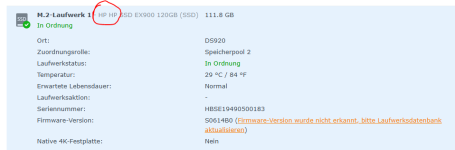
Soweit hat alles geklappt - nur meine NVME von Hewlett Packard steht nicht in der Liste.
Irgendwie muß ich ja die Liste editieren und das Script neu ausführen - oder?
Ich benötige wohl die Vendor-ID der HP-NVME.
Wie bekomme ich die raus ?
So sah es nacht dem Ausführen des Scriptes "syno_hdd_db.sh" aus:
wollte gerade eine NVME (ehemals Cache) als Volumen einrichten.
Soweit hat alles geklappt - nur meine NVME von Hewlett Packard steht nicht in der Liste.
Irgendwie muß ich ja die Liste editieren und das Script neu ausführen - oder?
Ich benötige wohl die Vendor-ID der HP-NVME.
Wie bekomme ich die raus ?
So sah es nacht dem Ausführen des Scriptes "syno_hdd_db.sh" aus:
Code:
superuser@DS920:~$ sudo -s /volume1/scripts/hdd/syno_hdd_db.sh
Password:
Synology_HDD_db v3.6.111
DS920+ x86_64 DSM 7.2.2-72806-4
StorageManager 1.0.0-00502

ds920+_host_v7 version 8061
ds920+_host version 4021
Running from: /volume1/scripts/hdd/syno_hdd_db.sh
WARNING Don't store this script on an NVMe volume!
WARNING No vendor found for vid 0x1dee
You can add 0x1dee and your drive's vendor to:
/volume1/scripts/hdd/syno_hdd_vendor_ids.txt
HDD/SSD models found: 1
ST6000VN001-2BB186,SC60,6001 GB
M.2 drive models found: 1
HP SSD EX900 120GB,S0614B0,120 GB
No M.2 PCIe cards found
No Expansion Units found
ST6000VN001-2BB186 already exists in ds920+_host.db
ST6000VN001-2BB186 already exists in ds920+_host_v7.db
ST6000VN001-2BB186 already exists in ds920+_host.db.new
Added HP SSD EX900 120GB to ds920+_host.db
Added HP SSD EX900 120GB to ds920+_host_v7.db
Added HP SSD EX900 120GB to ds920+_host.db.new
Support disk compatibility already enabled.
Re-enabled support memory compatibility.
NVMe support already enabled.
M.2 volume support already enabled.
Re-enabled drive db auto updates.
DSM successfully checked disk compatibility.
You may need to reboot the Synology to see the changes.