SMART-Werte auslesen und interpretieren

  • Ab sofort steht euch hier im Forum die neue Add-on Verwaltung zur Verfügung – eine zentrale Plattform für alles rund um Erweiterungen und Add-ons für den DSM.

    Damit haben wir einen Ort, an dem Lösungen von Nutzern mit der Community geteilt werden können. Über die Team Funktion können Projekte auch gemeinsam gepflegt werden.

    Was die Add-on Verwaltung kann und wie es funktioniert findet Ihr hier

    Hier geht es zu den Add-ons

The Output of "sudo synodisk --smart_info_get /dev/sas8" is (with or without sudo)

root@HD6500-Cluster:~# sudo synodisk --smart_info_get /dev/sas8
Failed to get the smart info of /dev/sas8
 
Die Abfrage der S.M.A.R.T.-Werte funktioniert bei mir nicht richtig. Hinter den HAT3300-Festplatten von Synology verbergen sich ja letztlich Seagate-Festplatten. Also soll man die Optionen -v 1,raw48:54 -v 7,raw48:54 -v 195,raw48:54 mit angeben um die Werte umrechnen zu lassen. Das führt aber letztlich dazu, dass genau diese Werte gar nicht mehr ausgegeben werden. Wenn ich mir das Skript von @DaveR auf Github anschaue, dann müsste der Aufruf aber passen.
Der vollständige Aufruf lautet beispielsweise:
sudo smartctl -iA -d sat -v 1,raw48:54 -v 7,raw48:54 -v 195,raw48:54 /dev/sata1
So ganz werde ich aus der Usage zu smartctl nicht schlau - wird bei der Option -v wirklich etwas umgerechnet (wie beispielsweise hier: https://yksi.ml/) oder wird bloß die Ausgabe anders formatiert?
Nachtrag: Hier die Ausgaben zum Vergleich:
Code:
# sudo smartctl -iA -d sat /dev/sata1
smartctl 6.5 (build date Sep 26 2022) [x86_64-linux-5.10.55+] (local build)
Copyright (C) 2002-16, Bruce Allen, Christian Franke, www.smartmontools.org

=== START OF INFORMATION SECTION ===
Model Family:     HAT3300
Device Model:     Synology HAT3300-6T
Serial Number:    <edited>
LU WWN Device Id: 5 000c50 0ea1f0eea
Firmware Version: PL01
User Capacity:    6,001,175,126,016 bytes [6.00 TB]
Sector Sizes:     512 bytes logical, 4096 bytes physical
Rotation Rate:    5400 rpm
Form Factor:      3.5 inches
Device is:        In smartctl database [for details use: -P show]
ATA Version is:   ACS-3 T13/2161-D revision 5
SATA Version is:  SATA 3.1, 6.0 Gb/s (current: 6.0 Gb/s)
Local Time is:    Fri Dec  5 17:41:15 2025 CET
SMART support is: Available - device has SMART capability.
SMART support is: Enabled

=== START OF READ SMART DATA SECTION ===
SMART Attributes Data Structure revision number: 10
Vendor Specific SMART Attributes with Thresholds:
ID# ATTRIBUTE_NAME                                                   FLAG     VALUE WORST THRESH TYPE      UPDATED  WHEN_FAILED RAW_VALUE
  1 Raw_Error_Rate                                                   0x000f   084   064   006    Pre-fail  Always       -       233731065
  3 Spin_Up_Time                                                     0x0003   092   091   000    Pre-fail  Always       -       0
  4 Start/Stop_Count                                                 0x0032   100   100   020    Old_age   Always       -       107
  5 Reallocated_Sector_Ct                                            0x0033   100   100   010    Pre-fail  Always       -       0
  7 Seek_Error_Rate                                                  0x000f   073   060   045    Pre-fail  Always       -       19225877
  9 Power_On_Hours                                                   0x0032   100   100   000    Old_age   Always       -       810
 10 Spin_Retry_Count                                                 0x0013   100   100   097    Pre-fail  Always       -       0
 12 Drive_Power_Cycle_Count                                          0x0032   100   100   020    Old_age   Always       -       89
183 PHY_Counter_Events                                               0x0032   100   100   000    Old_age   Always       -       0
184 Reported_IOEDC_Errors                                            0x0032   100   100   099    Old_age   Always       -       0
187 Reported_Uncorrectables                                          0x0032   100   100   000    Old_age   Always       -       0
188 Command_Timeouts                                                 0x0032   100   100   000    Old_age   Always       -       0
189 High_Fly_Writes                                                  0x003a   100   100   000    Old_age   Always       -       0
190 Airflow_Temperature                                              0x0022   071   065   040    Old_age   Always       -       29 (Min/Max 23/32)
191 Shock_Count                                                      0x0032   100   100   000    Old_age   Always       -       0
192 Emergency_Retract_Count                                          0x0032   100   100   000    Old_age   Always       -       2
193 Load/Unload_Count                                                0x0032   100   100   000    Old_age   Always       -       1214
194 Temperature                                                      0x0022   029   040   000    Old_age   Always       -       29 (0 21 0 0 0)
195 ECC_On_the_Fly_Count                                             0x001a   084   064   000    Old_age   Always       -       233731065
197 Current_Pending_Sector                                           0x0012   100   100   000    Old_age   Always       -       0
198 Uncorrectable_Sectors_Count                                      0x0010   100   100   000    Old_age   Offline      -       0
199 UDMA_CRC_Error_Count                                             0x003e   200   200   000    Old_age   Always       -       0
240 Head_Flight_Hours                                                0x0000   100   253   000    Old_age   Offline      -       206377473540662
241 Lifetime_Writes_From_host                                        0x0000   100   253   000    Old_age   Offline      -       7481630562
242 Lifetime_Reads_From_Host                                         0x0000   100   253   000    Old_age   Offline      -       44502448824


# sudo smartctl -iA -d sat -v 1,raw48:54 -v 7,raw48:54 -v 195,raw48:54 /dev/sata1
smartctl 6.5 (build date Sep 26 2022) [x86_64-linux-5.10.55+] (local build)
Copyright (C) 2002-16, Bruce Allen, Christian Franke, www.smartmontools.org

=== START OF INFORMATION SECTION ===
Model Family:     HAT3300
Device Model:     Synology HAT3300-6T
Serial Number:    <edited>
LU WWN Device Id: 5 000c50 0ea1f0eea
Firmware Version: PL01
User Capacity:    6,001,175,126,016 bytes [6.00 TB]
Sector Sizes:     512 bytes logical, 4096 bytes physical
Rotation Rate:    5400 rpm
Form Factor:      3.5 inches
Device is:        In smartctl database [for details use: -P show]
ATA Version is:   ACS-3 T13/2161-D revision 5
SATA Version is:  SATA 3.1, 6.0 Gb/s (current: 6.0 Gb/s)
Local Time is:    Fri Dec  5 17:41:04 2025 CET
SMART support is: Available - device has SMART capability.
SMART support is: Enabled

=== START OF READ SMART DATA SECTION ===
SMART Attributes Data Structure revision number: 10
Vendor Specific SMART Attributes with Thresholds:
ID# ATTRIBUTE_NAME                                                   FLAG     VALUE WORST THRESH TYPE      UPDATED  WHEN_FAILED RAW_VALUE
  3 Spin_Up_Time                                                     0x0003   092   091   000    Pre-fail  Always       -       0
  4 Start/Stop_Count                                                 0x0032   100   100   020    Old_age   Always       -       107
  5 Reallocated_Sector_Ct                                            0x0033   100   100   010    Pre-fail  Always       -       0
  9 Power_On_Hours                                                   0x0032   100   100   000    Old_age   Always       -       810
 10 Spin_Retry_Count                                                 0x0013   100   100   097    Pre-fail  Always       -       0
 12 Drive_Power_Cycle_Count                                          0x0032   100   100   020    Old_age   Always       -       89
183 PHY_Counter_Events                                               0x0032   100   100   000    Old_age   Always       -       0
184 Reported_IOEDC_Errors                                            0x0032   100   100   099    Old_age   Always       -       0
187 Reported_Uncorrectables                                          0x0032   100   100   000    Old_age   Always       -       0
188 Command_Timeouts                                                 0x0032   100   100   000    Old_age   Always       -       0
189 High_Fly_Writes                                                  0x003a   100   100   000    Old_age   Always       -       0
190 Airflow_Temperature                                              0x0022   071   065   040    Old_age   Always       -       29 (Min/Max 23/32)
191 Shock_Count                                                      0x0032   100   100   000    Old_age   Always       -       0
192 Emergency_Retract_Count                                          0x0032   100   100   000    Old_age   Always       -       2
193 Load/Unload_Count                                                0x0032   100   100   000    Old_age   Always       -       1214
194 Temperature                                                      0x0022   029   040   000    Old_age   Always       -       29 (0 21 0 0 0)
197 Current_Pending_Sector                                           0x0012   100   100   000    Old_age   Always       -       0
198 Uncorrectable_Sectors_Count                                      0x0010   100   100   000    Old_age   Offline      -       0
199 UDMA_CRC_Error_Count                                             0x003e   200   200   000    Old_age   Always       -       0
240 Head_Flight_Hours                                                0x0000   100   253   000    Old_age   Offline      -       157530810483254
241 Lifetime_Writes_From_host                                        0x0000   100   253   000    Old_age   Offline      -       7481630562
242 Lifetime_Reads_From_Host                                         0x0000   100   253   000    Old_age   Offline      -       44502448824
 
Zuletzt bearbeitet:
Offenbar ist die Angabe von [,NAME] bei der Option -v (siehe Usage -v ID,FORMAT[:BYTEORDER][,NAME]) nicht optional.
Folgender Aufruf liefert die fehlenden Werte 1, 7 und 195 wieder mit:

sudo smartctl -iA -d sat -v 1,raw48:54,Raw_Error_Rate -v 7,raw48:54,Seek_Error_Rate -v 195,raw48:54,ECC_On_the_Fly_Count /dev/sata1

Die Namen habe ich der Ausgabe ohne die -v-Optionen entnommen. Es reicht auch, hier irgendeinen beliebigen Text anzugeben.
Ich lass das jetzt mal so stehen zur Verarbeitung durch die Experten hier im Forum.
Das mit der eventuell notwendigen Umrechnung der drei Werte ist ja auch noch offen.
 
The -v option was changed to smartctl in 7. DSM only has smartctl 6.5

So if you want Seagate or Synology HAT3300 raw SMART values converted you need to install the SynoCli Disk Tools package from synocommunity.
I can decode Seagate or Synology HAT3300 raw SMART values 1, 7 and 195 in bash so will add that to the script so people with smartctl 6.5 will see human readable values.

EDIT: replaced "added" with "changed"
 
Zuletzt bearbeitet:
  • Like
Reaktionen: Benares
Are you sure? Usage shows this:
Code:
 -v N,OPTION , --vendorattribute=N,OPTION                            (ATA)
        Set display OPTION for vendor Attribute N (see man page)
Output from smartctl 6.5 on DSM 7.3.2. Eventually the syntax has changed.
I can decode Seagate or Synology HAT3300 raw SMART values 1, 7 and 195 in bash so will add that to the script so people with smartctl 6.5 will see human readable values.
That would be great!
 
I wasn't sure. But I just ran some tests:
  1. The -v option existed in smartctl 6.5
  2. According to the help the usage of the -v option has not changed.
From my tests I can see how the -v option behaves has changed.
  1. In smartctl 7 you do not need to specify the attribute name.
  2. In smartctl 6.5 you must specify the attribute name or it skips printing that attribute.
 
  • Like
Reaktionen: Hagen2000
I just noticed smartctl 6.5 -v uses the attribute name you specify.

Code:
root@DS925plus:~# smartctl -iA -d sat -v 1,raw48:54,one -v 7,raw48:54,seven -v 195,raw48:54,one_nine_five /dev/sata2
smartctl 6.5 (build date Sep 26 2022) [x86_64-linux-5.10.55+] (local build)
Copyright (C) 2002-16, Bruce Allen, Christian Franke, www.smartmontools.org

=== START OF INFORMATION SECTION ===
Model Family:     HAT3300
Device Model:     Synology HAT3300-4T

=== START OF READ SMART DATA SECTION ===
SMART Attributes Data Structure revision number: 10
Vendor Specific SMART Attributes with Thresholds:
ID# ATTRIBUTE_NAME                                   FLAG     VALUE WORST THRESH TYPE      UPDATED  WHEN_FAILED RAW_VALUE
  1 one                                              0x000f   082   064   006    Pre-fail  Always       -       0
  3 Spin_Up_Time                                     0x0003   095   095   000    Pre-fail  Always       -       0
  4 Start/Stop_Count                                 0x0032   100   100   020    Old_age   Always       -       925
  5 Reallocated_Sector_Ct                            0x0033   100   100   010    Pre-fail  Always       -       0
  7 seven                                            0x000f   067   060   045    Pre-fail  Always       -       0
  9 Power_On_Hours                                   0x0032   099   099   000    Old_age   Always       -       1332
 10 Spin_Retry_Count                                 0x0013   100   100   097    Pre-fail  Always       -       0
 12 Drive_Power_Cycle_Count                          0x0032   100   100   020    Old_age   Always       -       913
183 PHY_Counter_Events                               0x0032   100   100   000    Old_age   Always       -       0
184 Reported_IOEDC_Errors                            0x0032   100   100   099    Old_age   Always       -       0
187 Reported_Uncorrectables                          0x0032   100   100   000    Old_age   Always       -       0
188 Command_Timeouts                                 0x0032   100   100   000    Old_age   Always       -       0
189 High_Fly_Writes                                  0x003a   100   100   000    Old_age   Always       -       0
190 Airflow_Temperature                              0x0022   062   060   040    Old_age   Always       -       38 (Min/Max 33/38)
191 Shock_Count                                      0x0032   100   100   000    Old_age   Always       -       0
192 Emergency_Retract_Count                          0x0032   100   100   000    Old_age   Always       -       17
193 Load/Unload_Count                                0x0032   099   099   000    Old_age   Always       -       2210
194 Temperature                                      0x0022   038   040   000    Old_age   Always       -       38 (0 16 0 0 0)
195 one_nine_five                                    0x001a   082   064   000    Old_age   Always       -       0
197 Current_Pending_Sector                           0x0012   100   100   000    Old_age   Always       -       0
198 Uncorrectable_Sectors_Count                      0x0010   100   100   000    Old_age   Offline      -       0
199 UDMA_CRC_Error_Count                             0x003e   200   200   000    Old_age   Always       -       0
240 Head_Flight_Hours                                0x0000   100   253   000    Old_age   Offline      -       13198434501342
241 Lifetime_Writes_From_host                        0x0000   100   253   000    Old_age   Offline      -       393312158
242 Lifetime_Reads_From_Host                         0x0000   100   253   000    Old_age   Offline      -       26026438
 
Synology_SMART_Info updated to v.1.4.34
  • Added decoding of Seagate and Synology HAT3300 HDD SMART raw attribute 240 Flying_Head_Hours.
  • Added decoding of Seagate and Synology HAT3300 HDD SMART raw attributes 1, 7, 195 and 240 when DSM only has smartctl 6.5.
  • Updated to still work in future for smartmontools versions greater than 7.x.
 
I just noticed smartctl 6.5 -v uses the attribute name you specify.
That's what I meant by this sentence in #243: Es reicht auch, hier irgendeinen beliebigen Text anzugeben.
In other words: The given NAME must not be empty for smartctl 6.5.
 
  • Like
Reaktionen: DaveR
Hallo und guten Abend,
offengestanden liegt das hier alles "weit über meiner Gehaltsklasse" 😔 und ich versuche vergeblich die Werte meiner SAMSUNG SSD einzuschätzen. Ja ich habe mir das in Wikipedia angesehen, aber die Begriffe sind nicht identisch. Möchte das auch nicht ständig machen und arbeite nicht mit Docker. Hoffe aber die Werte sind auch so brauchbar.
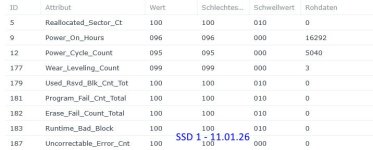
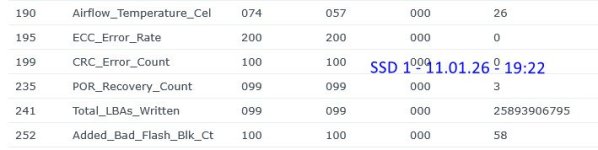
Vorab: Weder der Zeitpunkt noch der Grund ist bekannt, warum der Ruhemodus zwischen 10.24 und 01.26 unnützerweise aktiviert wurde. Ist abgestellt.

1.) Die Werte mit "Rohdaten = 0" interpretiere ich als optimal. Zutreffend?
2.) ID 177 + ID 235 : sind bei allen drei SSD (Btrfs) identisch. Ab wann werden diese kritisch?
3.) ID 252: SSD 1 = 58 / SSD 2 = 19 / SSD 3 = 22. Ab wann wird das kritisch? Sind die unterschiedlichen Werte von Relevanz?
4.) ID 241 - sind wohl die geschriebenen Sektoren. Die 870 sind lt. Samsung gut für "2.400 TBW* (Terabytes Written)" / 1.5 Million Hours Reliability (MTBF). Wie bringe ich das nun zusammen? 1 Bite (oder was auch immer) = 1 Sektor?

Für meine Wissen wäre es noch interessant was sich hinter diesen drei IDs 177/235/252 verbirgt. Aber das ist "Kür" ;)
2026-01-11_192036.jpg
2026-01-11_192056.jpg


Vielen Dank.
 
Von den Werten schaut die SSD grundsätzlich gut aus.
 
"Raw data = 0" for raw data that should be 0 is good.

For 177 you want to look at the Wert and not the raw value. Wear levelling count equates to percentage of life left. Your 177 Wert is 099 which means 99% life left. The Rohdaten of 3 means the drive has performed 3 Program/Erase (P/E) cycles. Note: Different brands may report these values differently.

235 Por_recovery_count is power on reset recovery count and is basically the same as unsafe shutdowns for other brands. So either the drive or the NAS has lost power 3 times. If you haven't accidentally pulled out the drive while the NAS was running I would suggest getting an UPS.

252 is like Reallocated sector count on a HDD. It's the number of failed flash blocks that have been remapped. And because the drive is a Samsung 870 EVO I would keep a close eye on 252 and if it gets into the 100s replace the drive ASAP.

241 Total LBAs Written is logical blocks written. Each logical block is usually 512 bytes. So 12.06 TB written. See https://www.virten.net/2016/12/ssd-total-bytes-written-calculator/
 
Zuletzt bearbeitet:
Vielen herzlichen Dank @DaveR für die umfassende Antwort und den sehr interessanten Links zu den LBAs!

..... If you haven't accidentally pulled out the drive while the NAS was running I would suggest getting an UPS.....
Richtig, daß Problem war der "verdammte" Stecker (was mich daran erinnert, daß ich den noch irgenwei sichern wollte...)

...and if it gets into the 100s replace the drive ASAP...
Da bin ich unsicher in der Übersetzung. Meint das (a) "wenn es über 100geht dann bald Handlungsbedarf" oder wenn es in die (b) "wenn es in die Hunderte (200/300/400) geht" ?
Da es aktuell noch ca 99% (ID177) "Restlebenszeit" und weniger als 6 % der LBAs (ID241) sind, der Wert ID 252 bei der SSD1 aber bereits bei 58 liegt, müßte es eher (b) sein - ansonste hätte die SSD rund die Hälfte Ihrer Lebenszweit bereits jetzt hinter sich?
 
Nobody really knows how many spare flash blocks a Samsung 870 EVO has. People say "100s" of failed flash blocks which I take to mean more than 200. But other people say 1, 2 or 3 is acceptable on an SSD that has reached it's TBW limit.

Data Recovery Services have mentioned 870 EVO SSDs dying with 953 failed flash blocks. Some with thousands. And one even made it to 1.5 million(!?!?!) failed flash blocks by the time it died.

Personally with a recently new SSD with 58 failed flash blocks I would be returning it under warranty now.

This is a common issue with 1TB, 2TB and 4TB 870 EVO SSDs manufactured in 2021.
https://www.techpowerup.com/forums/...ware-certain-batches-prone-to-failure.291504/
https://www.reddit.com/r/DataHoarder/comments/10bmtsw/870_evo_1tb_bad_blocks/

The internet is full horror stories about 870 EVO SSDs
https://www.google.com/search?q=samsung+870+evo+bad+blocks
 
@mae-syn Beobachte oder nutze das Script von @DaveR zum monitoren spez. Wert 252, bei über 100 würde ich auch tauschen.
Ich habe 4 Stück Samsung Evo 870 2 TB im Einsatz und nur bei einer habe ich 1 Bad Block, 2 Stück haben 10.000 Betriebsstunden und 2 Stück haben 2.000 Betriebsstunden.
 
  • Like
Reaktionen: mae-syn
Vielen Dank @DaveR - es ist mir klar, daß es da bestimmt "100 Meinungen" und keine Garantie / feste Angabe gibt. Ich habe die Ware soeben beim Händler reklamiert. Werde mal berichten wie das ausgeht.

Vielen Dank @ctrlaltdelete - Scripte / Docker etc. liegt außerhalb meiner "Gehaltsklasse". Sicher sehr spannend und nützlich und wenn mein Tag mal 36 h komme ich darauf zurück ;) - bis dahin müssen die gelegentlichen "manuellen" Prüfungen (und etwas Daumendrücken) reichen. Aber Danke für den Hinweis.
 
  • Like
Reaktionen: ctrlaltdelete

Additional post fields


Kaffeautomat

Wenn du das Forum hilfreich findest oder uns unterstützen möchtest, dann gib uns doch einfach einen Kaffee aus.

Als Dankeschön schalten wir deinen Account werbefrei.

:coffee:

Hier gehts zum Kaffeeautomat





