DSM 7.2 Speicherpool defekt???

  • Ab sofort steht euch hier im Forum die neue Add-on Verwaltung zur Verfügung – eine zentrale Plattform für alles rund um Erweiterungen und Add-ons für den DSM.

    Damit haben wir einen Ort, an dem Lösungen von Nutzern mit der Community geteilt werden können. Über die Team Funktion können Projekte auch gemeinsam gepflegt werden.

    Was die Add-on Verwaltung kann und wie es funktioniert findet Ihr hier

    Hier geht es zu den Add-ons

MuM2810

Benutzer
Registriert
07. Mai 2014
Beiträge
22
Reaktionspunkte
0
Punkte
1
Hallo zusammen,
am Wochenende ist das Netzteil von meiner DS916+ kaputt gegangen. Jetzt habe ich ein neues bekommen und habe die DS wieder gestartet.
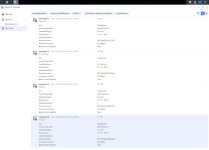
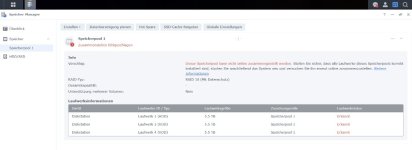
Leider sind beim Speicherpool Probleme aufgetreten und er lässt sich auch nicht mehr zusammenstellen.
Die Festplatte 2 wurde mir beim ersten Start noch als kritisch angezeigt. Also habe ich die DS einmal ausgeschaltet, Festplatte raus und wieder rein, neu gestartet und danach wurde die Festplatte als in Ordnung angezeigt, jedoch ohne Zuordnung zum Speicherpool.
Hat irgendjemand eine Idee wie ich meinen Speicherpool wiederherstellen kann?
Viele Grüße
Sven
 

Anhänge

  • 1.jpg
    1.jpg
    66,6 KB · Aufrufe: 31
  • 2.jpg
    2.jpg
    49,2 KB · Aufrufe: 30
Moin Sven, hast Du ein (halbwegs) aktuelles Backup?
 
Bevor Du die zweite Platte gezogen hast, wie sah der Speicherpool da aus? Die Laufwerke 1, 3 und 4 ok, Speicherpool degradet, weil Platte 2 kritisch?
 
Die Platten 1, 3 und 4 hatten dort auch schon den Status "erkannt". Die Funktion online zusammenstellen hat da aber auch schon nicht funktioniert.
 
  • Like
Reaktionen: Benie
Das sind die Werte der Platten 1 und 2

Code:
=== START OF INFORMATION SECTION ===
Model Family:     Western Digital Red (SMR)
Device Model:     WDC WD60EFAX-68JH4N1
Serial Number:    WD-WX82DA1EC7SP
LU WWN Device Id: 5 0014ee 26a172afe
Firmware Version: 83.00A83
User Capacity:    6,001,175,126,016 bytes [6.00 TB]
Sector Sizes:     512 bytes logical, 4096 bytes physical
Rotation Rate:    5400 rpm
Form Factor:      3.5 inches
Device is:        In smartctl database [for details use: -P show]
ATA Version is:   ACS-3 T13/2161-D revision 5
SATA Version is:  SATA 3.1, 6.0 Gb/s (current: 6.0 Gb/s)
Local Time is:    Tue Jun 24 13:05:12 2025 CEST
SMART support is: Available - device has SMART capability.
SMART support is: Enabled

=== START OF READ SMART DATA SECTION ===
SMART Attributes Data Structure revision number: 16
Vendor Specific SMART Attributes with Thresholds:
ID# ATTRIBUTE_NAME                                                   FLAG     VALUE WORST THRESH TYPE      UPDATED  WHEN_FAILED RAW_VALUE
  1 Raw_Read_Error_Rate                                              0x002f   200   200   051    Pre-fail  Always       -       0
  3 Spin_Up_Time                                                     0x0027   227   225   021    Pre-fail  Always       -       3633
  4 Start_Stop_Count                                                 0x0032   100   100   000    Old_age   Always       -       85
  5 Reallocated_Sector_Ct                                            0x0033   200   200   140    Pre-fail  Always       -       0
  7 Seek_Error_Rate                                                  0x002e   200   200   000    Old_age   Always       -       0
  9 Power_On_Hours                                                   0x0032   073   073   000    Old_age   Always       -       19989
 10 Spin_Retry_Count                                                 0x0032   100   253   000    Old_age   Always       -       0
 11 Calibration_Retry_Count                                          0x0032   100   253   000    Old_age   Always       -       0
 12 Power_Cycle_Count                                                0x0032   100   100   000    Old_age   Always       -       84
192 Power-Off_Retract_Count                                          0x0032   200   200   000    Old_age   Always       -       51
193 Load_Cycle_Count                                                 0x0032   200   200   000    Old_age   Always       -       35
194 Temperature_Celsius                                              0x0022   119   108   000    Old_age   Always       -       31
196 Reallocated_Event_Count                                          0x0032   200   200   000    Old_age   Always       -       0
197 Current_Pending_Sector                                           0x0032   200   200   000    Old_age   Always       -       0
198 Offline_Uncorrectable                                            0x0030   100   253   000    Old_age   Offline      -       0
199 UDMA_CRC_Error_Count                                             0x0032   200   200   000    Old_age   Always       -       0
200 Multi_Zone_Error_Rate                                            0x0008   100   253   000    Old_age   Offline      -       0


root@Diskstation:~# smartctl -iA -d sat /dev/sdb
smartctl 6.5 (build date Sep 26 2022) [x86_64-linux-3.10.108] (local build)
Copyright (C) 2002-16, Bruce Allen, Christian Franke, www.smartmontools.org

=== START OF INFORMATION SECTION ===
Model Family:     Western Digital Red (SMR)
Device Model:     WDC WD60EFAX-68JH4N1
Serial Number:    WD-WXA2D91E92H6
LU WWN Device Id: 5 0014ee 26a1a3545
Firmware Version: 83.00A83
User Capacity:    6,001,175,126,016 bytes [6.00 TB]
Sector Sizes:     512 bytes logical, 4096 bytes physical
Rotation Rate:    5400 rpm
Form Factor:      3.5 inches
Device is:        In smartctl database [for details use: -P show]
ATA Version is:   ACS-3 T13/2161-D revision 5
SATA Version is:  SATA 3.1, 6.0 Gb/s (current: 6.0 Gb/s)
Local Time is:    Tue Jun 24 13:07:03 2025 CEST
SMART support is: Available - device has SMART capability.
SMART support is: Enabled

=== START OF READ SMART DATA SECTION ===
SMART Attributes Data Structure revision number: 16
Vendor Specific SMART Attributes with Thresholds:
ID# ATTRIBUTE_NAME                                                   FLAG     VALUE WORST THRESH TYPE      UPDATED  WHEN_FAILED RAW_VALUE
  1 Raw_Read_Error_Rate                                              0x002f   200   200   051    Pre-fail  Always       -       0
  3 Spin_Up_Time                                                     0x0027   224   223   021    Pre-fail  Always       -       3791
  4 Start_Stop_Count                                                 0x0032   100   100   000    Old_age   Always       -       69
  5 Reallocated_Sector_Ct                                            0x0033   200   200   140    Pre-fail  Always       -       0
  7 Seek_Error_Rate                                                  0x002e   200   200   000    Old_age   Always       -       0
  9 Power_On_Hours                                                   0x0032   073   073   000    Old_age   Always       -       20000
 10 Spin_Retry_Count                                                 0x0032   100   253   000    Old_age   Always       -       0
 11 Calibration_Retry_Count                                          0x0032   100   253   000    Old_age   Always       -       0
 12 Power_Cycle_Count                                                0x0032   100   100   000    Old_age   Always       -       68
192 Power-Off_Retract_Count                                          0x0032   200   200   000    Old_age   Always       -       33
193 Load_Cycle_Count                                                 0x0032   200   200   000    Old_age   Always       -       36
194 Temperature_Celsius                                              0x0022   118   107   000    Old_age   Always       -       32
196 Reallocated_Event_Count                                          0x0032   200   200   000    Old_age   Always       -       0
197 Current_Pending_Sector                                           0x0032   200   200   000    Old_age   Always       -       0
198 Offline_Uncorrectable                                            0x0030   100   253   000    Old_age   Offline      -       0
199 UDMA_CRC_Error_Count                                             0x0032   200   200   000    Old_age   Always       -       0
200 Multi_Zone_Error_Rate                                            0x0008   100   253   000    Old_age   Offline      -       0
 
und das die Platten 3 und 4

Code:
=== START OF INFORMATION SECTION ===
Model Family:     Western Digital Red (SMR)
Device Model:     WDC WD60EFAX-68JH4N1
Serial Number:    WD-WX92DA1NF77D
LU WWN Device Id: 5 0014ee 214c1ede9
Firmware Version: 83.00A83
User Capacity:    6,001,175,126,016 bytes [6.00 TB]
Sector Sizes:     512 bytes logical, 4096 bytes physical
Rotation Rate:    5400 rpm
Form Factor:      3.5 inches
Device is:        In smartctl database [for details use: -P show]
ATA Version is:   ACS-3 T13/2161-D revision 5
SATA Version is:  SATA 3.1, 6.0 Gb/s (current: 6.0 Gb/s)
Local Time is:    Tue Jun 24 13:11:27 2025 CEST
SMART support is: Available - device has SMART capability.
SMART support is: Enabled

=== START OF READ SMART DATA SECTION ===
SMART Attributes Data Structure revision number: 16
Vendor Specific SMART Attributes with Thresholds:
ID# ATTRIBUTE_NAME                                                   FLAG     VALUE WORST THRESH TYPE      UPDATED  WHEN_FAILED RAW_VALUE
  1 Raw_Read_Error_Rate                                              0x002f   200   200   051    Pre-fail  Always       -       0
  3 Spin_Up_Time                                                     0x0027   229   227   021    Pre-fail  Always       -       3550
  4 Start_Stop_Count                                                 0x0032   100   100   000    Old_age   Always       -       77
  5 Reallocated_Sector_Ct                                            0x0033   200   200   140    Pre-fail  Always       -       0
  7 Seek_Error_Rate                                                  0x002e   200   200   000    Old_age   Always       -       0
  9 Power_On_Hours                                                   0x0032   073   073   000    Old_age   Always       -       20029
 10 Spin_Retry_Count                                                 0x0032   100   253   000    Old_age   Always       -       0
 11 Calibration_Retry_Count                                          0x0032   100   253   000    Old_age   Always       -       0
 12 Power_Cycle_Count                                                0x0032   100   100   000    Old_age   Always       -       76
192 Power-Off_Retract_Count                                          0x0032   200   200   000    Old_age   Always       -       26
193 Load_Cycle_Count                                                 0x0032   200   200   000    Old_age   Always       -       51
194 Temperature_Celsius                                              0x0022   117   107   000    Old_age   Always       -       33
196 Reallocated_Event_Count                                          0x0032   200   200   000    Old_age   Always       -       0
197 Current_Pending_Sector                                           0x0032   200   200   000    Old_age   Always       -       0
198 Offline_Uncorrectable                                            0x0030   100   253   000    Old_age   Offline      -       0
199 UDMA_CRC_Error_Count                                             0x0032   200   200   000    Old_age   Always       -       0
200 Multi_Zone_Error_Rate                                            0x0008   100   253   000    Old_age   Offline      -       0
root@Diskstation:~# smartctl -iA -d sat /dev/sdd
smartctl 6.5 (build date Sep 26 2022) [x86_64-linux-3.10.108] (local build)
Copyright (C) 2002-16, Bruce Allen, Christian Franke, www.smartmontools.org

=== START OF INFORMATION SECTION ===
Model Family:     Western Digital Red (CMR)
Device Model:     WDC WD60EFPX-68C5ZN0
Serial Number:    WD-WXW2D53RVZDP
LU WWN Device Id: 5 0014ee 26b39416c
Firmware Version: 81.00A81
User Capacity:    6,001,175,126,016 bytes [6.00 TB]
Sector Sizes:     512 bytes logical, 4096 bytes physical
Rotation Rate:    5400 rpm
Form Factor:      3.5 inches
Device is:        In smartctl database [for details use: -P show]
ATA Version is:   ACS-3 T13/2161-D revision 5
SATA Version is:  SATA 3.1, 6.0 Gb/s (current: 6.0 Gb/s)
Local Time is:    Tue Jun 24 13:12:17 2025 CEST
SMART support is: Available - device has SMART capability.
SMART support is: Enabled

=== START OF READ SMART DATA SECTION ===
SMART Attributes Data Structure revision number: 16
Vendor Specific SMART Attributes with Thresholds:
ID# ATTRIBUTE_NAME                                                   FLAG     VALUE WORST THRESH TYPE      UPDATED  WHEN_FAILED RAW_VALUE
  1 Raw_Read_Error_Rate                                              0x002f   200   200   051    Pre-fail  Always       -       0
  3 Spin_Up_Time                                                     0x0027   226   225   021    Pre-fail  Always       -       3666
  4 Start_Stop_Count                                                 0x0032   100   100   000    Old_age   Always       -       42
  5 Reallocated_Sector_Ct                                            0x0033   200   200   140    Pre-fail  Always       -       0
  7 Seek_Error_Rate                                                  0x002e   200   200   000    Old_age   Always       -       0
  9 Power_On_Hours                                                   0x0032   080   080   000    Old_age   Always       -       14669
 10 Spin_Retry_Count                                                 0x0032   100   253   000    Old_age   Always       -       0
 11 Calibration_Retry_Count                                          0x0032   100   253   000    Old_age   Always       -       0
 12 Power_Cycle_Count                                                0x0032   100   100   000    Old_age   Always       -       42
192 Power-Off_Retract_Count                                          0x0032   200   200   000    Old_age   Always       -       6
193 Load_Cycle_Count                                                 0x0032   200   200   000    Old_age   Always       -       83
194 Temperature_Celsius                                              0x0022   118   107   000    Old_age   Always       -       32
196 Reallocated_Event_Count                                          0x0032   200   200   000    Old_age   Always       -       0
197 Current_Pending_Sector                                           0x0032   200   200   000    Old_age   Always       -       0
198 Offline_Uncorrectable                                            0x0030   100   253   000    Old_age   Offline      -       0
199 UDMA_CRC_Error_Count                                             0x0032   200   200   000    Old_age   Always       -       0
200 Multi_Zone_Error_Rate                                            0x0008   100   253   000    Old_age   Offline      -       0
 
Die sind top, aber das sind alles SMR HDDs!
Was steht im Log?
 
  • Like
Reaktionen: Benie
Kleine Ergänzung: Platte 4 ist 'ne CMR-Platte, aber das ändert nichts.
 
Danke, das habe ich übersehen. Ich bin mir fast sicher die Problematik kommt durch SMR.
Ich bin auf die Logs gespannt, erwarte so etwas:
Disk [1] I/O error occurred. Device is not responding.
Disk [1] was removed from volume [Volume 1] due to I/O failure.
 
  • Like
Reaktionen: Benie
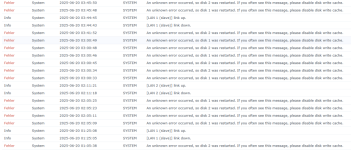
So hat es angefangen laut Synology-Log.
Da ich am Wochenende unterwegs war und der Rest der Familie am nächsten Tag vom ständigen Gepiepe genervt war, wollte ich die DS aus der Ferne herunterfahren. Ich hatte aber schon keinen Zugriff mehr.
Dann hat meine Frau den Stecker der USV gezogen, damit die DS herunterfährt. Das hat auch geklappt.
Dann wollte ich die DS am Sonntag wieder starten, jedoch war dann das Netzteil defekt.
Mit neuem Netzteil hat der Start wieder funktioniert, mit dem jetzt bekanntem Problem.

Screenshot 2025-06-24 142036.png
 
Ok, das sieht nach SMR Problem aus.
1. Ticket bei Synology aufmachen, vielleicht können die den Speicherpool retten
2. ontrack oder andere Firma kontaktieren
3. Mal überlegen, ob ein Backup vielleicht sinnvoll wäre.
Edit: Hast du den Neustart schon versucht, wie in der Fehlermeldung beschrieben?
 
Ok, vielen Dank schonmal.
Den Neustart habe ich schon mehrmals probiert, jedoch immer erfolglos. Eine Backup-Strategie werde ich mir für die Zukunft auf jeden Fall vornehmen.
Was genau bedeutet das SMR Problem? So weit geht mein technisches Verständnis leider nicht.
Was schreibt man dann an den Synology Support? Ich gehe mal davon aus, dass ich das Problem so wie hier im Forum beschreiben muss oder?
 
Ich sehe keine Fehlermeldung in der ein Neustart empfohlen wird.
 
SMR HDDs antworten teilweise zu langsam und das Software RAID denkt dann die HDD wäre defekt und meldet sie ab.
Ja, genau das und die Erkenntnisse aus diesem Thread.
Wie wichtig sind die Daten?
 
@synfor erster Post Screenshot
 
SMR HDDs antworten teilweise zu langsam und das Software RAID denkt dann die HDD wäre defekt und meldet sie ab.
Ja, genau das und die Erkenntnisse aus diesem Thread.
Wie wichtig sind die Daten?
Das für mich wichtigste, Dokumente die ich per Paperless ngx gespeichert habe und sämtliche privaten Fotos, habe ich Gott sei dank per Drive gesichert. Trotzdem haben sich über die Jahre auch viele Dateien angesammelt, wo ein Verlust jetzt schon ärgerlich wäre.
 
>Und ich würde keine SMR HDDs im NAS einsetzen.
 

Additional post fields


Kaffeautomat

Wenn du das Forum hilfreich findest oder uns unterstützen möchtest, dann gib uns doch einfach einen Kaffee aus.

Als Dankeschön schalten wir deinen Account werbefrei.

:coffee:

Hier gehts zum Kaffeeautomat