Upgrade NAS mit NVMe?

  • Ab sofort steht euch hier im Forum die neue Add-on Verwaltung zur Verfügung – eine zentrale Plattform für alles rund um Erweiterungen und Add-ons für den DSM.

    Damit haben wir einen Ort, an dem Lösungen von Nutzern mit der Community geteilt werden können. Über die Team Funktion können Projekte auch gemeinsam gepflegt werden.

    Was die Add-on Verwaltung kann und wie es funktioniert findet Ihr hier

    Hier geht es zu den Add-ons

fernsehen123

Benutzer
Registriert
06. März 2026
Beiträge
4
Reaktionspunkte
0
Punkte
1
Hi,

ich habe einen 1525+ gekauft und eine 16TB Synology Festplatte.
Läuft super, läuft 24/7. Aber mich stört ein bisschen der konstante Krach, den er macht. Immer rattert die Festplatte, auch wenn der NAS quasi gar nichts macht...?
Es läuft Docker darauf mit 1-2 kleinen Anwendungen. Fotos, Dokumente, Videos, Musik etc. will ich alles gern weiterhin auf der HDD haben (und bald weitere HDDs nachrüsten)
Aber ich frage mich, wieviel Sinn es machen würde auch eine NVMe einzubauen (oder irgendwas anderes), damit das System vllt auf der NVMe laufen kann und dadurch weniger Krach macht...?
Funktioniert das so, wie ich es mir vorstelle? Oder was für Vorteile könnte ich haben, wenn ich eine NVMe nachrüste?
 
Willkommen im Forum.
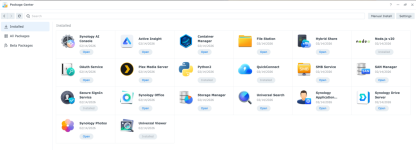
DSM (System) läuft/liegt auf allen SATA Laufwerken als RAID1 (versteckt). Du brauchst einen geeigneten Aufstellort für dein NAS. Poste doch mal einen Screenshot der installierten Pakete? Active Insight brauchen die meisten User nicht und es verursacht viele Zugriffe auf den HDDs.
 
jau, hier der screenshot

Active Insight also mal deinstallieren?

Wenn ich also eine NVMe einbaue, läuft DSM weiterhin auf der HDD, richtig? NVMe würde also nicht viel bringen lautstärketechnisch.
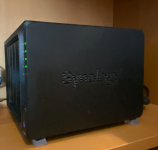
Der NAS ist bei mir in der Küche; habe eine recht kleine Wohnung und höre den dann immer noch, wenn ich am PC oder sonstwo im Wohnzimmer sitze.
Deutlich weiter weg wäre er nur, wenn ich ihn ins Badezimmer oder auf den Balkon stelle. Aber ich glaub das sind auch beides keine guten Optionen...

1772794115238.png
 
Zuletzt bearbeitet von einem Moderator:

Anhänge

  • 1772794385072.png
    1772794385072.png
    649,2 KB · Aufrufe: 19
  • 1772797187390.png
    1772797187390.png
    1,1 MB · Aufrufe: 15
  • 1772797207643.png
    1772797207643.png
    941,2 KB · Aufrufe: 15
Zuletzt bearbeitet:
  • Like
Reaktionen: Skyhigh
super, danke!
NVMe also nur kaufen, wenn ich Geld aus dem Fenster schmeißen will?
 
Zuletzt bearbeitet von einem Moderator:
Also ich hab mir das angeguckt mit der Dämmung. Die Ideen sind super, aber ich denke das Geräusch das mich stört, ist einfach die HDD. Und die wird dadurch wohl kaum leiser.
Das Velcro Band hab ich mir trotzdem mal bestellt.

Und bei Active Insight bin ich noch unsicher. Ist das nicht dafür da, damit regelmäßig gecheckt wird, ob alles in Ordnung ist mit dem System und den HDDs? Verliere ich nicht Funktionalität, wenn ich das deinstalliere?
 
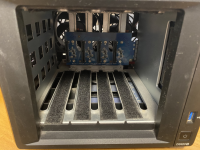
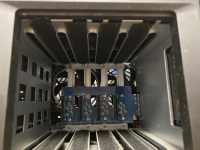
Das Sound Problem kommt von den HDD, wird aber über den Cage auf das gesamte Gehäuse übertragen und damit verstärkt.
Also im normalen Consumer Umfeld benötigt man m.W. Active Insight nicht, viele haben es hier deinstalliert, weil es nur unnötig Workload produziert. Das ist eigentlich nur interessant wenn du mehrere DS monitoren musst.
 
I always uninstall Active Insight. But a recent comment on reddit has me wondering if I should leave it installed.

Usually Active Insight creates immutable snapshots of all shared folders once it detects ransomware behavior kicking in.

And https://kb.synology.com/de-de/insights/active_ransomware_protection_file_analytics explains how it works and why it causes so much drive activity.

But it can also cause problems: https://www.reddit.com/r/synology/c...e_insight_keeps_creating_immutable_snapshots/
 
  • Like
Reaktionen: Skyhigh und Benie
@DaveR it sounds like a nice feature, but is it really needed if the user does Immutable Snapshots anyways?

If no Snapshots are configured, it's neat that Active Insight does it for you. But if you already set it up yourself (I did set it to 14Days), I think it's safe to uninstall it.


Edit:
Unless you're a Business Owner, then I would use everything I could, to protect the Company Data.
 
I guess it would better if DSM just notified you when snapshots aren't enabled.

This actually gives me an idea for a new script to:
  1. Check weekly if snapshots are enabled for all shared folders that aren't set to be ignored in "exclude="
  2. Check if any shared folders not in the exclude array don't have snapshots enabled.
  3. Check if any shared folders not in the exclude array don't have recent snapshots.
  4. Check if any shared folders not in the exclude array don't have "schedule_snapshot=true".
  5. Check if any shared folders not in the exclude array don't have a snapshot with "worm_lock=true".
  6. Send email if any of the above are missing.
 
  • Like
Reaktionen: Skyhigh
Good idea!
If I get it right that would be to check, that nothing changed the settings for the Immutable Snapshots and if so, the email warns the user.


One idea for that (even I'm not sure if this would be possible):

If no Snapshot (with worm_lock=true) is available anymore, it could be to late. And Harm could be done already.

Instead Read for the Snapshot settings of each folder.

if I set folder1 to 10 Days and folder2 to 20 Days, there should be a 20-30% threshold. (maybe User-defined $Variable at the beginning of the script?)

The email should send a notification if folder1 has less than 2-3 Snapshots and folder2 less than 4-6Snapshots with worm_lock=true of I use the 20-30% threshold
 
  • Like
Reaktionen: DaveR
I could make the script send an email if previous snapshots had worm_lock=true but the latest snapshot has worm_lock=false.

One of my shared folder's snapshots are set to daily, retain for 14 days, and immutable for 7 days. The oldest entry in it's meta file contains:
Code:
[GMT+11-2026.02.20-16.00.02]
hide=false
worm_lock_begin=1770649541
take-by=/usr/syno/sbin/synosharesnapshot
uuid=ff2f2e66-38ed-2945-959c-3c9864437d73
schedule_snapshot=true
worm_lock_day=7
k8s_csi_name=
worm_lock_end=1771254341
lock=false
worm_lock=false
desc=Scheduled snapshot taken by [DISKSTATION]
ruuid=ff2f2e66-38ed-2945-959c-3c9864437d73
snap_size=7476074528768

and the newest entry contains:
Code:
[GMT+11-2026.03.06-16.00.02]
hide=false
worm_lock_begin=1771859143
take-by=/usr/syno/sbin/synosharesnapshot
uuid=bcf5c811-637a-e54a-a6f1-95490a835506
schedule_snapshot=true
worm_lock_day=7
k8s_csi_name=
worm_lock_end=1772463943
lock=false
worm_lock=true
desc=Scheduled snapshot taken by [DISKSTATION]
ruuid=bcf5c811-637a-e54a-a6f1-95490a835506
snap_size=7507606761472

I probably need to also check that the scheduled task is still scheduled, and how many snapshots are set to be retained.

DSM hides scheduled tasks in a number of places, depending on the type of scheduled task. I've never looked for where snapshot scheduled tasks are located. These are my notes from when I looked for where user-defined script scheduled tasks are located.
Code:
User defined scheduled task locations

https://new.reddit.com/r/synology/comments/1egatcr/where_does_dsm_hide_userdefined_script_bootup/

User defined script scheduled tasks (except for the boot-up and shutdown schedules) are saved in the following sqlite database (which only includes id number and not the commands!?):
/usr/syno/etc/sched_status.sqlite

Boot-up and shutdown user defined script scheduled tasks are saved in the following sqlite database:
/usr/syno/etc/esynoscheduler/esynoscheduler.db

The "Save results to" path for user defined scripts is saved in:
/usr/syno/etc/esynoscheduler/esynoscheduler-conf.json


/usr/local/etc/rc.d is empty but you can put scripts in here.
see https://www.reddit.com/r/synology/comments/1egatcr/comment/lfsl0b6/

/etc/crontab only contains DSM's system schedules, with id numbers instead of the commands that are scheduled, like:
- 55    6    *    *    *    root    /usr/syno/bin/synoschedtask --run id=1

/etc/crontab has ids 1, 2, 12, 13, 32 and 33 and I can see that none of them are my scheduled tasks with sudo synoschedtask --get id=1 and sudo synoschedtask --get id=2 etc.

The ids not in crontab, 3-11 and 14-31 are for my user defined script schedules... except not for any of my boot-up and shutdown schedules.


/etc/cron.d only contains:
- crontab (which only contains AvrLogger's scheduled task)
- synosched.spacereclaim.task.task

/tmp/DSMTaskMgr/@administrators is empty. Only used when scheduled task is running?

/usr/lib/systemd looked interesting but nothing related to scheduled tasks.
 
  • Like
Reaktionen: Skyhigh

Additional post fields


Kaffeautomat

Wenn du das Forum hilfreich findest oder uns unterstützen möchtest, dann gib uns doch einfach einen Kaffee aus.

Als Dankeschön schalten wir deinen Account werbefrei.

:coffee:

Hier gehts zum Kaffeeautomat