SMART-Werte auslesen und interpretieren

  • Ab sofort steht euch hier im Forum die neue Add-on Verwaltung zur Verfügung – eine zentrale Plattform für alles rund um Erweiterungen und Add-ons für den DSM.

    Damit haben wir einen Ort, an dem Lösungen von Nutzern mit der Community geteilt werden können. Über die Team Funktion können Projekte auch gemeinsam gepflegt werden.

    Was die Add-on Verwaltung kann und wie es funktioniert findet Ihr hier

    Hier geht es zu den Add-ons

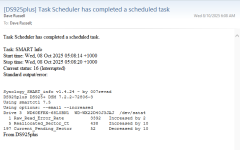
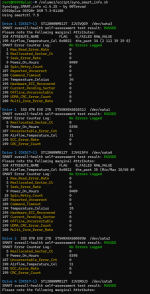
Hier zum Vergleich, die komplette Ausgabe des super Scripts von @DaveR

Code:
root@DS920plus:~# /volume1/script/syno_smart_info.sh
Synology_SMART_info v1.4.24 - by 007revad
DS920plus DS920+ DSM 7.2.2-72806-4
Using smartctl 7.5

Drive 1  SSD 870 EVO 2TB  S754NX0X602832J  /dev/sata1
SMART overall-health self-assessment test result: PASSED
SMART Error Counter Log:         No Errors Logged
  5 Reallocated_Sector_Ct        0
  9 Power_On_Hours               8089
187 Uncorrectable_Error_Cnt      0
190 Airflow_Temperature_Cel      32
195 ECC_Error_Rate               0
199 CRC_Error_Count              0

Drive 2  SSD 870 EVO 2TB  S754NX0X600593W  /dev/sata2
SMART overall-health self-assessment test result: PASSED
SMART Error Counter Log:         No Errors Logged
  5 Reallocated_Sector_Ct        0
  9 Power_On_Hours               8089
187 Uncorrectable_Error_Cnt      0
190 Airflow_Temperature_Cel      32
195 ECC_Error_Rate               0
199 CRC_Error_Count              0

Drive 1 (DX517-1)  ST12000NM0127  ZJV3VQG9  /dev/sata3
SMART overall-health self-assessment test result: PASSED
Please note the following marginal Attributes:
ID# ATTRIBUTE_NAME          FLAG    N_FAILED RAW_VALUE
190 Airflow_Temperature_Cel 0x0022  the_past 35 (2 112 39 29 0)
SMART Error Counter Log:         No Errors Logged
  1 Raw_Read_Error_Rate          0
  5 Reallocated_Sector_Ct        0
  7 Seek_Error_Rate              0
  9 Power_On_Hours               8099
 10 Spin_Retry_Count             0
187 Reported_Uncorrect           0
188 Command_Timeout              0
194 Temperature_Celsius          35
195 Hardware_ECC_Recovered       0
197 Current_Pending_Sector       0
198 Offline_Uncorrectable        0
199 UDMA_CRC_Error_Count         0
200 Multi_Zone_Error_Rate        0

Drive 2 (DX517-1)  ST12000NM0127  ZJV415F4  /dev/sata4
SMART overall-health self-assessment test result: PASSED
Please note the following marginal Attributes:
ID# ATTRIBUTE_NAME          FLAG    N_FAILED RAW_VALUE
190 Airflow_Temperature_Cel 0x0022  the_past 35 (Min/Max 28/40 #9
SMART Error Counter Log:         No Errors Logged
  1 Raw_Read_Error_Rate          0
  5 Reallocated_Sector_Ct        0
  7 Seek_Error_Rate              0
  9 Power_On_Hours               8100
 10 Spin_Retry_Count             0
187 Reported_Uncorrect           0
188 Command_Timeout              0
194 Temperature_Celsius          35
195 Hardware_ECC_Recovered       0
197 Current_Pending_Sector       0
198 Offline_Uncorrectable        0
199 UDMA_CRC_Error_Count         0
200 Multi_Zone_Error_Rate        0

Drive 4 (DX517-1)  ST12000NM0127  ZJV2RDJ3  /dev/sata5
SMART overall-health self-assessment test result: PASSED
Please note the following marginal Attributes:
ID# ATTRIBUTE_NAME          FLAG    N_FAILED RAW_VALUE
190 Airflow_Temperature_Cel 0x0022  the_past 33 (3 104 37 27 0)
SMART Error Counter Log:         No Errors Logged
  1 Raw_Read_Error_Rate          0
  5 Reallocated_Sector_Ct        0
  7 Seek_Error_Rate              0
  9 Power_On_Hours               8056
 10 Spin_Retry_Count             0
187 Reported_Uncorrect           0
188 Command_Timeout              0
194 Temperature_Celsius          33
195 Hardware_ECC_Recovered       0
197 Current_Pending_Sector       0
198 Offline_Uncorrectable        0
199 UDMA_CRC_Error_Count         0
200 Multi_Zone_Error_Rate        0

Drive 5 (DX517-1)  ST12000NM0127  ZJV4SF3M  /dev/sata6
SMART overall-health self-assessment test result: PASSED
Please note the following marginal Attributes:
ID# ATTRIBUTE_NAME          FLAG    N_FAILED RAW_VALUE
190 Airflow_Temperature_Cel 0x0022  the_past 34 (2 80 37 27 0)
SMART Error Counter Log:         No Errors Logged
  1 Raw_Read_Error_Rate          0
  5 Reallocated_Sector_Ct        0
  7 Seek_Error_Rate              0
  9 Power_On_Hours               8056
 10 Spin_Retry_Count             0
187 Reported_Uncorrect           0
188 Command_Timeout              0
194 Temperature_Celsius          34
195 Hardware_ECC_Recovered       0
197 Current_Pending_Sector       0
198 Offline_Uncorrectable        0
199 UDMA_CRC_Error_Count         0
200 Multi_Zone_Error_Rate        0

USB Drive  My Book 1230  WCC4E0806802  /dev/usb1
SMART overall-health self-assessment test result: PASSED
SMART Error Counter Log:         No Errors Logged
  1 Raw_Read_Error_Rate          0
  5 Reallocated_Sector_Ct        0
  7 Seek_Error_Rate              0
  9 Power_On_Hours               3675
 10 Spin_Retry_Count             0
194 Temperature_Celsius          29
197 Current_Pending_Sector       0
198 Offline_Uncorrectable        0
199 UDMA_CRC_Error_Count         0
200 Multi_Zone_Error_Rate        1

M.2 Drive 2  KINGSTON SA2000M81000G  50026B768465D29C  /dev/nvme0n1
SMART overall-health self-assessment test result: PASSED
SMART Error Counter Log:         No Errors Logged
  1 Critical_Warning             0
  2 Temperature                  31 C
  5 Percentage_Used              66%
 12 Power_On_Hours               41,400
 13 Unsafe_Shutdowns             4
 14 Media_Errors                 0

M.2 Drive 1  KINGSTON SA2000M81000G  50026B7684575C9B  /dev/nvme1n1
SMART overall-health self-assessment test result: PASSED
SMART Error Counter Log:         No Errors Logged
  1 Critical_Warning             0
  2 Temperature                  31 C
  5 Percentage_Used              65%
 12 Power_On_Hours               41,466
 13 Unsafe_Shutdowns             4
 14 Media_Errors                 0

Finished
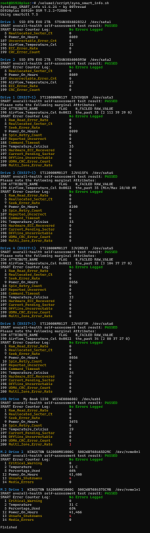
 

Anhänge

  • 20251007_smart_revad.png
    20251007_smart_revad.png
    282,6 KB · Aufrufe: 8
  • Like
Reaktionen: Benie und ElaCorp
Krux ist, dass Du genau einmal benachrichtigt wirst wenn sich ein Wert erhöht hat. Danach ist wieder Ruhe bis zur nächsten Änderung ;)
 
To test the -i option you can simulate an increase or decrease in the SMART values by editing the smart.log file which is in the same folder as syno_smart_info.sh

For example if I change this:
Code:
[WD-WX22D40J3JAJ]
drive_num=Drive 3
model=WD60EFRX-68L0BN1
Current_Pending_Sector=52
device=/dev/sata4
Reallocated_Sector_Ct=438

to this:
Code:
[WD-WX22D40J3JAJ]
drive_num=Drive 3
model=WD60EFRX-68L0BN1
Current_Pending_Sector=62
device=/dev/sata4
Reallocated_Sector_Ct=428

I'd get an email telling me about the changes
1759864182701.png
 

Anhänge

  • 1759863168952.png
    1759863168952.png
    19,2 KB · Aufrufe: 10
Zuletzt bearbeitet:
your example is wrong?
 
Du weisst, dass es eine didaktische Methode ist, etwas Falsches zu zeigen um zu testen, ob der Leser das Funktionsprinzip verstanden hat ? :D
 
your example is wrong?
On my first try I didn't receive an email when I should have. Then I remembered I hadn't setup email notifications on the DS925+. So I had to edit smart.log again but this time I thought I'd also edit the Raw_Read_Error_Rate
 
Zuletzt bearbeitet:
@DaveR Thanks für the Update, but the sorting is a little bit confused, when you have a additional DX running, see Screenshot:
1760951922049.png
 
  • Wow
Reaktionen: DaveR
😅 I'll change it so the DX drives are shown after the internal drives.
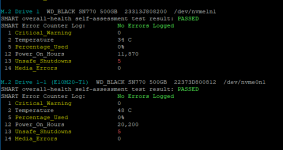
When I changed it to sort by DSM's drive number I made sure that NVMe drives in a PCIe M.2 card come after NVMe drives in the internal M.2 slots.
1760952552659.png

I only have a "Drive 1" in my DX and the drives in the NAS are Drives 3, 4 6 and 7 so I didn't see what you're seeing. But I did think it might be a problem but I wasn't sure if DSM would allow two "Drive 1"s and two "Drive 2"s etc.
1760952707537.png
 
lol, yes, my setup is a little bit special:
DS920+: 2 x SATA SSD + 2 x NVME-SSD
DX517: 4 x SATA HDD
 
  • Like
Reaktionen: DaveR
@ctrlaltdelete
Can you try v1.4.26

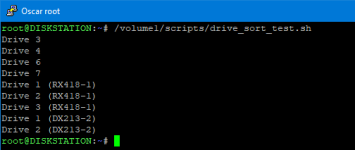
It not only sorts internal drives before expansion unit drives, but also sorts by expansion unit port (for people who have more than 1 expansion unit).

Test results with a simulated RX418 and a real DX213 connected.
1760993270759.png
 
Zuletzt bearbeitet:
Tested, perfect!
What do you think, is the SMART ID: 177 Wear_Leveling_Count PO--C- 097 097 000 - 40 on
SATA SSD interesting to show also without --all Option?
 
Do you have a Seagate SSD? Though BackBlaze says Seagate calls 177 Wear Range Delta (which to me sounds different to your Wear_Leveling_Count.

177 - Wear Range Delta - Delta between most-worn and least-worn Flash blocks. It describes how good/bad the wearleveling of the SSD works on a more technical way.

None of my SSDs have 177, and BackBlaze don't monitor it to determine if their SSDs need replacing.
 
My SATA SSDs are Samsung Evo 870

Code:
root@DS920plus:~# /volume1/script/syno_smart_info.sh --all
Synology_SMART_info v1.4.26 - by 007revad
DS920plus DS920+ DSM 7.3-81180
Using smartctl 7.5
Using options: --all

Drive 1  SSD 870 EVO 2TB  S754NX0X602832J  /dev/sata1
SMART overall-health self-assessment test result: PASSED
SMART Error Counter Log:         No Errors Logged

ID#  ATTRIBUTE_NAME                   FLAGS     VALUE  WORST  THRESH   FAIL RAW_VALUE
5    Reallocated_Sector_Ct            PO--CK      100    100     010      - 0
9    Power_On_Hours                   -O--CK      098    098     000      - 8422
12   Power_Cycle_Count                -O--CK      099    099     000      - 58
177  Wear_Leveling_Count              PO--C-      097    097     000      - 40
179  Used_Rsvd_Blk_Cnt_Tot            PO--C-      100    100     010      - 0
181  Program_Fail_Cnt_Total           -O--CK      100    100     010      - 0
182  Erase_Fail_Count_Total           -O--CK      100    100     010      - 0
183  Runtime_Bad_Block                PO--C-      100    100     010      - 0
187  Uncorrectable_Error_Cnt          -O--CK      100    100     000      - 0
190  Airflow_Temperature_Cel          -O--CK      069    056     000      - 31
195  ECC_Error_Rate                   -O-RC-      200    200     000      - 0
199  CRC_Error_Count                  -OSRCK      100    100     000      - 0
235  POR_Recovery_Count               -O--C-      099    099     000      - 1
241  Total_LBAs_Written               -O--CK      099    099     000      - 163944053183
252  Added_Bad_Flash_Blk_Ct           -O--CK      100    100     000      - 0
 
Hi

Ich hoffe das ich hier richtig bin.
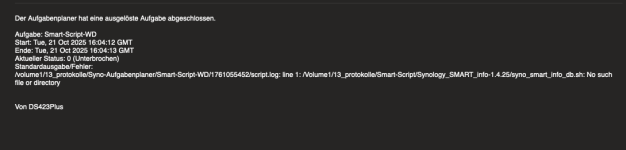
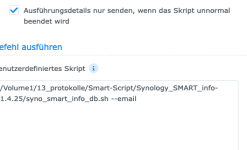
Ich habe das Script von DaveR Installiert nach Anleitung und bekomme immer diese Meldung.
Kann mir Jemand sagen an was dies liegen kann?

Ich habe im Anhang noch die Aufgabe vom Aufgabenplaner.

Kann mir da evt jemand helfen?

Danke schon mal.
 

Anhänge

  • Screenshot 21.10.2025 um 16.11.36 PM.png
    Screenshot 21.10.2025 um 16.11.36 PM.png
    45,5 KB · Aufrufe: 22
  • Screenshot 21.10.2025 um 16.14.06 PM.png
    Screenshot 21.10.2025 um 16.14.06 PM.png
    26,5 KB · Aufrufe: 22
Witzig sind die SMART Werte bei SAS Platten. Da kommt ja gar nichts zurück.
Code:
root@HD6500-Cluster:~# smartctl -a -d scsi /dev/sas2
smartctl 6.5 (build date Sep 26 2022) [x86_64-linux-4.4.302+] (local build)
Copyright (C) 2002-16, Bruce Allen, Christian Franke, www.smartmontools.org

=== START OF INFORMATION SECTION ===
Vendor:               Synology
Product:              HAS5300-16T
Revision:             1403
Compliance:           SPC-4
User Capacity:        16,000,900,661,248 bytes [16.0 TB]
Logical block size:   512 bytes
Physical block size:  4096 bytes
Rotation Rate:        7200 rpm
Form Factor:          3.5 inches
Logical Unit id:      0x5000039ce811293d
Serial number:        23B0T9RA0A08RFE3H
Device type:          disk
Transport protocol:   SAS (SPL-3)
Local Time is:        Tue Oct 21 16:21:23 2025 CEST
SMART support is:     Available - device has SMART capability.
SMART support is:     Enabled
Temperature Warning:  Disabled or Not Supported

=== START OF READ SMART DATA SECTION ===
SMART Health Status: OK

Current Drive Temperature:     29 C
Drive Trip Temperature:        65 C

Manufactured in week 45 of year 2023
Specified cycle count over device lifetime:  50000
Accumulated start-stop cycles:  7
Specified load-unload count over device lifetime:  600000
Accumulated load-unload cycles:  7
Elements in grown defect list: 0

Error counter log:
           Errors Corrected by           Total   Correction     Gigabytes    Total
               ECC          rereads/    errors   algorithm      processed    uncorrected
           fast | delayed   rewrites  corrected  invocations   [10^9 bytes]  errors
read:          0    15803         0         0          0     700712.699           0
write:         0      861         0         0          0      17804.320           0

Non-medium error count:        0

No self-tests have been logged
 
kommt --all mehr?
smartctl -a -d scsi --all /dev/sas2

oder versuche mal ob diese Befehle was bringen?
synodisk --status
synodisk --health /dev/sas2
 
wo liegt denn das Script?
Edit: Ja, DSM basiert auf Linux, und das Dateisystem (Btrfs oder ext4) unterscheidet grundsätzlich zwischen Groß- und Kleinschreibung
 
wo liegt denn das Script?
Edit: Ja, DSM basiert auf Linux, und das Dateisystem (Btrfs oder ext4) unterscheidet grundsätzlich zwischen Groß- und Kleinschreibung
Das Script liegt bei volume1/13_protokolle/Smart-Script/Synology_SMART_info-1.4.25
 

Additional post fields


Kaffeautomat

Wenn du das Forum hilfreich findest oder uns unterstützen möchtest, dann gib uns doch einfach einen Kaffee aus.

Als Dankeschön schalten wir deinen Account werbefrei.

:coffee:

Hier gehts zum Kaffeeautomat