I built my own 3rd Party Synology Package Repository

  • Ab sofort steht euch hier im Forum die neue Add-on Verwaltung zur Verfügung – eine zentrale Plattform für alles rund um Erweiterungen und Add-ons für den DSM.

    Damit haben wir einen Ort, an dem Lösungen von Nutzern mit der Community geteilt werden können. Über die Team Funktion können Projekte auch gemeinsam gepflegt werden.

    Was die Add-on Verwaltung kann und wie es funktioniert findet Ihr hier

    Hier geht es zu den Add-ons

I actually created this because you and @Tommes mentioned you wished there was a package repository that was better than cphub and synocommunity, and I didn't want to deal with SynoCommmunity's rules to publish my own packages.

Rather than forcing people to make spk files that conform to what my repository requires or expects, I decided to make it flexible enough to cope with:
  1. Missing keys in the INFO file.
  2. Whatever naming and versioning format authors have already.
  3. It even works if there are no releases and the spk files are in the repo's file tree (complete with inconsistent file names) like https://github.com/BenjV/SYNO-packages.
From my end, to add a new GitHub repo I just add 1 line to my GitHub workflow.

I haven't decided if I want to release the source code yet. I don't want a bunch of copycat package repositories out there while I'm trying to get people to use my package repository.

I just added SynoOCR to the GitHub workflow and your packages highlighted 3 issues with my GitHub workflow, and CloudFlare worker, that I've now fixed. The issues were:
  1. GitHub workflow was not finding the PACKAGE_ICON_256.PNG in your spk files.
  2. GitHub workflow was trying to create the same packagename_120.png for both DSM6 and DSM7 packages. It now creates packagename_DSM6_120.png for DSM 6 packages and packagename_120.png for DSM 7 packages.
  3. CloudFlare worker needed changing to map x86_64 (and all other arches) to the various CPU platforms (all 37 of them).
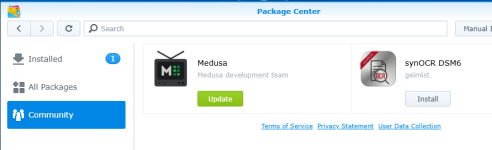
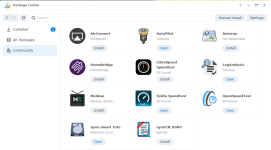
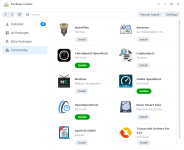
After 5 hours I finally got synoOCR showing in Package Center for DSM 7 and DSM 6.

1776906070167.png

Now Medusa has a friend :)
1776905648580.png
 
@geimist
I was checking out the source code for your synoOCR packages to see why they are x86_64 and if they could be noarch, when I noticed they require docker.

In your DMS 7 INFO file you should add: install_dep_packages="ContainerManager"

In your DMS 6 INFO file you should add: install_dep_packages="Dockerr"
 
I haven't decided if I want to release the source code yet. I don't want a bunch of copycat package repositories out there while I'm trying to get people to use my package repository.
That’s a great point! I hadn’t thought of that. I’m all for that idea. 👍

Still, we should make sure to promote your package source. Maybe you could also update your initial post so users can copy the package source URL directly (I didn’t even look for it in the screenshot at first 🙈).

After 5 hours I finally got synoOCR showing in Package Center for DSM 7 and DSM 6.
Oh, I feel sick …
Thank you!

Now Medusa has a friend :)
Friends are so important 😍

I was checking out the source code for your synoOCR packages to see why they are x86_64 and if they could be noarch, when I noticed they require docker.
Actually, it’s designed for noarch. However, in the last release (1.5.x), I encountered incompatibilities with arm64 involving a Python module that I couldn’t resolve at the time. That’s why the restriction is so strict. But I plan to fix the bug in the next release and then switch back to noarch. Also, I probably won’t be offering any more releases for DSM6. The outcry shouldn’t be deafening (only 1.2% of update requests still come from DSM6).

In your DMS 7 INFO file you should add: install_dep_packages="ContainerManager"
In your DMS 6 INFO file you should add: install_dep_packages="Dockerr"
Yes, that would be consistent. However, in the past there were devices for which there was no Synology installation of Docker (not even using workarounds). That’s why I manually check for Docker in preinst. But I think I might reconsider this approach now.

EDIT: I'm just wondering if it's really that simple. The switch from the Docker package to Container Manager wasn't from DSM 6 to DSM 7, but from DSM 7.1 to DSM 7.2. From the update requests, I can see that over 160 users are still using DSM 7.1. This will likely be addressed in a future update.
 
Zuletzt bearbeitet:
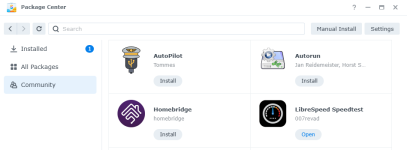
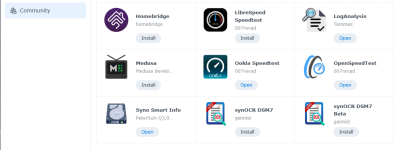
Homebridge have joined the party! I asked if I could add their packages and they said yes.

1776979582851.png
 
Zuletzt bearbeitet:
Good morning, Dave 🙋‍♂️

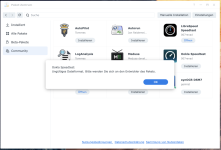
During my tests, I found that Ookla Speedtest cannot be installed: "Invalid file format"
(on my DS920+ and on the Synology demo server).

Bildschirmfoto 2026-04-23 um 14.34.59.png

I don't need it, but I just wanted to let you know.
 
  • Like
Reaktionen: Benie
@geimist
I forgot that Container Manager is only DSM 7.2 and later. So you'd need DSM 7 and DSM 7.2 spk files.

In your DMS 7.2 INFO file you would need:
Code:
install_dep_packages="ContainerManager"
firmware="7.2-64570"
os_min_ver="7.2-64570"
os_max_ver="9.9-99999"

In your DMS 7 INFO file you should add or edit:
Code:
install_dep_packages="Docker"
firmware="7.0-40000"
os_min_ver="7.0-40000"
os_max_ver="7.1-99999"
 
  • Like
Reaktionen: Benie und geimist
During my tests, I found that Ookla Speedtest cannot be installed: "Invalid file format"
I'm not sure what is going on there.

I can upgrade it or install on my DS1821+ (v1000 CPU) and DS925+ (v1000nk CPU) but not on my DS720+ (geminilake CPU). Sometimes when I try to install Ookla on the DS720+ it just refreshes Package Center and does not even try to download the spk file. Other times it downloads the spk file and shows the "Invalid format" error.

EDIT:
  1. Upgrading on all 3 NAS works.
  2. Installing on all 3 NAS fails.
 
I've now tried installing the packages manually (OoklaSpeedtest-x86_64-v1.0.27-DSM-7.x.spk, OoklaSpeedtest-noarch-v1.0.27-DSM-7.x.spk).
All devices are displaying the same error (DS218+, DS220+, DS920+, DS224+)

So it's clearly not a problem with the package server.
 
  • Like
Reaktionen: Benie
During my tests, I found that Ookla Speedtest cannot be installed: "Invalid file format"
(on my DS920+ and on the Synology demo server).
It´s me to, about that, so I tried 10 Minits ago, got same Error is Displayed on my DS1525+,

Edit: I could install on my DS920+ at the Time you made the 1.st .spk wenn you start with Ookla Speedtest as an .spk, and it was still working.
 
I've found and fixed the problem. In v1.0.27 I'd added a 2nd ui page in the WIZARD_UI/install_uifile but I'd left out the },{ between the "Permission setup required" section and the "How to schedule Ookla Speedtest" section. :rolleyes: So install was failing but upgrade and uninstall were working.

All fixed now in v1.0.28.
 
  • Like
Reaktionen: Benie
@DaveR
How does the package server handle beta versions? Has this been implemented?
Possible indicators would be prerelease versions from GitHub or the information in the package's INFO file.
 
  • Like
Reaktionen: DaveR
I hadn't even considered beta versions. :oops: Currently it (incorrectly) assumes all spk files in the latest release a not beta, and it only gets the list of spk files from the latest release.
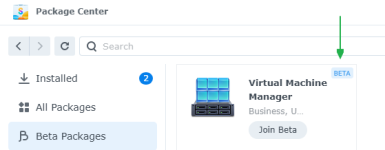
I've updated the GitHub workflow to read the beta value from the spk's INFO file. I've also updated it to get the list of spk files from both the latest release and the latest pre-release. And it sets pre-release spk files as "beta": true even if their INFO file contains "beta": false

Do you want to test it with:
  1. A spk file in the latest release that has INFO containing beta = true.
  2. A spk file in the latest pre-release that has INFO containing beta = false.
My repo checks for new releases at 2 AM UTC (though GitHub can delay or even skip running the 2 AM workflow during periods of high load on shared runners).
 
I just wanted to ask how it works, and you go and give me a solution right away. You're something else :ROFLMAO:
I've released a beta version, and we'll see how it goes tomorrow.

Thank you very much
 
  • Haha
Reaktionen: DaveR
Okay, I was unable to get both your synOCR 1.5.2 and synOCR 1.5.99.3-BETA to show in package center. In fact I managed to make them both disappear from package center!

After almost 7 hours of reverse engineering package center (with claude's help) I worked out that:
  1. Package Center will only show beta packages if they are from Synology's package server.
  2. 3rd party packages probably should NOT have "beta=true" in their INFO file.
  3. Providing package center with 2 different versions of the same package, with different version numbers, causes it to not show either package.
So the solution would be to make sure your beta or pre-release package's INFO file contains a different package and displayname to the release packages.

Beta release:
Code:
package="synOCR-beta"
displayname="synOCR DSM7 Beta"
displayname_enu="synOCR DSM7 Beta"
displayname_ger="synOCR DSM7 Beta"

Stable release:
Code:
package="synOCR"
displayname="synOCR DSM7"
displayname_enu="synOCR DSM7"
displayname_ger="synOCR DSM7"

This way both packages will appear in package center as 2 different packages. And users can install the beta package without affecting their installation of the stable package.

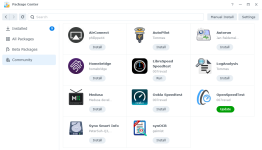
This screenshot is after I manually edited the package index with the "beta release" changes mentioned above.

1777518334225.png
 
Zuletzt bearbeitet:
Don't go out of your way for me. I just wanted to know how to handle your package server. It's no problem for me to manually distribute the beta versions via my own server. I've already built a notification feature into my GUI anyway.

Of course, I could adjust the value for package= now, but then it would be a standalone package, and beta users wouldn’t be properly notified of a release and wouldn’t be able to automatically switch to the release version with their configuration.

In case you're interested:
cphub.net had implemented the beta feature. So it seems to be possible in principle.
As far as I recall, beta versions were treated exactly the same way as Synology's. But as I said, you don't need to go out of your way for my sake.

Thank you very much for your support :)
 
No trouble. I needed something to do, and making my package source support beta packages seemed like a good idea.

That cphub post sounds like they had 2 package channels. A stable channel and a beta channel. Do you know if beta packages from cphub appeared in the Beta Packages section of package center? Or did they appear in the Community section with "BETA" text?
1777579037153.png
 
Zuletzt bearbeitet:
  • Like
Reaktionen: geimist
@Tommes Do you remember? I mean, it wasn't under "Beta Packages" but as a separate entry in "Community"
They definitely had the overlay as well (that must be coming from the INFO ➜ beta=yes)
 
From my testing yesterday having beta=yes caused neither package version to show in the Community section. But now that I have my package server returning the beta/pre-release package version if package center asks for "channel=beta" and returning the stable package version if package center asks for "channel=stable" I'll try the beta=yes again.

With "Beta Packages" enabled it shows the synOCR beta package.
1777582979231.png

With "Beta Packages" disabled it shows the synOCR stable package.
1777583107041.png
 

Additional post fields


Kaffeautomat

Wenn du das Forum hilfreich findest oder uns unterstützen möchtest, dann gib uns doch einfach einen Kaffee aus.

Als Dankeschön schalten wir deinen Account werbefrei.

:coffee:

Hier gehts zum Kaffeeautomat