How to install Video Station in DSM 7.2.2

  • Ab sofort steht euch hier im Forum die neue Add-on Verwaltung zur Verfügung – eine zentrale Plattform für alles rund um Erweiterungen und Add-ons für den DSM.

    Damit haben wir einen Ort, an dem Lösungen von Nutzern mit der Community geteilt werden können. Über die Team Funktion können Projekte auch gemeinsam gepflegt werden.

    Was die Add-on Verwaltung kann und wie es funktioniert findet Ihr hier

    Hier geht es zu den Add-ons

  • Like
Reaktionen: darknebular und DaveR
Es gibt keine Codecs Lizenz in in dem Sinn, war halt quasi bisher in DSM 7,2,1.... beinhaltet, Und die DSM Version und alle Updates dafür kannst Du doch Downloaden und abspeichern.
 
Der eigentliche Grund ist wohl eher, dass Synology Geld sparen möchte und das auf Kosten der Kunden durch Wegfallende Lizenzgebühren und pflegen muss man die VS dann ja auch nicht mehr, wenn es sie nicht mehr gibt.. was noch mal Geld spart
 
  • Like
Reaktionen: ChaosEmpire
Video Station for 722 updated so you can skip installing Media Server or Video Station or just install Advanced Media Codecs (for Synology Photo users who don't want Video Station or Media Server).

v1.3.12
  • Added menu with choices to skip installing Media Server, Video Station or both.
https://github.com/007revad/Video_Station_for_DSM_722#screenshots
 
Hi @DaveR is there a reason why video station 3.1.1.-3168 is not used as its the latest one i got in 7.2.1

Lot of thanks for your efforts making synology great again
 
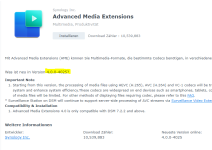
Video Station 3.1.1-3168 complains that it needs Advanced Media Codecs 4.0.0-4025 (which has no HEVC codec).

So I had to go with Video Station 3.1.0-3153 and Advanced Media Codecs 3.1.0-3005. The only difference between Video Station 3.1.0-3153 and Video Station 3.1.1-3168 is that 3.1.1-3168 has a bug fix for open subtitles.

OpenSubtitles has made changes that require users to update Video Station to this version or above. This update is necessary to renew the OpenSubtitles API key within the package.

Since nobody has complained about Video Station 3.1.0-3153 not being able to download subtitles I never got back to getting Video Station 3.1.1-3168 to work. :)
 
  • Like
Reaktionen: Benie
Video Station for 722 updated so it works when scheduled in task planner.

v1.3.13
  • Menu now times out after 5 seconds so script continues if no choice made (for when script is scheduled).
 
Video Station 3.1.1-3168 complains that it needs Advanced Media Codecs 4.0.0-4025 (which has no HEVC codec).

So I had to go with Video Station 3.1.0-3153 and Advanced Media Codecs 3.1.0-3005. The only difference between Video Station 3.1.0-3153 and Video Station 3.1.1-3168 is that 3.1.1-3168 has a bug fix for open subtitles.


Since nobody has complained about Video Station 3.1.0-3153 not being able to download subtitles I never got back to getting Video Station 3.1.1-3168 to work. :)
thanks for explaining, i only can tell you whats running on my ds1821+ with 7.2.1. update 6 (or was it 7..-the latest security thing)
and there is the 3.x audio codec stuff with the 3168 ds video, so i wonder its complains about codec 4.x
maybe its a difference in an upgraded scenario compared to a fresh installed one
 
Hallo zusammen, ich versuche auch gerade die Video-Station auf meinem neuen DSM 7.2.2-72806-update3 zu installieren.

Die ist auch schon im Paketzentrum angekommen ich habe die Vers. 3.1.1-3168
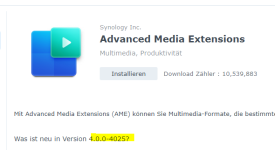
wenn ich jetzt die AME installieren will wird mir dies angeboten....
1745660045799.png

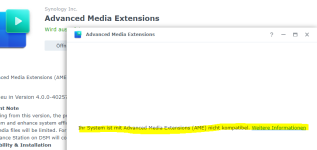
wenn ich die installiere, kommt folgender Fehler beim Start ....

1745660360405.png

insofern kann ich die VideoStation auch nicht starten.

Das ganze läuft bei mir zunächst in einer Testumgebung (unraid docker) bevor ich alles endgültig auf meine DS216j installieren würde ....
liegt das jetzt an meiner Hardware oder funktioniert dieser hack mit der VideoStation auf DSM 7.xx nicht mehr?
 

Anhänge

  • 1745660000172.png
    1745660000172.png
    58,6 KB · Aufrufe: 1
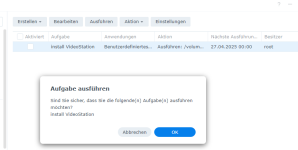
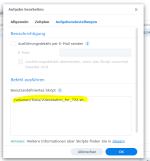
ok, ich habe das script über den Aufgabenplaner neu gestartet

1745679780565.png

sieht im Protokoll dann so aus ....

1745679844642.png

Am Ergebnis hat sich leider nichts geändert, ist alles so wie beim ersten Versuch ....
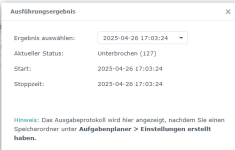
und jetzt sehe ich, daß im Protokoll steht "Status = unterbrochen" was habe ich jetzt falsch gemacht?
 
my second try could not work as I already deleted the script (my fault).
So I just did all over again but first deinstlled old VideoStation & AME:

1. downloaded source.code.zip from here (release 04Feb)
https://github.com/007revad/Video_Station_for_DSM_722/releases/tag/v1.3.17
2. unpacked the zip to /volume1/data/Video_Station_for_DSM_722-1.3.17
3. copied videostation_for_722.sh to /volume1/data
4. created a new task
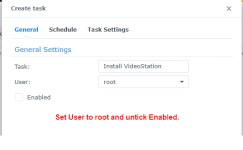
1745740684107.png

5. run the script, status now is "normal" and VideoStation appeared on the desktop
6. VideoStation seams to work correct now
1745741117269.png

in addition AME was automatically installed, so everything is fine now.

Great work !!! and thanks for your help.


EDIT:
I guess I can finally delete the task, correct?

EDIT2:
I tried to download the codecs but when I used my normal user & password to sign in I get the error message that I have a wron serial number ...
perhaps I have to create another account?
 
Zuletzt bearbeitet:
yes I know the difference between DSM user/PW and Synology-account user/PW
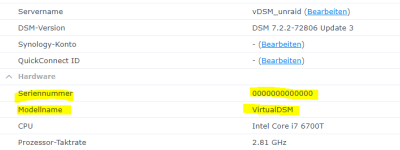
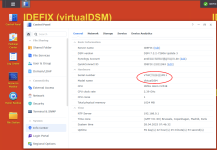
I guess the error message is correct. This s/n of virtualDSM 7.xx reads...
1745777903643.png

and I do not have such an device in my account .....
 
  • Like
Reaktionen: HHE3eich und Benie
I am running vDSM in unraid and I do not have a valid serial number - just something like 0000000

what happens if I try to create a new synology account from inside this vDSM?

Do I use these codecs at least?
 

Additional post fields


Kaffeautomat

Wenn du das Forum hilfreich findest oder uns unterstützen möchtest, dann gib uns doch einfach einen Kaffee aus.

Als Dankeschön schalten wir deinen Account werbefrei.

:coffee:

Hier gehts zum Kaffeeautomat