data deduplication auf unsupported DS und unsupported SSDs

  • Ab sofort steht euch hier im Forum die neue Add-on Verwaltung zur Verfügung – eine zentrale Plattform für alles rund um Erweiterungen und Add-ons für den DSM.

    Damit haben wir einen Ort, an dem Lösungen von Nutzern mit der Community geteilt werden können. Über die Team Funktion können Projekte auch gemeinsam gepflegt werden.

    Was die Add-on Verwaltung kann und wie es funktioniert findet Ihr hier

    Hier geht es zu den Add-ons

ctrlaltdelete

Benutzer
Sehr erfahren
Maintainer
Wiki Autor
Registriert
30. Dez. 2012
Beiträge
17.557
Reaktionspunkte
8.601
Punkte
679
Ich bin auch letztens über Daves Projekt gestolpert.

Bei mir geht es ja nur auf der 420+. Bei einem ersten Test tauchte bei mir allerdings der Unterpunkt für die Dedup-Einstellungen nicht auf und ich hab das erst mal abgebrochen und werde es später noch mal testen.
 
  • Like
Reaktionen: ctrlaltdelete
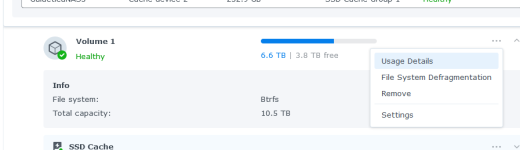
Also ich hab es noch mal getestet. Ich hatte vergessen, die "Usage detail analysis" zu aktivieren und hatte die Hoffnung, dass es daran liegt.

Aber es funktioniert nur teilweise. Das Skript sagte "Alles Ok", aber der Menüpunkt taucht nicht auf:
dedup.PNG

Unter den "Global Settings" des Volumes tauchen immerhin die Zeitplan-Einstellungen auf. Die natürlich nur funktionieren, wenn man die Deduplikation aktivieren könnte.

@DaveR I opened an issue in your repository, maybe you can give me some hints, what may went wrong: https://github.com/007revad/Synology_enable_Deduplication/issues/79
 
  • Like
Reaktionen: ctrlaltdelete
  • Like
Reaktionen: ctrlaltdelete
Hi Dave,

I restarted the system before this. That would be enough, wouldn't it?

Have I misunderstood something here? I have a system with hard drives and ssd's as cache. Is this not supported then?
 
I suspect you didn't run the script with the --hdd option.

I've just released v1.4.29
  • Changed to show state of "Dedupe config menu for HDDs and 2.5 inch SSDs" even if --hdd option not used.
    • Now also shows "Run the script with the --hdd option if you want it enabled".
https://github.com/007revad/Synology_enable_Deduplication/releases
 
@DaveR You're right, I started it without --hdd

Reason in your description: Enable data deduplication for HDDs (dangerous)

I thought tiny would be enough...

What is tiny then for? And what is meant by "dangerous" in the description for --hdd
 
  • Like
Reaktionen: Benie und dil88
I wrote dangerous because:
  • Synology must have a reason for only allowing deduplication on SSDs.
  • I don't want to be responsible if people run deduplication on HDDs and something goes wrong.
There's enough people who do run deduplication on HDDs without any reported issues that I should remove that (dangerous) comment.

DSM can do 2 different types of deduplication:
  • "btrfs data deduplication" which requires 16GB of memory or more.
  • "tiny btrfs data deduplication" which requires 4GB of memory or more.
If your Synology has more than 3GB of memory but less than 16GB the script enables "tiny btrfs data deduplication".

If your Synology has 16GB or more memory the script enables "btrfs data deduplication".

What is the difference between tiny and regular deduplication? Apart from the required amount of memory I honestly don't know. I assume tiny deduplication takes longer.

I should run some tests and time them.
 
  • Like
Reaktionen: Benie und dil88
The --tiny option only exists in case someone has a Synology with 16GB of memory but wants to use tiny deduplication instead of regular deduplication. Like if they 8GB of memory allocated to VMs and regular deduplication slows down the NAS too much.
 
  • Like
Reaktionen: Benie
Hi Dave,

did use --hdd and now the missing point is shown. As my DS420+ has only 10GB RAM, your script enabled tiny dedup.

Just running a dedup analysis...
 
Zuletzt bearbeitet:
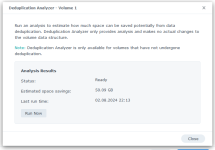
After more than five hours analysis this is the result:

analysis.PNG

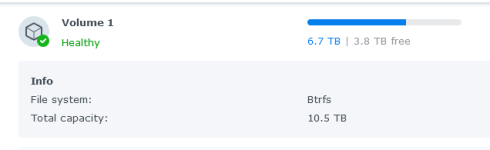
On a 10 TB volume filled with 6,7 TB:

volume.PNG

So in my case, I think it's not really worth it... ;)
 

Additional post fields


Kaffeautomat

Wenn du das Forum hilfreich findest oder uns unterstützen möchtest, dann gib uns doch einfach einen Kaffee aus.

Als Dankeschön schalten wir deinen Account werbefrei.

:coffee:

Hier gehts zum Kaffeeautomat