

Surveillance Station Probleme mit Mac Java Version
- Ersteller DannyCAM
- Erstellt am
-
Ab sofort steht euch hier im Forum die neue Add-on Verwaltung zur Verfügung – eine zentrale Plattform für alles rund um Erweiterungen und Add-ons für den DSM.
Damit haben wir einen Ort, an dem Lösungen von Nutzern mit der Community geteilt werden können. Über die Team Funktion können Projekte auch gemeinsam gepflegt werden.
Was die Add-on Verwaltung kann und wie es funktioniert findet Ihr hier
Du verwendest einen veralteten Browser. Es ist möglich, dass diese oder andere Websites nicht korrekt angezeigt werden.
Du solltest ein Upgrade durchführen oder einen alternativen Browser verwenden.
Du solltest ein Upgrade durchführen oder einen alternativen Browser verwenden.
- Status
- Für weitere Antworten geschlossen.

Soeben folgende Antwort vom Support erhalten,
Hi ,
Thank you for the update.
Please upgrade your SS to the latest version (6.0-2383) and check the help on the top right coner of the window to see details.
Hope this helps.
--
Sincerely,
Hi ,
Thank you for the update.
Please upgrade your SS to the latest version (6.0-2383) and check the help on the top right coner of the window to see details.
Hope this helps.
--
Sincerely,
Cavekeeper
Benutzer
- Registriert
- 08. Okt. 2008
- Beiträge
- 142
- Reaktionspunkte
- 6
- Punkte
- 18
Update auf 6.0-2383 und Java 7.11
Das gleiche bei mir: "Java-Applet Laufzeitfehler"
Keine Ahnung, ob man hier noch was besonderes einstellen muss....
Das gleiche bei mir: "Java-Applet Laufzeitfehler"
Keine Ahnung, ob man hier noch was besonderes einstellen muss....
Dit werkte bij mij:
First off, you must log in as an adminstrator.
Note: If prompted for your administrator password after a command, enter it and then press the Return or Enter key.
Go to Applications > Utilities and then open Terminal. Enter the following command, and press the Return or Enter key:
sudo mkdir -p /Library/Internet\ Plug-Ins/disabled
Enter the following command, and press the Return or Enter key:
sudo mv /Library/Internet\ Plug-Ins/JavaAppletPlugin.plugin /Library/Internet\ Plug-Ins/disabled
Enter the following command, and press the Return or Enter key:
sudo ln -sf /System/Library/Java/Support/Deploy.bundle/Contents/Resources/JavaPlugin2_NPAPI.plugin /Library/Internet\ Plug-Ins/JavaAppletPlugin.plugin
First off, you must log in as an adminstrator.
Note: If prompted for your administrator password after a command, enter it and then press the Return or Enter key.
Go to Applications > Utilities and then open Terminal. Enter the following command, and press the Return or Enter key:
sudo mkdir -p /Library/Internet\ Plug-Ins/disabled
Enter the following command, and press the Return or Enter key:
sudo mv /Library/Internet\ Plug-Ins/JavaAppletPlugin.plugin /Library/Internet\ Plug-Ins/disabled
Enter the following command, and press the Return or Enter key:
sudo ln -sf /System/Library/Java/Support/Deploy.bundle/Contents/Resources/JavaPlugin2_NPAPI.plugin /Library/Internet\ Plug-Ins/JavaAppletPlugin.plugin
Cavekeeper
Benutzer
- Registriert
- 08. Okt. 2008
- Beiträge
- 142
- Reaktionspunkte
- 6
- Punkte
- 18
Daumen hoch, es geht jetzt. Aber wer soll denn auf so was kommen?
Das ist aber doch keine Vorgehensweise für Otto-normal user.
Läuft da was bei Synology oder bei Java auf dem MAC nicht vernünftig?
Das ist aber doch keine Vorgehensweise für Otto-normal user.
Läuft da was bei Synology oder bei Java auf dem MAC nicht vernünftig?
Applehorsti
Benutzer
- Registriert
- 14. Feb. 2008
- Beiträge
- 27
- Reaktionspunkte
- 0
- Punkte
- 1
Thank you very much for this hint, works as it should !
But this is really really poor from synology that they offer us an update wich is defently not working without more modifications. I do not understand what they are doing here, this is not OK for my.
Thanks again to you for your help !
Regards,
Horst
But this is really really poor from synology that they offer us an update wich is defently not working without more modifications. I do not understand what they are doing here, this is not OK for my.
Thanks again to you for your help !
Regards,
Horst
Dit werkte bij mij:
First off, you must log in as an adminstrator.
Note: If prompted for your administrator password after a command, enter it and then press the Return or Enter key.
Go to Applications > Utilities and then open Terminal. Enter the following command, and press the Return or Enter key:
sudo mkdir -p /Library/Internet\ Plug-Ins/disabled
Enter the following command, and press the Return or Enter key:
sudo mv /Library/Internet\ Plug-Ins/JavaAppletPlugin.plugin /Library/Internet\ Plug-Ins/disabled
Enter the following command, and press the Return or Enter key:
sudo ln -sf /System/Library/Java/Support/Deploy.bundle/Contents/Resources/JavaPlugin2_NPAPI.plugin /Library/Internet\ Plug-Ins/JavaAppletPlugin.plugin
preussnerk
Benutzer
- Registriert
- 17. Aug. 2011
- Beiträge
- 11
- Reaktionspunkte
- 1
- Punkte
- 3
...Daaaanke !!!
Ich kann bestätigen, daß es mit Obelisks Terminalbefehlen funktioniert.
Ich bin auf Synologys Lösung gespannt.
Jetzt muß nur noch der CloudStation Client mit Little Snitch funktionieren.... Das ist mein aktuelles Problem
Ich kann bestätigen, daß es mit Obelisks Terminalbefehlen funktioniert.
Ich bin auf Synologys Lösung gespannt.
Jetzt muß nur noch der CloudStation Client mit Little Snitch funktionieren.... Das ist mein aktuelles Problem
Cavekeeper
Benutzer
- Registriert
- 08. Okt. 2008
- Beiträge
- 142
- Reaktionspunkte
- 6
- Punkte
- 18
...leider funktioniert die Lösung auf einem anderen Mac wiederum nicht. Ich erhalte bei der Terminal-Eingabe der 2. Befehlszeile "sudo mv /Library/Internet\ Plug-Ins/JavaAppletPlugin.plugin /Library/Internet\ Plug-Ins/disabled" abschließend die Meldung "Not a directory". Natürlich lautet die Surveillance Meldung dann wieder: "Java-Applet Laufzeitfehler".
Hat da einer eine Idee?
Hat da einer eine Idee?
Cavekeeper
Benutzer
- Registriert
- 08. Okt. 2008
- Beiträge
- 142
- Reaktionspunkte
- 6
- Punkte
- 18
Cavekeeper
Benutzer
- Registriert
- 08. Okt. 2008
- Beiträge
- 142
- Reaktionspunkte
- 6
- Punkte
- 18
Nach einigem probieren, habe ich es nun so gelöst.
Offensichtlich arbeitet das Surveillance Paket nicht mit Java 7 zusammen.
Wenn man also kein Java 6 hat und gleich mit Java 7 anfängt, funktioniert es nicht.
1. Java 6 besorgen und installieren.
2. Dann mit Java 7 überbügeln.
3. Terminal Eingabe:
sudo mkdir -p /Library/Internet\ Plug-Ins/disabled
sudo mv /Library/Internet\ Plug-Ins/JavaAppletPlugin.plugin /Library/Internet\ Plug-Ins/disabled
sudo ln -sf /System/Library/Java/Support/Deploy.bundle/Contents/Resources/JavaPlugin2_NPAPI.plugin /Library/Internet\ Plug-Ins/JavaAppletPlugin.plugin
Wer die beiden Java Versionen sucht, wird hier fündig.
Offensichtlich arbeitet das Surveillance Paket nicht mit Java 7 zusammen.
Wenn man also kein Java 6 hat und gleich mit Java 7 anfängt, funktioniert es nicht.
1. Java 6 besorgen und installieren.
2. Dann mit Java 7 überbügeln.
3. Terminal Eingabe:
sudo mkdir -p /Library/Internet\ Plug-Ins/disabled
sudo mv /Library/Internet\ Plug-Ins/JavaAppletPlugin.plugin /Library/Internet\ Plug-Ins/disabled
sudo ln -sf /System/Library/Java/Support/Deploy.bundle/Contents/Resources/JavaPlugin2_NPAPI.plugin /Library/Internet\ Plug-Ins/JavaAppletPlugin.plugin
Wer die beiden Java Versionen sucht, wird hier fündig.

wellenreiter48
Benutzer
- Registriert
- 08. Juni 2012
- Beiträge
- 41
- Reaktionspunkte
- 2
- Punkte
- 14
So nun läuft es bei mir. Ich habe die Java 7.11 deinstalliert und die Version Java for OS X 2012-006 wieder neu installiert. Dann bin ich wie folgt vorgegangen und siehe da, es läuft perfekt:
For Mac Safari:
Make sure your Mac OS X is updated to version 10.6 or onward and Safari is updated to version 5.1 or onward.
Go to Apple menu > Software Update and check for any possible Java updates to make sure your Java applet is up-to-date.
Note:
For users without Java for OS X 2012-006 upgrade patch, please go to Applications > Utilities, and then open Java Preferences to do the following:
On the list of Java applications, make sure the version of Java SE is 1.6.0_26 or onward (excluding 1.7.x).
Please make sure 64-bit version of Java SE is on top of the application list (above 32-bit).
If you are using Mac OS X 10.7 or onward, tick Enable applet plug-in and Web Start applications.
If you encountered compatibility issues with Java applet version, the cause may be the Java for OS X 2012-006 upgrade.
Please visit Apple Support, and rollback your Java applet version to 1.6.
Or, you can execute the following commands:
First off, you must log in as an adminstrator.
Note: If prompted for your administrator password after a command, enter it and then press the Return or Enter key.
Go to Applications > Utilities and then open Terminal. Enter the following command, and press the Return or Enter key:
sudo mkdir -p /Library/Internet\ Plug-Ins/disabled
Enter the following command, and press the Return or Enter key:
sudo mv /Library/Internet\ Plug-Ins/JavaAppletPlugin.plugin /Library/Internet\ Plug-Ins/disabled
Enter the following command, and press the Return or Enter key:
sudo ln -sf /System/Library/Java/Support/Deploy.bundle/Contents/Resources/JavaPlugin2_NPAPI.plugin /Library/Internet\ Plug-Ins/JavaAppletPlugin.plugin
Gruß, Wellenreiter 48
For Mac Safari:
Make sure your Mac OS X is updated to version 10.6 or onward and Safari is updated to version 5.1 or onward.
Go to Apple menu > Software Update and check for any possible Java updates to make sure your Java applet is up-to-date.
Note:
For users without Java for OS X 2012-006 upgrade patch, please go to Applications > Utilities, and then open Java Preferences to do the following:
On the list of Java applications, make sure the version of Java SE is 1.6.0_26 or onward (excluding 1.7.x).
Please make sure 64-bit version of Java SE is on top of the application list (above 32-bit).
If you are using Mac OS X 10.7 or onward, tick Enable applet plug-in and Web Start applications.
If you encountered compatibility issues with Java applet version, the cause may be the Java for OS X 2012-006 upgrade.
Please visit Apple Support, and rollback your Java applet version to 1.6.
Or, you can execute the following commands:
First off, you must log in as an adminstrator.
Note: If prompted for your administrator password after a command, enter it and then press the Return or Enter key.
Go to Applications > Utilities and then open Terminal. Enter the following command, and press the Return or Enter key:
sudo mkdir -p /Library/Internet\ Plug-Ins/disabled
Enter the following command, and press the Return or Enter key:
sudo mv /Library/Internet\ Plug-Ins/JavaAppletPlugin.plugin /Library/Internet\ Plug-Ins/disabled
Enter the following command, and press the Return or Enter key:
sudo ln -sf /System/Library/Java/Support/Deploy.bundle/Contents/Resources/JavaPlugin2_NPAPI.plugin /Library/Internet\ Plug-Ins/JavaAppletPlugin.plugin
Gruß, Wellenreiter 48
@ Cavekeeper
Hallo,
vielen Dank für die Anleitung. Ich habe sie, zumindest glaube ich dies, genau befolgt und Safari auch neu gestartet. Leider ohne Erfolg. Bekomme immer noch die Meldung Laufzeitfehler.....
Unter /User/synology/Java etc. Habe ich als Version 1.4.311.2332 ist dies korrekt?, oder wo könnte mein Fehler noch liegen?
Vielen Dank im Voraus
Hallo,
vielen Dank für die Anleitung. Ich habe sie, zumindest glaube ich dies, genau befolgt und Safari auch neu gestartet. Leider ohne Erfolg. Bekomme immer noch die Meldung Laufzeitfehler.....
Unter /User/synology/Java etc. Habe ich als Version 1.4.311.2332 ist dies korrekt?, oder wo könnte mein Fehler noch liegen?
Vielen Dank im Voraus
@ rmjspa
Hallo,
Es kommt vor allem drauf dass die richtige Java Version also Java SE6 wieder auf deinem Mac läuft, wie es nach der Anleitung eigentlich sein sollte.
Du kannst das einfach hier testen http://www.java.com/de/download/testjava.jsp
Unter dem Download Knopf ist der link zum Testen welche Version installiert ist, bei mir sieht das so aus.
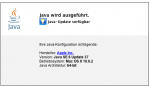
Hallo,
Es kommt vor allem drauf dass die richtige Java Version also Java SE6 wieder auf deinem Mac läuft, wie es nach der Anleitung eigentlich sein sollte.
Du kannst das einfach hier testen http://www.java.com/de/download/testjava.jsp
Unter dem Download Knopf ist der link zum Testen welche Version installiert ist, bei mir sieht das so aus.
Danke für die schnelle Antwort.
Bei mir steht da: Java SE7 Update 11 OSX 10.7.5 64Bit
Vermutlich habe ich dann Fehler bei den Terminalbefehlen gemacht, bin da auch nicht so bewandert.
Werde jetzt zum Aufruf der Cam Webseite als Browser google chrome verwenden, da geht es nämlich.
Wenn ich ein rollback durchführe, befürchte ich, dass vielleicht andere Seiten / Applikationen auch wieder meckern, dass nicht die neuseste Version installiert ist. Hatte ich vor einigen Tagen erst.
Bei mir steht da: Java SE7 Update 11 OSX 10.7.5 64Bit
Vermutlich habe ich dann Fehler bei den Terminalbefehlen gemacht, bin da auch nicht so bewandert.
Werde jetzt zum Aufruf der Cam Webseite als Browser google chrome verwenden, da geht es nämlich.
Wenn ich ein rollback durchführe, befürchte ich, dass vielleicht andere Seiten / Applikationen auch wieder meckern, dass nicht die neuseste Version installiert ist. Hatte ich vor einigen Tagen erst.
sconsulting
Benutzer
- Registriert
- 01. Feb. 2013
- Beiträge
- 6
- Reaktionspunkte
- 0
- Punkte
- 1
So nun läuft es bei mir. Ich habe die Java 7.11 deinstalliert und die Version Java for OS X 2012-006 wieder neu installiert. Dann bin ich wie folgt vorgegangen und siehe da, es läuft perfekt:
For Mac Safari:
Make sure your Mac OS X is updated to version 10.6 or onward and Safari is updated to version 5.1 or onward.
Go to Apple menu > Software Update and check for any possible Java updates to make sure your Java applet is up-to-date.
Note:
For users without Java for OS X 2012-006 upgrade patch, please go to Applications > Utilities, and then open Java Preferences to do the following:
On the list of Java applications, make sure the version of Java SE is 1.6.0_26 or onward (excluding 1.7.x).
Please make sure 64-bit version of Java SE is on top of the application list (above 32-bit).
If you are using Mac OS X 10.7 or onward, tick Enable applet plug-in and Web Start applications.
If you encountered compatibility issues with Java applet version, the cause may be the Java for OS X 2012-006 upgrade.
Please visit Apple Support, and rollback your Java applet version to 1.6.
Or, you can execute the following commands:
First off, you must log in as an adminstrator.
Note: If prompted for your administrator password after a command, enter it and then press the Return or Enter key.
Go to Applications > Utilities and then open Terminal. Enter the following command, and press the Return or Enter key:
sudo mkdir -p /Library/Internet\ Plug-Ins/disabled
Enter the following command, and press the Return or Enter key:
sudo mv /Library/Internet\ Plug-Ins/JavaAppletPlugin.plugin /Library/Internet\ Plug-Ins/disabled
Enter the following command, and press the Return or Enter key:
sudo ln -sf /System/Library/Java/Support/Deploy.bundle/Contents/Resources/JavaPlugin2_NPAPI.plugin /Library/Internet\ Plug-Ins/JavaAppletPlugin.plugin
Gruß, Wellenreiter 48
Ich habe diese Instruktionen genau so befolgt, leider erscheint dann auf der Java-Testseite nur ein weisses Feld anstatt dem Applet und die SurveillanceStation funktioniert auch nicht. Ich verwende Mac OSX 10.8.2. Auf welche Weise hast Du Java 7.11 deinstalliert?
Bei mir geht es nun auch nicht mehr, Apple hat Java "ausgesperrt". http://www.mactechnews.de/news/arti...-in-Browser-mithilfe-von-XProtect-154978.html
sconsulting
Benutzer
- Registriert
- 01. Feb. 2013
- Beiträge
- 6
- Reaktionspunkte
- 0
- Punkte
- 1
Bei mir geht es nun auch nicht mehr, Apple hat Java "ausgesperrt". http://www.mactechnews.de/news/arti...-in-Browser-mithilfe-von-XProtect-154978.html
Dies müsste sich eigentlich wie folgt umgehen lassen:
1. Terminal öffnen
2.
Rich (BBCode):
sudo nano /System/Library/CoreServices/CoreTypes.bundle/Contents/Resources/XProtect.meta.plist2.
Rich (BBCode):
<string>1.6.0_37-b06-434</string>Quelle: http://apple.stackexchange.com/ques...ircumvent-xprotect-and-re-enable-java-applets
Hat bei mir allerdings nix gebracht...
- Status
- Für weitere Antworten geschlossen.

Kaffeautomat
Wenn du das Forum hilfreich findest oder uns unterstützen möchtest, dann gib uns doch einfach einen Kaffee aus.
Als Dankeschön schalten wir deinen Account werbefrei.




