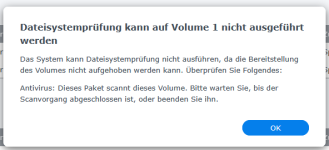
Dateisystemfehler auf Volume 1 aufgetreten

  • Ab sofort steht euch hier im Forum die neue Add-on Verwaltung zur Verfügung – eine zentrale Plattform für alles rund um Erweiterungen und Add-ons für den DSM.

    Damit haben wir einen Ort, an dem Lösungen von Nutzern mit der Community geteilt werden können. Über die Team Funktion können Projekte auch gemeinsam gepflegt werden.

    Was die Add-on Verwaltung kann und wie es funktioniert findet Ihr hier

    Hier geht es zu den Add-ons

chrisschl

Benutzer
Registriert
08. Jan. 2020
Beiträge
26
Reaktionspunkte
2
Punkte
3
Hallo,

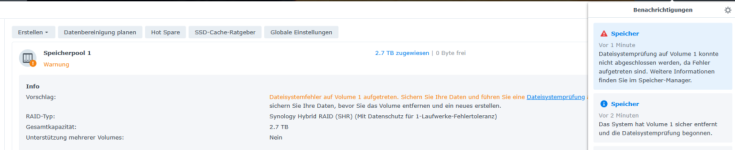
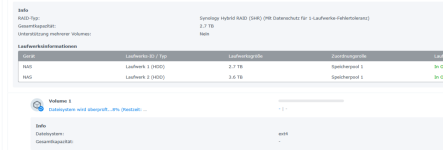
Habe seit ca 1 Woche folgenden Fehler und kann ihn nicht beheben. Wenn ich die Dateisystemprüfung starte bricht er nach ca 10 % ab.

1768979060429.png
1768979047130.png


Die Beiden Platten zeigen aber keinen Fehler an . Alles ok. Hat jemand eine Idee wie ich den Fehler beheben kann. Leider funktioniert seit diesem Fehler auch das HyperBackup nicht mehr.
 
=== START OF READ SMART DATA SECTION ===
SMART Attributes Data Structure revision number: 10
Vendor Specific SMART Attributes with Thresholds:
ID# ATTRIBUTE_NAME FLAG VA LUE WORST THRESH TYPE UPDATED WHEN_FAILED RAW_VALUE
1 Raw_Read_Error_Rate 0x000f 11 8 099 006 Pre-fail Always - 180559552
3 Spin_Up_Time 0x0003 09 3 093 000 Pre-fail Always - 0
4 Start_Stop_Count 0x0032 10 0 100 020 Old_age Always - 67
5 Reallocated_Sector_Ct 0x0033 10 0 100 010 Pre-fail Always - 0
7 Seek_Error_Rate 0x000f 08 4 060 030 Pre-fail Always - 274642124
9 Power_On_Hours 0x0032 04 0 040 000 Old_age Always - 52950
10 Spin_Retry_Count 0x0013 10 0 100 097 Pre-fail Always - 0
12 Power_Cycle_Count 0x0032 10 0 100 020 Old_age Always - 56
184 End-to-End_Error 0x0032 10 0 100 099 Old_age Always - 0
187 Reported_Uncorrect 0x0032 08 2 082 000 Old_age Always - 18
188 Command_Timeout 0x0032 10 0 100 000 Old_age Always - 0 0 0
189 High_Fly_Writes 0x003a 00 1 001 000 Old_age Always - 151
190 Airflow_Temperature_Cel 0x0022 07 0 064 045 Old_age Always - 30 (Min/Max 29/30)
191 G-Sense_Error_Rate 0x0032 10 0 100 000 Old_age Always - 0
192 Power-Off_Retract_Count 0x0032 10 0 100 000 Old_age Always - 27
193 Load_Cycle_Count 0x0032 10 0 100 000 Old_age Always - 207
194 Temperature_Celsius 0x0022 03 0 040 000 Old_age Always - 30 (0 23 0 0 0)
197 Current_Pending_Sector 0x0012 10 0 100 000 Old_age Always - 0
198 Offline_Uncorrectable 0x0010 10 0 100 000 Old_age Offline - 0
199 UDMA_CRC_Error_Count 0x003e 20 0 200 000 Old_age Always - 0

 
Bis auf ID 187 sehe ich ersteinmal nichts. Allerdings habe ich da ID1 und ID7 noch nicht umgerechnet.
 
ID 1 und 7 sind sauber. ID187 kann zu Dateisystemfehlern führen.
Hast du Antivirus gestoppt und die Reparatur erneut versucht?
 
ich kann es starten. und er kann das Volume 1 sicher entfernen. aber er bricht bei 10 % ab .
Dateisystemprüfung auf Volume 1 konnte nicht abgeschlossen werden, da Fehler aufgetreten sind. Weitere Informationen finden Sie im Speicher-Manager.

was könnte ich noch machen
 
Du hast bisher nur die SMART Werte für eine HDD gepostet, was ist mit der zweiten?
 
ich hab die Werte mit dem befehl smarctl -iA -d sat /dev/sda ausgelsesen ich dachte das ist alles ?. was muss ich da ändern um auch die Anderen Werte auszulesen ?. muss ich smarctl -iA -d sat /dev/sda1 schreiben ?.
 
smarctl -iA -d sat /dev/sdb
Edit: Steht auch so in der Anleitung :cool:
 
ok wenn ist das ausführe bekomme ich folgende info.

sudo smartctl -iA -d sat /dev/sda
Password:
smartctl 6.5 (build date Sep 26 2022) [x86_64-linux-4.4.302+] (local build)
Copyright (C) 2002-16, Bruce Allen, Christian Franke, www.smartmontools.org

=== START OF INFORMATION SECTION ===
Model Family: Seagate IronWolf
Device Model: ST3000VN007-2E4166
Serial Number: Z7309Z7V
LU WWN Device Id: 5 000c50 0a5f154d7
Firmware Version: SC60
User Capacity: 3,000,592,982,016 bytes [3.00 TB]
Sector Sizes: 512 bytes logical, 4096 bytes physical
Rotation Rate: 5900 rpm
Form Factor: 3.5 inches
Device is: In smartctl database [for details use: -P show]
ATA Version is: ACS-2, ACS-3 T13/2161-D revision 3b
SATA Version is: SATA 3.1, 6.0 Gb/s (current: 6.0 Gb/s)
Local Time is: Wed Jan 21 13:07:45 2026 CET
SMART support is: Available - device has SMART capability.
SMART support is: Enabled

=== START OF READ SMART DATA SECTION ===
SMART Attributes Data Structure revision number: 10
Vendor Specific SMART Attributes with Thresholds:
ID# ATTRIBUTE_NAME FLAG VA LUE WORST THRESH TYPE UPDATED WHEN_FAILED RAW_VALUE
1 Raw_Read_Error_Rate 0x000f 11 8 099 006 Pre-fail Always - 186399000
3 Spin_Up_Time 0x0003 09 3 093 000 Pre-fail Always - 0
4 Start_Stop_Count 0x0032 10 0 100 020 Old_age Always - 67
5 Reallocated_Sector_Ct 0x0033 10 0 100 010 Pre-fail Always - 0
7 Seek_Error_Rate 0x000f 08 4 060 030 Pre-fail Always - 274673337
9 Power_On_Hours 0x0032 04 0 040 000 Old_age Always - 52953
10 Spin_Retry_Count 0x0013 10 0 100 097 Pre-fail Always - 0
12 Power_Cycle_Count 0x0032 10 0 100 020 Old_age Always - 56
184 End-to-End_Error 0x0032 10 0 100 099 Old_age Always - 0
187 Reported_Uncorrect 0x0032 08 2 082 000 Old_age Always - 18
188 Command_Timeout 0x0032 10 0 100 000 Old_age Always - 0 0 0
189 High_Fly_Writes 0x003a 00 1 001 000 Old_age Always - 151
190 Airflow_Temperature_Cel 0x0022 07 0 064 045 Old_age Always - 30 (Min/Max 29/31)
191 G-Sense_Error_Rate 0x0032 10 0 100 000 Old_age Always - 0
192 Power-Off_Retract_Count 0x0032 10 0 100 000 Old_age Always - 27
193 Load_Cycle_Count 0x0032 10 0 100 000 Old_age Always - 207
194 Temperature_Celsius 0x0022 03 0 040 000 Old_age Always - 30 (0 23 0 0 0)
197 Current_Pending_Sector 0x0012 10 0 100 000 Old_age Always - 0
198 Offline_Uncorrectable 0x0010 10 0 100 000 Old_age Offline - 0
199 UDMA_CRC_Error_Count 0x003e 20 0 200 000 Old_age Always - 0

 

Additional post fields


Kaffeautomat

Wenn du das Forum hilfreich findest oder uns unterstützen möchtest, dann gib uns doch einfach einen Kaffee aus.

Als Dankeschön schalten wir deinen Account werbefrei.

:coffee:

Hier gehts zum Kaffeeautomat