VirtualBox auf der DS

  • Ab sofort steht euch hier im Forum die neue Add-on Verwaltung zur Verfügung – eine zentrale Plattform für alles rund um Erweiterungen und Add-ons für den DSM.

    Damit haben wir einen Ort, an dem Lösungen von Nutzern mit der Community geteilt werden können. Über die Team Funktion können Projekte auch gemeinsam gepflegt werden.

    Was die Add-on Verwaltung kann und wie es funktioniert findet Ihr hier

    Hier geht es zu den Add-ons

Status
Für weitere Antworten geschlossen.
sorry form my english but if Im typ german it will be worse.
But is there any progress on dsm 6.0.1 or what is the reason that virtualbox not works on the latest version??
How difficult is it to downgrade dsm to 6.0 ???
 
@tweakertje - you can consult the english forum at forum.synology.com as well. I guess you will get the same info.
the reason for a missing phpVirtualbox port for DSM 6.0.1 is that Synology has changed something in the kernel(modules). Without them releasing the sources for DSM 6.x it is not possible to update the package accordingly. So in this case Synology is the only one responsible that there currently is no working version for 6.0.1
 
Virtualbox wird eher nicht im hochprofessionelen Umfelde zum Virtualiseren genutzt.

Da sind VMWare, und Win Server gemeint und die verwenden teils eigene Protokolle um direkt auf den Speicher der DS zuzugreifen und zu Managen...
Sorry das sagen zu müssen, aber jetzt stehst du auf der Leitung. Wen professionell virtualisiert wird dann am ehesten mit dem bare-metal Hypervisor Xen oder Proxmox VE auf Linux oder BSD. Ein MS Server sollte wirklich nur noch eingesetzt wen man ihn lokal einsetzen möchte, und oder die notwendige Fachkompetenz für etwas grösseres fehlt. Alles andre ist längst nichtmer Professionell. Davon abgesehen ist so ein Typ-2 Hypervisor -wie das KVM, Quemu, VB, Parallels ect auch sind- manchmal auch gar nicht so verkehrt, und mancherorts gut und gerne besser eingesetzt als ein teurer ESX/ESXi auf MS.
 
Sorry Bordi ich hab ein Wort vergessen ;)

Virtualbox wird eher nicht im hochprofessionelen Umfelde zum Virtualiseren genutzt.
Da sind wir uns ja einig das das nicht als hochprofessionell anzusehn ist ;)

Da sind *eher* VMWare, und Win Server gemeint und die verwenden teils eigene Protokolle um direkt auf den Speicher der DS zuzugreifen und zu Managen...
In beim Schreiben hatte ich da auch XEN und Proxmox drinnen, hab sie aber nicht doch angeführt das diese nicht die "speziellen Protokolle" benutzen die Synology groß als "Virtualsierung" bewirbt.
Bei VMWARE "iSCSI VAAI" und bei Windows "ODX"
https://www.synology.com/de-de/dsm/6.0/iSCSI_virtualization

Alles wieder gut? ;)

Das war wieder ein weiter Ausflug abseits vom Thema, gefühlte 10 Seiten die uns da rednag beschert hat :D
 
..
Alles wieder gut? ;) ..
Deiner Meinung bin ich nur in Bezug auf den Ausflug, deine Ansichten was Professionell oder Hochprofessionell ist kann ich jedoch nicht teilen. Ansonsten, ja klar peace. Wer Krieg will soll in ein IS Forum (ups, zuviel?)
 
Das war wieder ein weiter Ausflug abseits vom Thema, gefühlte 10 Seiten die uns da rednag beschert hat :D

Der Seitenhieb mußte jetzt wohl sein was ;)

Aber Jungs, sonst wäre es doch nur langweilig geworden. Seien wir ehrlich. Jeder drückt gefühlt alle 2 Min auf "Aktualsieren" im Browser und hofft auf einen neuen Beitrag...:cool:
 
rednag macht das gemessen alle 2 Sec! :D:D :p hehehe

Bordi lernt es auch nie.... :rolleyes: ich glaub er braucht wieder 2 Wochen "Urlaub" ;)
 
Schreibt ihr mal ruhig, dann gibt es bald für alle Urlaub :eek:
 
Heute ist Freitag, rednag drückt nur noch alle 3 Sec F5! :p:p abzüglich der Polling Rate des Keyboards.... :D
 
krass! Oracle scheint es eilig zu haben! vBox 5.1.2 ist erschienen! :rolleyes::eek:
 
Wäre schön, wenn Synology auch mal aus dem Arsch kommt ......
 
Oracle scheint es eilig zu haben! vBox 5.1.2 ist erschienen!
Ist aber auch nicht unbedingt eine Gütezeichen. Bei so vielen Bugfixexs gehts wohl mehr um Imagepflege.
https://www.virtualbox.org/wiki/Changelog#v2


schön, wenn Synology auch mal aus dem Arsch kommt ......
Haha, je die Frage ist bloss: Aus wessen? :o

PS: Lasst sich irgendwo RTFM verlinken. ..um kapitel 5-10 etwas besser ins Forum zu bekommen. ;) :p

https://www.virtualbox.org/manual/UserManual.html
 
Zuletzt bearbeitet:
Hallo zusammen,

besteht denn die Möglichkeit die VirtualBox auch auf der DS216J zu installieren.

Für Rückmeldungen wäre ich sehr dankbar.

Grüße
nGb4gNb
 
Nein. Falsche CPU.
 
@ nGb4gNb: Andi hat recht.
 
Sorry das sagen zu müssen, aber jetzt stehst du auf der Leitung. Wen professionell virtualisiert wird dann am ehesten mit dem bare-metal Hypervisor Xen oder Proxmox VE auf Linux oder BSD. Ein MS Server sollte wirklich nur noch eingesetzt wen man ihn lokal einsetzen möchte, und oder die notwendige Fachkompetenz für etwas grösseres fehlt. Alles andre ist längst nichtmer Professionell. Davon abgesehen ist so ein Typ-2 Hypervisor -wie das KVM, Quemu, VB, Parallels ect auch sind- manchmal auch gar nicht so verkehrt, und mancherorts gut und gerne besser eingesetzt als ein teurer ESX/ESXi auf MS.

Öhm. What?!?^^

Aber bevor es zur Diskussion hier kommt, sparen wir uns das.
VMware vSphere (inkl. ESXi) und Microsoft Hyper-V sind glasklare Marktführer. Und werden beide als Typ1-Hypervisoren anerkannt.

Quellen:
https://www.gartner.com/doc/reprints?id=1-2JGMVZX&ct=150715&st=sb
https://en.wikipedia.org/wiki/Hypervisor#Classification

Ich selbst administriere beruflich 6x ESXi und 2x Hyper-V - jeweils im Cluster.
 
Zuletzt bearbeitet:
Guten Tag

Entschuldigen Sie mich bitte, aber ich spreche kein Deutsch, doch ich brauche Hilfe.

I have DS1813+ with DSM 5.2-5967 and VirtualBox version 5.0.22-108108-2

I have installed Ubuntu 14.04.4 32-bit PC (i386) server version without problems.
After installation is Network in VirtualBox set by default to NAT (and working), but I need Bridged Adapter and here my problems starts.

With NAT ubuntu can obtain IP v4 address and can normaly access internet without problems, but with Bridged Adapter Ubuntu always waits for network configuration and than booting system without full network configuration! Ubuntu does not have IP v4 address and I cant access internet or connect to it from local network :(

I googled out that this can be solved by VirtualBox Guest Additions...

so I installed in Ubuntu VBoxGuestAdditions 5.0.22 like this:

sudo apt-get update
sudo apt-get upgrade
sudo apt-get install build-essential module-assistant
sudo m-a prepare


(mounted the VBoxGuestAdditions_5.0.22.iso in VirtualBox)

sudo blkid
sudo mount /dev/sr0 /media/cdrom/
sudo /media/cdrom/VBoxLinuxAdditions.run


But after I reboot, the network with Bridged Adapter still doesnt work :(

According to Richard I also updated VirtualBox with Oracle_VM_VirtualBox_Extension_Pack-5.0.22-108108.vbox-extpack. But result is still same: with Bridged Adapter is ubuntu still booting system without full network configuration = no network!

Any ideas what I do wrong or what I have to do? Can you help me please?

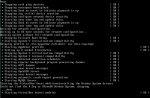
screenshot.86+.jpg

screenshot.87+.jpg
 
Zuletzt bearbeitet:
Can you please post you network settings within virtualbox as well as the contents of /etc/network/interfaces please?
 
Of course...

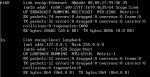
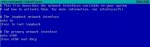
The contents of /etc/network/interfaces:
screenshot.89+.jpg

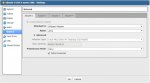
My network settings within virtualbox for ubuntu (Adapter 2, 3 and 4 is disabled):
screenshot.90+.jpg

Also I would like to point out that virtualbox says that is unable to retrieve guest properties:
screenshot.91+.jpg


More info about DS1813+:
DS1813+ is behind Two routers. First router handle eth0, eth1, eth2. Second router handle eth3. Both routers run DHCP. But DS1813+ have pre-set static IPs for its ethernets .


BTW: Unfortunately I wont be able to try anything next 3 days (Im going on 3day trip, so I wont be online till Tuesday).
 
Zuletzt bearbeitet:
Status
Für weitere Antworten geschlossen.
 

Kaffeautomat

Wenn du das Forum hilfreich findest oder uns unterstützen möchtest, dann gib uns doch einfach einen Kaffee aus.

Als Dankeschön schalten wir deinen Account werbefrei.

:coffee:

Hier gehts zum Kaffeeautomat