

Hallo zusammen, wahrscheinlich dumme Frage, bin kein Netzwerk Fachmann brauche Hinweis von Gurus.
Konfig:
Vodafone Kabel mit Fritz 6490 (DS-Light) verbunden als Router direkt an Kabelanschluss ( Standartfall) mit interne IP 192.168.0.1.
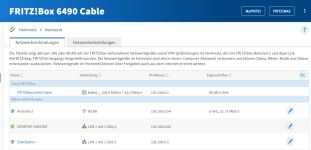
DS214 mit feste IP 192.168.0.5 Fritz 6490(192.168.0.1) als Standard Gateway und DNS , IPV6 disabled, keine weitere Interfaces, keine zusätzliche Routes usw.
root@DS-214:~# ip a
1: lo: <LOOPBACK,UP,LOWER_UP> mtu 16436 qdisc noqueue state UNKNOWN
link/loopback 00:00:00:00:00:00 brd 00:00:00:00:00:00
inet 127.0.0.1/8 scope host lo
inet6 ::1/128 scope host
valid_lft forever preferred_lft forever
2: eth0: <BROADCAST,MULTICAST,UP,LOWER_UP> mtu 1500 qdisc mq state UP qlen 532
link/ether 00:11:32:2a:3f:1e brd ff:ff:ff:ff:ff:ff
inet 192.168.0.5/24 brd 192.168.0.255 scope global eth0
3: sit0: <NOARP> mtu 1480 qdisc noop state DOWN
link/sit 0.0.0.0 brd 0.0.0.0
root@DS-214:~# route
Kernel IP routing table
Destination Gateway Genmask Flags Metric Ref Use Iface
default fritz.box 0.0.0.0 UG 0 0 0 eth0
192.168.0.0 0.0.0.0 255.255.255.0 U 0 0 0 eth0
root@DS-214:~# ip route
default via 192.168.0.1 dev eth0 src 192.168.0.5
192.168.0.0/24 dev eth0 proto kernel scope link src 192.168.0.5
root@DS-214:~#
Windows VM mit feste IP 192.168.0.66, DNS Fritz 6490(192.168.0.1), Gateway DS214(192.168.0.5) , IPV6 disabled, auch kein zusätzliche Spielerei da
Windows IP Configuration
Host Name . . . . . . . . . . . . : DESKTOP-10KFJOE
Primary Dns Suffix . . . . . . . :
Node Type . . . . . . . . . . . . : Hybrid
IP Routing Enabled. . . . . . . . : No
WINS Proxy Enabled. . . . . . . . : No
thernet adapter Ethernet0:
Connection-specific DNS Suffix . :
Description . . . . . . . . . . . : Intel(R) 82574L Gigabit Network Connection
Physical Address. . . . . . . . . : 00-0C-29-98-80-9C
DHCP Enabled. . . . . . . . . . . : No
Autoconfiguration Enabled . . . . : Yes
IPv4 Address. . . . . . . . . . . : 192.168.0.66(Preferred)
Subnet Mask . . . . . . . . . . . : 255.255.255.0
Default Gateway . . . . . . . . . : 192.168.0.5
DNS Servers . . . . . . . . . . . : 192.168.0.1
NetBIOS over Tcpip. . . . . . . . : Enabled
IPv4 Route Table
===========================================================================
Active Routes:
Network Destination Netmask Gateway Interface Metric
0.0.0.0 0.0.0.0 192.168.0.5 192.168.0.66 281
127.0.0.0 255.0.0.0 On-link 127.0.0.1 331
127.0.0.1 255.255.255.255 On-link 127.0.0.1 331
127.255.255.255 255.255.255.255 On-link 127.0.0.1 331
192.168.0.0 255.255.255.0 On-link 192.168.0.66 281
192.168.0.66 255.255.255.255 On-link 192.168.0.66 281
192.168.0.255 255.255.255.255 On-link 192.168.0.66 281
224.0.0.0 240.0.0.0 On-link 127.0.0.1 331
224.0.0.0 240.0.0.0 On-link 192.168.0.66 281
255.255.255.255 255.255.255.255 On-link 127.0.0.1 331
255.255.255.255 255.255.255.255 On-link 192.168.0.66 281
===========================================================================
Persistent Routes:
Network Address Netmask Gateway Address Metric
0.0.0.0 0.0.0.0 192.168.0.5 Default
===========================================================================
DS214 sieht Internet
root@DS-214:~# traceroute google.com
traceroute to google.com (142.250.181.174), 30 hops max, 60 byte packets
1 fritz.box (192.168.0.1) 0.327 ms 0.217 ms 0.285 ms
2 * * *
3 188.111.129.12 (188.111.129.12) 16.680 ms 92.79.214.94 (92.79.214.94) 16.692 ms 188.111.129.12 (188.111.129.12) 16.644 ms
4 145.254.2.195 (145.254.2.195) 18.886 ms 145.254.2.179 (145.254.2.179) 18.858 ms 145.254.2.207 (145.254.2.207) 18.832 ms
5 74.125.51.10 (74.125.51.10) 18.762 ms * 18.648 ms
6 * * *
7 142.250.213.212 (142.250.213.212) 17.918 ms 142.250.46.182 (142.250.46.182) 19.865 ms 142.250.214.194 (142.250.214.194) 17.557 ms
8 192.178.109.124 (192.178.109.124) 17.541 ms 142.250.238.130 (142.250.238.130) 21.254 ms 192.178.105.16 (192.178.105.16) 22.302 ms
9 209.85.240.113 (209.85.240.113) 21.195 ms 21.174 ms *
10 142.251.54.70 (142.251.54.70) 25.976 ms * *
11 192.178.109.236 (192.178.109.236) 26.551 ms 142.250.228.22 (142.250.228.22) 22.846 ms 27.570 ms
12 192.178.104.213 (192.178.104.213) 27.567 ms 26.599 ms 192.178.104.107 (192.178.104.107) 23.047 ms
13 142.251.235.177 (142.251.235.177) 25.129 ms 142.251.235.179 (142.251.235.179) 25.094 ms 142.251.235.177 (142.251.235.177) 24.774 ms
14 mct01s20-in-f14.1e100.net (142.250.181.174) 23.657 ms 23.600 ms 24.975 ms
VM kann sowohl Fritz als auch DS214 pingen, auch Weboberfläche von beiden in Browser öffnen.
C:\Windows\system32>ping 192.168.0.1
Pinging 192.168.0.1 with 32 bytes of data:
Reply from 192.168.0.1: bytes=32 time<1ms TTL=64
Reply from 192.168.0.1: bytes=32 time<1ms TTL=64
Reply from 192.168.0.1: bytes=32 time<1ms TTL=64
Reply from 192.168.0.1: bytes=32 time<1ms TTL=64
C:\Windows\system32>ping 192.168.0.5
Pinging 192.168.0.5 with 32 bytes of data:
Reply from 192.168.0.5: bytes=32 time<1ms TTL=64
Reply from 192.168.0.5: bytes=32 time<1ms TTL=64
Reply from 192.168.0.5: bytes=32 time<1ms TTL=64
Problem: VM sieht kein Internet (obwohl Icon in Windows Taskbar von VM zeigt „Internet Zugriff“)…
C:\Windows\system32>tracert google.com
Tracing route to google.com [142.250.181.174]
over a maximum of 30 hops:
1 * * * Request timed out.
2 * * * Request timed out.
3 * * * Request timed out.
4 * * * Request timed out.
5 * * * Request timed out.
6 * * * Request timed out.
7 * * * Request timed out.
8 * * * Request timed out.
9 * * * Request timed out.
10 * * * Request timed out.
Frage: was mache Ich falsch? Was zusätzlich sollte konfiguriert werden (bei VM oder DS214) um VM ins Internet durch DS214 bringen (192.168.0.66-> 192.168.0.5->192.168.0.1->draußen)?
Idee dahinter: später DS214 als Client an OpenVpn verbinden und VM durch diese Verbindung nach draußen lassen… Bisher leider auch ohne VPN nicht geklappt…
Danke
Konfig:
Vodafone Kabel mit Fritz 6490 (DS-Light) verbunden als Router direkt an Kabelanschluss ( Standartfall) mit interne IP 192.168.0.1.
DS214 mit feste IP 192.168.0.5 Fritz 6490(192.168.0.1) als Standard Gateway und DNS , IPV6 disabled, keine weitere Interfaces, keine zusätzliche Routes usw.
root@DS-214:~# ip a
1: lo: <LOOPBACK,UP,LOWER_UP> mtu 16436 qdisc noqueue state UNKNOWN
link/loopback 00:00:00:00:00:00 brd 00:00:00:00:00:00
inet 127.0.0.1/8 scope host lo
inet6 ::1/128 scope host
valid_lft forever preferred_lft forever
2: eth0: <BROADCAST,MULTICAST,UP,LOWER_UP> mtu 1500 qdisc mq state UP qlen 532
link/ether 00:11:32:2a:3f:1e brd ff:ff:ff:ff:ff:ff
inet 192.168.0.5/24 brd 192.168.0.255 scope global eth0
3: sit0: <NOARP> mtu 1480 qdisc noop state DOWN
link/sit 0.0.0.0 brd 0.0.0.0
root@DS-214:~# route
Kernel IP routing table
Destination Gateway Genmask Flags Metric Ref Use Iface
default fritz.box 0.0.0.0 UG 0 0 0 eth0
192.168.0.0 0.0.0.0 255.255.255.0 U 0 0 0 eth0
root@DS-214:~# ip route
default via 192.168.0.1 dev eth0 src 192.168.0.5
192.168.0.0/24 dev eth0 proto kernel scope link src 192.168.0.5
root@DS-214:~#
Windows VM mit feste IP 192.168.0.66, DNS Fritz 6490(192.168.0.1), Gateway DS214(192.168.0.5) , IPV6 disabled, auch kein zusätzliche Spielerei da
Windows IP Configuration
Host Name . . . . . . . . . . . . : DESKTOP-10KFJOE
Primary Dns Suffix . . . . . . . :
Node Type . . . . . . . . . . . . : Hybrid
IP Routing Enabled. . . . . . . . : No
WINS Proxy Enabled. . . . . . . . : No
thernet adapter Ethernet0:
Connection-specific DNS Suffix . :
Description . . . . . . . . . . . : Intel(R) 82574L Gigabit Network Connection
Physical Address. . . . . . . . . : 00-0C-29-98-80-9C
DHCP Enabled. . . . . . . . . . . : No
Autoconfiguration Enabled . . . . : Yes
IPv4 Address. . . . . . . . . . . : 192.168.0.66(Preferred)
Subnet Mask . . . . . . . . . . . : 255.255.255.0
Default Gateway . . . . . . . . . : 192.168.0.5
DNS Servers . . . . . . . . . . . : 192.168.0.1
NetBIOS over Tcpip. . . . . . . . : Enabled
IPv4 Route Table
===========================================================================
Active Routes:
Network Destination Netmask Gateway Interface Metric
0.0.0.0 0.0.0.0 192.168.0.5 192.168.0.66 281
127.0.0.0 255.0.0.0 On-link 127.0.0.1 331
127.0.0.1 255.255.255.255 On-link 127.0.0.1 331
127.255.255.255 255.255.255.255 On-link 127.0.0.1 331
192.168.0.0 255.255.255.0 On-link 192.168.0.66 281
192.168.0.66 255.255.255.255 On-link 192.168.0.66 281
192.168.0.255 255.255.255.255 On-link 192.168.0.66 281
224.0.0.0 240.0.0.0 On-link 127.0.0.1 331
224.0.0.0 240.0.0.0 On-link 192.168.0.66 281
255.255.255.255 255.255.255.255 On-link 127.0.0.1 331
255.255.255.255 255.255.255.255 On-link 192.168.0.66 281
===========================================================================
Persistent Routes:
Network Address Netmask Gateway Address Metric
0.0.0.0 0.0.0.0 192.168.0.5 Default
===========================================================================
DS214 sieht Internet
root@DS-214:~# traceroute google.com
traceroute to google.com (142.250.181.174), 30 hops max, 60 byte packets
1 fritz.box (192.168.0.1) 0.327 ms 0.217 ms 0.285 ms
2 * * *
3 188.111.129.12 (188.111.129.12) 16.680 ms 92.79.214.94 (92.79.214.94) 16.692 ms 188.111.129.12 (188.111.129.12) 16.644 ms
4 145.254.2.195 (145.254.2.195) 18.886 ms 145.254.2.179 (145.254.2.179) 18.858 ms 145.254.2.207 (145.254.2.207) 18.832 ms
5 74.125.51.10 (74.125.51.10) 18.762 ms * 18.648 ms
6 * * *
7 142.250.213.212 (142.250.213.212) 17.918 ms 142.250.46.182 (142.250.46.182) 19.865 ms 142.250.214.194 (142.250.214.194) 17.557 ms
8 192.178.109.124 (192.178.109.124) 17.541 ms 142.250.238.130 (142.250.238.130) 21.254 ms 192.178.105.16 (192.178.105.16) 22.302 ms
9 209.85.240.113 (209.85.240.113) 21.195 ms 21.174 ms *
10 142.251.54.70 (142.251.54.70) 25.976 ms * *
11 192.178.109.236 (192.178.109.236) 26.551 ms 142.250.228.22 (142.250.228.22) 22.846 ms 27.570 ms
12 192.178.104.213 (192.178.104.213) 27.567 ms 26.599 ms 192.178.104.107 (192.178.104.107) 23.047 ms
13 142.251.235.177 (142.251.235.177) 25.129 ms 142.251.235.179 (142.251.235.179) 25.094 ms 142.251.235.177 (142.251.235.177) 24.774 ms
14 mct01s20-in-f14.1e100.net (142.250.181.174) 23.657 ms 23.600 ms 24.975 ms
VM kann sowohl Fritz als auch DS214 pingen, auch Weboberfläche von beiden in Browser öffnen.
C:\Windows\system32>ping 192.168.0.1
Pinging 192.168.0.1 with 32 bytes of data:
Reply from 192.168.0.1: bytes=32 time<1ms TTL=64
Reply from 192.168.0.1: bytes=32 time<1ms TTL=64
Reply from 192.168.0.1: bytes=32 time<1ms TTL=64
Reply from 192.168.0.1: bytes=32 time<1ms TTL=64
C:\Windows\system32>ping 192.168.0.5
Pinging 192.168.0.5 with 32 bytes of data:
Reply from 192.168.0.5: bytes=32 time<1ms TTL=64
Reply from 192.168.0.5: bytes=32 time<1ms TTL=64
Reply from 192.168.0.5: bytes=32 time<1ms TTL=64
Problem: VM sieht kein Internet (obwohl Icon in Windows Taskbar von VM zeigt „Internet Zugriff“)…
C:\Windows\system32>tracert google.com
Tracing route to google.com [142.250.181.174]
over a maximum of 30 hops:
1 * * * Request timed out.
2 * * * Request timed out.
3 * * * Request timed out.
4 * * * Request timed out.
5 * * * Request timed out.
6 * * * Request timed out.
7 * * * Request timed out.
8 * * * Request timed out.
9 * * * Request timed out.
10 * * * Request timed out.
Frage: was mache Ich falsch? Was zusätzlich sollte konfiguriert werden (bei VM oder DS214) um VM ins Internet durch DS214 bringen (192.168.0.66-> 192.168.0.5->192.168.0.1->draußen)?
Idee dahinter: später DS214 als Client an OpenVpn verbinden und VM durch diese Verbindung nach draußen lassen… Bisher leider auch ohne VPN nicht geklappt…
Danke







