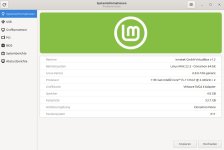
System:
Kernel: 6.17.0-19-generic arch: x86_64 bits: 64 compiler: gcc v: 13.3.0 clocksource: hpet
Desktop: Cinnamon v: 6.6.7 tk: GTK v: 3.24.41 wm: Muffin v: 6.6.3 vt: 8 dm: LightDM v: 1.30.0
Distro: Linux Mint 22.3 Zena base: Ubuntu 24.04 noble
Machine:
Type: Portable System: Dell product: Latitude D620 v: N/A serial: <superuser required> Chassis:
type: 8 serial: <superuser required>
Mobo: Dell model: 0FT292 serial: <superuser required> uuid: <superuser required> BIOS: Dell
v: A08 date: 04/03/2007
Ablauf der installation im Bash
Funktioniert dies mit der neuen 22.3 Version von Linux Mint nicht mehr?
habe leider bisher keine Hinsweise auf https://sy.to/abb_requireandlimit gefunden.
Kernel: 6.17.0-19-generic arch: x86_64 bits: 64 compiler: gcc v: 13.3.0 clocksource: hpet
Desktop: Cinnamon v: 6.6.7 tk: GTK v: 3.24.41 wm: Muffin v: 6.6.3 vt: 8 dm: LightDM v: 1.30.0
Distro: Linux Mint 22.3 Zena base: Ubuntu 24.04 noble
Machine:
Type: Portable System: Dell product: Latitude D620 v: N/A serial: <superuser required> Chassis:
type: 8 serial: <superuser required>
Mobo: Dell model: 0FT292 serial: <superuser required> uuid: <superuser required> BIOS: Dell
v: A08 date: 04/03/2007
Ablauf der installation im Bash
Code:
reiner@Latitude-D620:~$ cd Downloads
reiner@Latitude-D620:~/Downloads$ dir
install.run  README  sudo
reiner@Latitude-D620:~/Downloads$ make --version
GNU Make 4.3
Gebaut für x86_64-pc-linux-gnu
Copyright (C) 1988-2020 Free Software Foundation, Inc.
Lizenz GPLv3+: GNU GPL Version 3 oder später <http://gnu.org/licenses/gpl.html>
Dies ist freie Software: Sie können sie nach Belieben ändern und weiter verteilen.
Soweit es die Gesetze erlauben gibt es KEINE GARANTIE.
reiner@Latitude-D620:~/Downloads$ dkms --version
dkms-3.0.11
reiner@Latitude-D620:~/Downloads$ gcc --version
gcc (Ubuntu 13.3.0-6ubuntu2~24.04.1) 13.3.0
Copyright (C) 2023 Free Software Foundation, Inc.
This is free software; see the source for copying conditions.  There is NO
warranty; not even for MERCHANTABILITY or FITNESS FOR A PARTICULAR PURPOSE.

reiner@Latitude-D620:~/Downloads$ sudo ./install.run
[sudo] Passwort für reiner:
Verifying archive integrity...  100%   MD5 checksums are OK. All good.
Uncompressing Active Backup for Business Agent  100%
 * current installing folder is /tmp/selfgz67628
OK:1 http://security.ubuntu.com/ubuntu noble-security InRelease
OK:2 http://archive.ubuntu.com/ubuntu noble InRelease
OK:3 http://archive.ubuntu.com/ubuntu noble-updates InRelease
OK:4 http://archive.ubuntu.com/ubuntu noble-backports InRelease
Ign:5 http://packages.linuxmint.com zena InRelease
OK:6 http://packages.linuxmint.com zena Release
Paketlisten werden gelesen… Fertig
Abhängigkeitsbaum wird aufgebaut… Fertig
Statusinformationen werden eingelesen… Fertig
Alle Pakete sind aktuell.
 * start checking dependency of (3)
 * checking linux-headers-6.17.0-19-generic
 * linux-headers-6.17.0-19-generic has already installed
 * checking dkms
 * dkms has already installed
 * checking make
 * make has already installed
 * start installing snapshot driver and agent service
 * snapshot driver has not installed, installing snapshot driver
 * installing synosnap-0.12.10.deb
(Lese Datenbank ... 509420 Dateien und Verzeichnisse sind derzeit installiert.)
Vorbereitung zum Entpacken von synosnap-0.12.10.deb ...
upgrade from 0.12.10 to 0.12.10
rmmod: ERROR: Module synosnap is not currently loaded
Deleting module synosnap-0.12.10 completely from the DKMS tree.
Entpacken von synosnap (0.12.10) über (0.12.10) ...
synosnap (0.12.10) wird eingerichtet ...
Loading new synosnap-0.12.10 DKMS files...
Building for 6.17.0-19-generic
Building initial module for 6.17.0-19-generic
xargs: Warnung: Die Optionen --max-args und --replace/-I/-i schließen sich gegenseitig aus, der vorherige --max-args-Wert wird ignoriert
Error! Bad return status for module build on kernel: 6.17.0-19-generic (x86_64)
Consult /var/lib/dkms/synosnap/0.12.10/build/make.log for more information.
dpkg: Fehler beim Bearbeiten des Paketes synosnap (--install):
 »installiertes post-installation-Skript des Paketes synosnap«-Unterprozess gab den Fehlerwert 1 zurück
Fehler traten auf beim Bearbeiten von:
 synosnap
 * failed to install snapshot driver
* Please review the highlighted information above.
**********************************************************************
* Please check if your distro / kernel version is supported in detail at
* https://sy.to/abb_requireandlimit
* or the "System requirement" part in README.md
**********************************************************************
reiner@Latitude-D620:~/Downloads$habe leider bisher keine Hinsweise auf https://sy.to/abb_requireandlimit gefunden.