Ext-USB-HDDs haben Namen verloren und somit Störungen beim Hyperbackup

  • Ab sofort steht euch hier im Forum die neue Add-on Verwaltung zur Verfügung – eine zentrale Plattform für alles rund um Erweiterungen und Add-ons für den DSM.

    Damit haben wir einen Ort, an dem Lösungen von Nutzern mit der Community geteilt werden können. Über die Team Funktion können Projekte auch gemeinsam gepflegt werden.

    Was die Add-on Verwaltung kann und wie es funktioniert findet Ihr hier

    Hier geht es zu den Add-ons

insai

Benutzer
Registriert
06. Jan. 2020
Beiträge
48
Reaktionspunkte
5
Punkte
8
Hallo Leute,

eine Frage die ich nicht genau zuordnen kann: Hier in Konfiguration oder unter Hyperbackup.

Generell sollte es hier aber schon passen, hoff ich mal.

Ich habe an meiner Syno DS218J, DSM 7.1.1-42962 Update 9, seit Jahre eine Ext-Dockingstation ASM1051E SATA 6Gb/s bridge mit 2 USB-Festplatten hängen.

Da die Datenmengen immer grösser werden habe ich eine 2 Ext-Dockingstation ASM1051E mit erstmal einer USB-HDD angehängt.

Bisher hatte in der Filestation für eine Dockingstation immer je Festpaltte einen festen Namen auf den sich auch das Hyperback bezog (HDD1-xxx??).
Wie ich das hingebracht habe weis ich leider nicht mehr :unsure:.

Nur das Problem ist wie der Name war ist mir nicht mehr bekannt.

z.Z. steht nur noch usbshare2-2, usbshare1 und usbshare somit fällt auch das Hyperbackup auf die Nase.

Wisst Ihr wo ich das ausgraben kann damit dich die entsprechenden Bezeichnungen wieder eintragen kann und wie damits dauerhaft bleibt?

Danke Euch herzlichst für die Infos.
insai
 
Ich denke, das diese Anleitung eher zur Lösungsfindung beiträgt als AutoPilot
 
  • Like
Reaktionen: DaveR
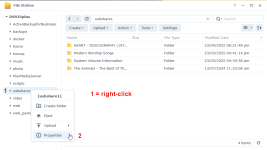
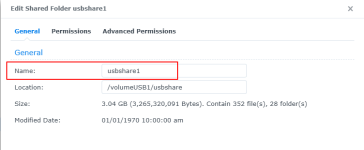
You probably renamed them in the past.

1764660718475.png
1764660733831.png

I also like to create a <name>.txt file on each USB drive... just in case they lose their name so I can remember what I previously named them.
 
  • Like
Reaktionen: dil88 und maxblank
ich habe da auch mal was für meine interne Kollegen gebastelt
https://app.box.com/s/98ov6i4oxrp9ol1e6u8v96rpb6p3gmu9
Danke für die super Erklärung, leider habe ich keine bzw. komplett andere Einträge in der usbno_guid.map:


1="000000000000000000011"
2="000000000000000000000"
3="000000000000000000010"

11="000000000000000000001"
12="000000000000000000000"
13="000000000000000000010

und auch nach diesen Anpassungen wurde nur eine USB-HDD angepasst auf Disk12 (die neue HDD dem 2tem (neuem) ASM11051.
Einen Reboot habe ich durchgeführt, was mach ich denn falsch?
Hier noch die Übersicht der USB-Structur:.
ash-4.4# lsusb
|__usb1 1d6b:0002:0310 09 2.00 480MBit/s 0mA 1IF (Linux 3.10.108 xhci-hcd xHCI Host Contro ller f10f0000.usb3) hub
|__usb2 1d6b:0003:0310 09 3.00 5000MBit/s 0mA 1IF (Linux 3.10.108 xhci-hcd xHCI Host Contro ller f10f0000.usb3) hub
|__2-1 174c:55aa:0100 00 3.00 5000MBit/s 0mA 1IF ( IB-1232CL-U3 00000000000000000000)
|__usb3 1d6b:0002:0310 09 2.00 480MBit/s 0mA 1IF (Linux 3.10.108 xhci-hcd xHCI Host Contro ller f10f8000.usb3) hub
|__usb4 1d6b:0003:0310 09 3.00 5000MBit/s 0mA 1IF (Linux 3.10.108 xhci-hcd xHCI Host Contro ller f10f8000.usb3) hub
|__4-1 174c:55aa:0100 00 3.00 5000MBit/s 0mA 1IF ( IB-1232CL-U3 00000000000000000001)
|__usb5 1d6b:0002:0310 09 2.00 480MBit/s 0mA 1IF (ehci_hcd f1058000.usb) hub
 

Anhänge

es geht nicht um die wirklichen Einträge, sondern eher um die Zuweisung der ID zu einer bestimmten usbNr.
Das wird verwendet wenn wir viele Ext Disk haben und Leute vergessen was speichert was genau. Dann werden die usbNr automatisch jeweisl zugewiesen, egal wie viele man hat
 
This also happens with my IB-3640SU3 Ice Box JBOD enclosure and IB-141CL-U3 Icy Box 4 bay Docking Station. The order that drives get mounted in DSM is the order that they get their usbshare# assigned. With my IB-141CL-U3 Icy Box 4 bay Docking Station it had a power button for each drive bay so I could get DSM to mount them in the correct order. With my IB-3640SU3 Ice Box JBOD enclosure the order was totally random. With these devices, if I remember correctly, DSM cannot read the drives' serial numbers - which is why your drives' serial numbers show as 00000000000000000000 and 00000000000000000001.

With your Raidsonic/Icy Box IB-1232CL-U3 (which do not have a power button for each drive) you would have to plug the drives into each IB-1232CL-U3 in the order you want DSM to mount them. After plugging in drive 1 you'd need to wait for DSM to mount that drive before plugging in the next drive. You'd need to do this after every reboot.

I could probably write a script to run at boot to do automatically mount the drives in your desired order. You would need to add an ID#.txt file to the root of the data partition on each USB drive. Then the script would:
  1. Check each mounted USB drive for it's ID#.txt
  2. Unmount any that are not mounted in the correct order.
  3. Mount them in the correct order.
 
Zuletzt bearbeitet:
Ok. Habe nicht realisiert es geht hier um eine docking station für die Platten. Die echten ID sieht man nur wenn die HD direkt eingesteckt sind
 
@insai

What do these commands return:

Code:
synousbdisk -info usb1
synousbdisk -info usb2
synousbdisk -info usb3
Administrator@Backup:~$ sudo -l
Password:
Matching Defaults entries for Administrator on Backup:
syslog=authpriv

User Administrator may run the following commands on Backup:
(ALL) ALL
Administrator@Backup:~$ synousbdisk -info usb1
Failed to get Device usb1 information.
Error Code: 0x2000
Administrator@Backup:~$ synousbdisk -info usb2
Failed to get Device usb2 information.
Error Code: 0x2000
Administrator@Backup:~$ synousbdisk -info usb3
 
  • Wow
Reaktionen: maxblank
Sind die externen Datenträger angeschlossen, während du diese Befehle abgeben hast?
 
  • Like
Reaktionen: DaveR
alle HDDs sind gemountet und beschreibbar:
Administrator@Backup:~$ sudo -l
Password:
Matching Defaults entries for Administrator on Backup:
syslog=authpriv

User Administrator may run the following commands on Backup:
(ALL) ALL
Administrator@Backup:~$ synousbdisk -info usb1
Failed to get Device usb1 information.
Error Code: 0x2000
Administrator@Backup:~$ synousbdisk -info usb2
Failed to get Device usb2 information.
Error Code: 0x2000
Administrator@Backup:~$ synousbdisk -info usb3
Failed to get Device usb3 information.
Error Code: 0x2000
 

Additional post fields


Kaffeautomat

Wenn du das Forum hilfreich findest oder uns unterstützen möchtest, dann gib uns doch einfach einen Kaffee aus.

Als Dankeschön schalten wir deinen Account werbefrei.

:coffee:

Hier gehts zum Kaffeeautomat