rechte für ordner video verbogen

  • Ab sofort steht euch hier im Forum die neue Add-on Verwaltung zur Verfügung – eine zentrale Plattform für alles rund um Erweiterungen und Add-ons für den DSM.

    Damit haben wir einen Ort, an dem Lösungen von Nutzern mit der Community geteilt werden können. Über die Team Funktion können Projekte auch gemeinsam gepflegt werden.

    Was die Add-on Verwaltung kann und wie es funktioniert findet Ihr hier

    Hier geht es zu den Add-ons

rtax

Benutzer
Registriert
29. Juli 2018
Beiträge
46
Reaktionspunkte
3
Punkte
8
hallo ihrs hier,

habe versucht mit jellyfin zu installieren und habe dabei mit den rechten für den ordner video irgendwie kaput gemacht .... dieser befehl war wahrscheinlich dir ursache

chown -R root:users /volume1/video


chmod -R 755 /volume1/video/Filme

bekomme es auch nicht mehr hin, dass z.b. meine vlc auf meinem sony tv auf den medienordner video zugreifen kann , er zeigt diesen ordner als leer an ... gibt es eine lösung das wieder alles zum laufen zu brinegen, die daten sind ja noch da .. backup nicht möglich da zu viele daten ... ich weiss, dass ich da scheinbar eine dummheit begangen habe ... mea culpa... wie kann ich das wieder hin bekommen , wer kann helfen?? habe als workaround erstmal alles in einen anderen shared folder kopiert und diesen vom mediaserver indiezieren lassen, in der hoffnung, das ich auf diesen ordner vpm tv/vlc zugreifen kann ... lieben gruss r.
 
ok ... how to get this right back to buiseness ?? thank you !!!
 
As sudo try:

Code:
chmod -R 777 /volume1/video
chown root:root /volume1/video
chown -R rtax:users /volume1/video/Filme

Change rtax:users to yourname:users
 
ok .. but now im missing a folder in the gui called Videos ... in the shell the folder is there what to now , sorry for the inconvenience ;) regards
 
Do you still have Videos listed in "Control Panel > Shared Folder"?

Via SSH what does the following command return:
Code:
sudo synoshare --getmap videos | grep volume
 
hello, yes the folder is shown in shared folders .... cmd result :

Path .......[/volume1/Videos]
what to next, think the restart inbetween has the folder vanishing ... uff , hope this can be fixed , many thanks for the help! regards r.
 
moin, is it possible that the indexer, i have newly startet is the root cause for this behavior ?
regards and thx r.
 
The indexer would not be helping the situation.

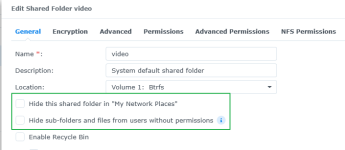
Go to "Control Panel > Shared Folder > select Videos > Edit" then make sure the Hide options are not ticked.
1766485993115.png

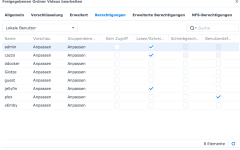
Next click on Permissions and make sure the expected users and groups have read/write permissions.
 
thanks for the reply these boxes are not ticked ! but se the hardcopy ...
 

Anhänge

  • Bildschirmfoto 2025-12-23 um 13.57.47.png
    Bildschirmfoto 2025-12-23 um 13.57.47.png
    158,4 KB · Aufrufe: 11
what means this exactly, evtl. a backgroung process ?? thx r.
 
Rather than trying to fix the permissions it might actually be easier to:
  1. Rename the Videos shared folder to something like Videos-bak.
  2. Then create a new Videos shared folder.
  3. Give admin, cazzo and jellyfin read/write permissions and give plex your custom permissions.
  4. Finally using File Station copy your sub folders and files from Videos-bak to Videos.
 
ok Thx i'll do so , what about the running background processes tht set the rights from saturday, when i have tried to set them over the gui ...

ths merry xmas. r.
 
problem solved it was a simple richts problem, thank you all, happy new year to all of you
 
  • Like
Reaktionen: DaveR

Additional post fields


Kaffeautomat

Wenn du das Forum hilfreich findest oder uns unterstützen möchtest, dann gib uns doch einfach einen Kaffee aus.

Als Dankeschön schalten wir deinen Account werbefrei.

:coffee:

Hier gehts zum Kaffeeautomat