Immich als bessere Alternative zu Photos ?

  • Ab sofort steht euch hier im Forum die neue Add-on Verwaltung zur Verfügung – eine zentrale Plattform für alles rund um Erweiterungen und Add-ons für den DSM.

    Damit haben wir einen Ort, an dem Lösungen von Nutzern mit der Community geteilt werden können. Über die Team Funktion können Projekte auch gemeinsam gepflegt werden.

    Was die Add-on Verwaltung kann und wie es funktioniert findet Ihr hier

    Hier geht es zu den Add-ons

Habe gestern abend alles neu installiert. Soweit funktioniert es. Auch die Gescihetr laufen.
Habe nur ein Problem:
Wenn ich mit http://192.168.x.x:2283 einloggen will, da kommt unsichere Seite? Logge ich mit http://192.168.x.x:2283/photos ein, funktioniert es?
Wo muss ich nach dem Fehler schauen?
 
Also bei mir funktioniert beides, also auch ohne "/photos" dahinter. Melde dich mal sauber ab und probiere es nochmal.
 
  • Like
Reaktionen: Merlin2504
Also hat es nun funktioniert?
 
Komme erst morgen dazu. Bin unterwegs zum Männertag.
Ist nur komisch. Muss in Ruhe schauen.
Will morgen dann auch extern einstellen.
1. Es muss meine vorhandene Struktur übernommen werden.
2. Und normal dann die Handys meiner Familie gesichert werden.
 
Über den Browser funktioniert jetzt der Zugriff. Nur der der Immich Viewer auf der Apple TV nimmt die Daten nicht an.
Beimir zhause ist aber alles im gleichen Netzwerk. Will jetzt mal https aktivieren und mich mit dem Zertifikat befassen.
 
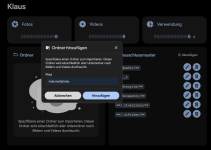
Jetzt verzweifle ich gerade an der Einbindung der externen Bibliothek, wo meine fertigen Bilder liegen.
Ich habe den Befehl in die docker-compose.yaml dazu geschrieben.

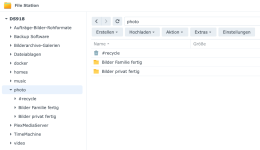
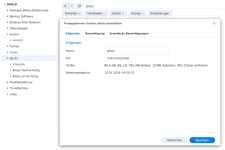
der Pfad ist dann /volume3/photo siehe anhängendes Bild. Wenn Immich dann funktioniert und auf den ordner photo greift, greift er doch automtisch auf die Unterordner zu?
Habe ich bei der Befehlszeile einen Fehler?
immich-server:
volumes:
+ - /volume3/photo/:/volume3/photo/:rw
 

Anhänge

  • Bildschirmfoto 2026-05-15 um 11.33.29.png
    Bildschirmfoto 2026-05-15 um 11.33.29.png
    114,6 KB · Aufrufe: 6
  • Bildschirmfoto 2026-05-15 um 11.40.55.png
    Bildschirmfoto 2026-05-15 um 11.40.55.png
    182,8 KB · Aufrufe: 6
  • Bildschirmfoto 2026-05-15 um 11.41.12.png
    Bildschirmfoto 2026-05-15 um 11.41.12.png
    51,5 KB · Aufrufe: 6
Und was findest du in Immich unter Verwaltung, Externe Bibliotheken?
Poste mal bitte den kompletten volumes-Abschnitt aus compose.

Bei mir sieht's da so aus
Code:
volumes:
      - /volume2/photo:/mnt/media/photo:ro                                          #Pfad zu externen Medien (optional)
      - /volume2/video:/mnt/media/video:ro                                          #Pfad zu externen Medien (optional)
also ohne jeweils den Slash (/) am Ende. Ich bin mir auch nicht sicher, ob das containerseitig nicht unter /mnt/media muss.
 
@Merlin2504, ich hoffe, du hast nicht das "+" aufgenommen, wie hier beschrieben. Das soll nur zeigen, dass die Zeile dazukommt, gehört aber nicht in die compose rein.
 
Hier ist der Inhalt:
#
# WARNING: To install Immich, follow our guide: https://docs.immich.app/install/docker-compose
#
# Make sure to use the docker-compose.yml of the current release:
#
# https://github.com/immich-app/immich/releases/latest/download/docker-compose.yml
#
# The compose file on main may not be compatible with the latest release.

name: immich

services:
immich-server:
container_name: immich_server
image: ghcr.io/immich-app/immich-server:${IMMICH_VERSION:-release}
# extends:
# file: hwaccel.transcoding.yml
# service: cpu # set to one of [nvenc, quicksync, rkmpp, vaapi, vaapi-wsl] for accelerated transcoding
volumes:
# Do not edit the next line. If you want to change the media storage location on your system, edit the value of UPLOAD_LOCATION in the .env file
- ${UPLOAD_LOCATION}:/data
- /etc/localtime:/etc/localtime:ro
env_file:
- .env
ports:
- '2283:2283'
depends_on:
- redis
- database
restart: always
healthcheck:
disable: false

immich-machine-learning:
container_name: immich_machine_learning
# For hardware acceleration, add one of -[armnn, cuda, rocm, openvino, rknn] to the image tag.
# Example tag: ${IMMICH_VERSION:-release}-cuda
image: ghcr.io/immich-app/immich-machine-learning:${IMMICH_VERSION:-release}
# extends: # uncomment this section for hardware acceleration - see https://docs.immich.app/features/ml-hardware-acceleration
# file: hwaccel.ml.yml
# service: cpu # set to one of [armnn, cuda, rocm, openvino, openvino-wsl, rknn] for accelerated inference - use the `-wsl` version for WSL2 where applicable
volumes:
- ./model-cache:/cache
env_file:
- .env
restart: always
healthcheck:
disable: false

redis:
container_name: immich_redis
image: docker.io/valkey/valkey:9@sha256:3b55fbaa0cd93cf0d9d961f405e4dfcc70efe325e2d84da207a0a8e6d8fde4f9
healthcheck:
test: redis-cli ping || exit 1
restart: always

database:
container_name: immich_postgres
image: ghcr.io/immich-app/postgres:14-vectorchord0.4.3-pgvectors0.2.0@sha256:bcf63357191b76a916ae5eb93464d65c07511da41e3bf7a8416db519b40b1c23
environment:
POSTGRES_PASSWORD: ${DB_PASSWORD}
POSTGRES_USER: ${DB_USERNAME}
POSTGRES_DB: ${DB_DATABASE_NAME}
POSTGRES_INITDB_ARGS: '--data-checksums'
# Uncomment the DB_STORAGE_TYPE: 'HDD' var if your database isn't stored on SSDs
# DB_STORAGE_TYPE: 'HDD'
volumes:
# Do not edit the next line. If you want to change the database storage location on your system, edit the value of DB_DATA_LOCATION in the .env file
- ${DB_DATA_LOCATION}:/var/lib/postgresql/data
shm_size: 128mb
restart: always
healthcheck:
disable: false

immich-server:
volumes:
- /volume3/photo/:/volume3/photo/:rw
 
Das ist falsch. Du hast doch schon oben den Abschnitt "immich-server". Da muss das rein.
Also bei
Code:
services:
immich-server:
container_name: immich_server
image: ghcr.io/immich-app/immich-server:${IMMICH_VERSION:-release}
# extends:
# file: hwaccel.transcoding.yml
# service: cpu # set to one of [nvenc, quicksync, rkmpp, vaapi, vaapi-wsl] for accelerated transcoding
volumes:
# Do not edit the next line. If you want to change the media storage location on your system, edit the value of UPLOAD_LOCATION in the .env file
- ${UPLOAD_LOCATION}:/data
- /etc/localtime:/etc/localtime:ro
- /volume3/photo:/volume3/photo:rw
...
Beschäftige dich mal bitte etwas mit docker-compose.yml-Files. Und behalte die Einrückungen bei, dann sieht man das besser.
 
  • Like
Reaktionen: Merlin2504
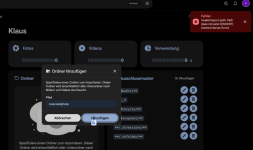
Danke, habe es in docker-compose.yml jetzt geändert. Aber bei Immich kommte bei externer Einstellung /volume3/photo wieder eine Fehlermeldung.
#
# WARNING: To install Immich, follow our guide: https://docs.immich.app/install/docker-compose
#
# Make sure to use the docker-compose.yml of the current release:
#
# https://github.com/immich-app/immich/releases/latest/download/docker-compose.yml
#
# The compose file on main may not be compatible with the latest release.

name: immich

services:
immich-server:
container_name: immich_server
image: ghcr.io/immich-app/immich-server:${IMMICH_VERSION:-release}
# extends:
# file: hwaccel.transcoding.yml
# service: cpu # set to one of [nvenc, quicksync, rkmpp, vaapi, vaapi-wsl] for accelerated transcoding
volumes:
# Do not edit the next line. If you want to change the media storage location on your system, edit the value of UPLOAD_LOCATION in the .env file
- ${UPLOAD_LOCATION}:/data
- /etc/localtime:/etc/localtime:ro
- /volume3/photo/:/volume3/photo/:rw
env_file:
- .env
ports:
- '2283:2283'
depends_on:
- redis
- database
restart: always
healthcheck:
disable: false

immich-machine-learning:
container_name: immich_machine_learning
# For hardware acceleration, add one of -[armnn, cuda, rocm, openvino, rknn] to the image tag.
# Example tag: ${IMMICH_VERSION:-release}-cuda
image: ghcr.io/immich-app/immich-machine-learning:${IMMICH_VERSION:-release}
# extends: # uncomment this section for hardware acceleration - see https://docs.immich.app/features/ml-hardware-acceleration
# file: hwaccel.ml.yml
# service: cpu # set to one of [armnn, cuda, rocm, openvino, openvino-wsl, rknn] for accelerated inference - use the `-wsl` version for WSL2 where applicable
volumes:
- ./model-cache:/cache
env_file:
- .env
restart: always
healthcheck:
disable: false

redis:
container_name: immich_redis
image: docker.io/valkey/valkey:9@sha256:3b55fbaa0cd93cf0d9d961f405e4dfcc70efe325e2d84da207a0a8e6d8fde4f9
healthcheck:
test: redis-cli ping || exit 1
restart: always

database:
container_name: immich_postgres
image: ghcr.io/immich-app/postgres:14-vectorchord0.4.3-pgvectors0.2.0@sha256:bcf63357191b76a916ae5eb93464d65c07511da41e3bf7a8416db519b40b1c23
environment:
POSTGRES_PASSWORD: ${DB_PASSWORD}
POSTGRES_USER: ${DB_USERNAME}
POSTGRES_DB: ${DB_DATABASE_NAME}
POSTGRES_INITDB_ARGS: '--data-checksums'
# Uncomment the DB_STORAGE_TYPE: 'HDD' var if your database isn't stored on SSDs
# DB_STORAGE_TYPE: 'HDD'
volumes:
# Do not edit the next line. If you want to change the database storage location on your system, edit the value of DB_DATA_LOCATION in the .env file
- ${DB_DATA_LOCATION}:/var/lib/postgresql/data
shm_size: 128mb
restart: always
healthcheck:
disable: false
 
Jetzt nimm doch mal endlich diese blöden Slashes (/) am Ende raus, also "- /volume3/photo/:/volume3/photo/:rw" -> "- /volume3/photo:/volume3/photo:rw".
Ich bin mir nicht sicher, aber ich denke, dass es daran liegt. Dann schau dir mal die Eigenschaften deines immich-server-Containers an, was der Volumes zeigt.
Und /volume3/photo gibt es wirklich auf deiner DS?
Welches Tool zur Container-Verwaltung verwendest du? Container Manager, Portainer, Dockhand?
 
Zuletzt bearbeitet:
Welches Tool zur Container-Verwaltung verwendest du? Container Manager, Portainer, Dockhand?
Ich nutze Container Manager
Jetzt nimm doch mal endlich diese blöden Slashes (/) am Ende raus, also "- /volume3/photo/:/volume3/photo/:rw" -> "- /volume3/photo:/volume3/photo:rw".
Hab es raus.
# WARNING: To install Immich, follow our guide: https://docs.immich.app/install/docker-compose
#
# Make sure to use the docker-compose.yml of the current release:
#
# https://github.com/immich-app/immich/releases/latest/download/docker-compose.yml
#
# The compose file on main may not be compatible with the latest release.

name: immich

services:
immich-server:
container_name: immich_server
image: ghcr.io/immich-app/immich-server:${IMMICH_VERSION:-release}
# extends:
# file: hwaccel.transcoding.yml
# service: cpu # set to one of [nvenc, quicksync, rkmpp, vaapi, vaapi-wsl] for accelerated transcoding
volumes:
# Do not edit the next line. If you want to change the media storage location on your system, edit the value of UPLOAD_LOCATION in the .env file
- ${UPLOAD_LOCATION}:/data
- /etc/localtime:/etc/localtime:ro
- /volume3/photo:/volume3/photo:rw
- /volume3/docker/immich/upload:/usr/src/app/upload:rw
env_file:
- .env
ports:
- '2283:2283'
depends_on:
- redis
- database
restart: always
healthcheck:
disable: false

immich-machine-learning:
container_name: immich_machine_learning
# For hardware acceleration, add one of -[armnn, cuda, rocm, openvino, rknn] to the image tag.
# Example tag: ${IMMICH_VERSION:-release}-cuda
image: ghcr.io/immich-app/immich-machine-learning:${IMMICH_VERSION:-release}
# extends: # uncomment this section for hardware acceleration - see https://docs.immich.app/features/ml-hardware-acceleration
# file: hwaccel.ml.yml
# service: cpu # set to one of [armnn, cuda, rocm, openvino, openvino-wsl, rknn] for accelerated inference - use the `-wsl` version for WSL2 where applicable
volumes:
- ./model-cache:/cache
env_file:
- .env
restart: always
healthcheck:
disable: false

redis:
container_name: immich_redis
image: docker.io/valkey/valkey:9@sha256:3b55fbaa0cd93cf0d9d961f405e4dfcc70efe325e2d84da207a0a8e6d8fde4f9
healthcheck:
test: redis-cli ping || exit 1
restart: always

database:
container_name: immich_postgres
image: ghcr.io/immich-app/postgres:14-vectorchord0.4.3-pgvectors0.2.0@sha256:bcf63357191b76a916ae5eb93464d65c07511da41e3bf7a8416db519b40b1c23
environment:
POSTGRES_PASSWORD: ${DB_PASSWORD}
POSTGRES_USER: ${DB_USERNAME}
POSTGRES_DB: ${DB_DATABASE_NAME}
POSTGRES_INITDB_ARGS: '--data-checksums'
# Uncomment the DB_STORAGE_TYPE: 'HDD' var if your database isn't stored on SSDs
# DB_STORAGE_TYPE: 'HDD'
volumes:
# Do not edit the next line. If you want to change the database storage location on your system, edit the value of DB_DATA_LOCATION in the .env file
- ${DB_DATA_LOCATION}:/var/lib/postgresql/data
shm_size: 128mb
restart: always
healthcheck:
disable: false
Und /volume3/photo gibt es wirklich auf deiner DS?
Ja, den gibt es, siehe Bild.

 

Anhänge

  • Bildschirmfoto 2026-05-15 um 16.30.35.png
    Bildschirmfoto 2026-05-15 um 16.30.35.png
    134,1 KB · Aufrufe: 0
  • Bildschirmfoto 2026-05-15 um 16.32.35.png
    Bildschirmfoto 2026-05-15 um 16.32.35.png
    189,5 KB · Aufrufe: 0
Sorry, weiß ich nicht, wo es da bei dir hakt. Schau mal über die Konsole des Containers nach, ob /volume3/photo existiert.
 

Additional post fields


Kaffeautomat

Wenn du das Forum hilfreich findest oder uns unterstützen möchtest, dann gib uns doch einfach einen Kaffee aus.

Als Dankeschön schalten wir deinen Account werbefrei.

:coffee:

Hier gehts zum Kaffeeautomat