I built my own 3rd Party Synology Package Repository

  • Ab sofort steht euch hier im Forum die neue Add-on Verwaltung zur Verfügung – eine zentrale Plattform für alles rund um Erweiterungen und Add-ons für den DSM.

    Damit haben wir einen Ort, an dem Lösungen von Nutzern mit der Community geteilt werden können. Über die Team Funktion können Projekte auch gemeinsam gepflegt werden.

    Was die Add-on Verwaltung kann und wie es funktioniert findet Ihr hier

    Hier geht es zu den Add-ons

DaveR

Benutzer
Sehr erfahren
Add-on Developer
Registriert
30. März 2022
Beiträge
1.306
Reaktionspunkte
2.280
Punkte
229
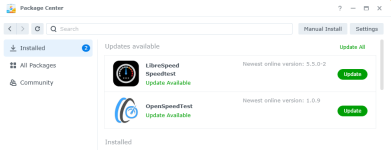
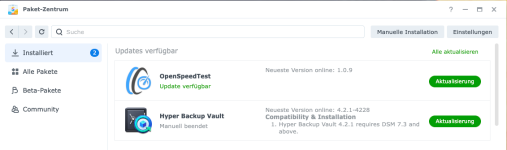
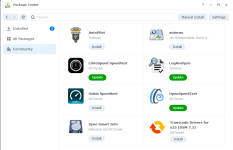
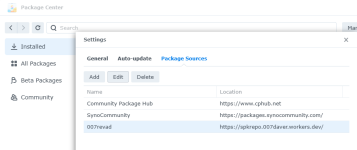
As I now have 4 Synology packages I decided I needed a package repository that users can add to Package Center.
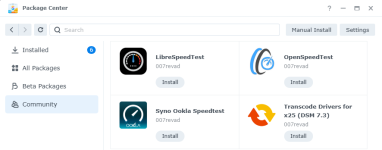
1776598648896.png
1776598686310.png
1776598710613.png
Package Center even shows the download count :)
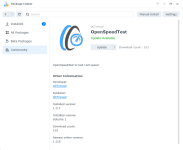
1776598767202.png

I intend updating it so other creators of Synology packages can get their packages listed to make it easier for users to install and update the packages.
 
Just added your Package Source, it works, thanks.
But I stopped your Speedtest-Packages for now. They (or one of them) seem to disturb Disk-Hibernation even when I don't use them. Is this possible? May be it's better to install them on a NVME-Volume.
 
@Tommes
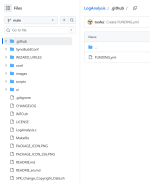
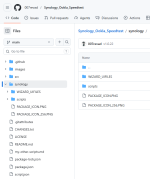
Where did you get the file layout for your package source? Is it a common layout that other 3rd party packages often use?
I notice it has INFO.conf which is just a conf file in the repo's root.
1776631670999.png
My package repos use a workflow to build the spk files when I create a new release. The workflow uses https://github.com/007revad/synology-package-builder which builds the INFO file from package.json (which obviously is a json file :) )
1776631945189.png

To add someone's package to my spk repository I'd just need:
  1. GitHub username.
  2. Repo name.
  3. PACKAGE-ICON.PNG location.
  4. INFO location and type (conf or json).
For point 3 it would be better if they had a 120×120 PNG thumbnail named <Package-Id>_120.png where <Package-Id> is packagename from INFO.

I see that I'd need to add support for for different language packagenames.

Ideally you may also want to add a workflow that notifies my spk repository when you create a new release. Though my spk repository does check at 2am each day for any new spk files on repos that it monitors so adding a workflow is optional.

I have enough information to add your package to my spk repository, so you can relax and wait for it to happen :D
 
  • Like
Reaktionen: luddi
It's alive! :D

1776642761370.png

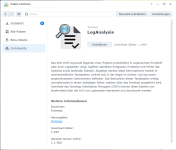
Looking at the download count for LogAnalysis and Syno Smart Info makes me little sad for my packages.
  • LogAnalysis Download count: 1,486
  • Syno Smart Info Download count: 1,838
 
  • Like
Reaktionen: anmi4345
You don't need to be sad about it. You made it possible to provide a repository. Therefore, you can be proud of it. (y)
 
  • Like
Reaktionen: DaveR und Tommes
Hi!
First of all, I'm thrilled with what you've put together. I just wanted to thank you for adding my packages to your SPK repository. It's absolutely fantastic.

Where did you get the file layout for your package source?

I use the Synology Toolkit to manage and convert packages into SPKs. The Synology Developer Guide provides information on the directory structure that should be followed. However, I don't adhere to all the guidelines.
Looking at the download count for LogAnalysis
Where does this data come from? Is there any way I can display it in my GitHub repository? The original counters stopped working at some point and, so far, I’ve been too lazy to look for alternatives.
 
  • Like
Reaktionen: DaveR
Thank you.

You'll like this then. You can see how many downloads each release has had, and the total of all downloads.
https://hanadigital.github.io/grev/?user=toafez&repo=LogAnalysis
https://hanadigital.github.io/grev/?user=toafez&repo=AutoPilot

The data comes from the GitHub API. But it only returns 100 at a time so you need a loop to get all of them, and add them all up for the total.

Shields has a button that shows the total downloads. https://img.shields.io/github/downloads/toafez/LogAnalysis/total.svg

To get the code for the badge see https://shields.io/badges/git-hub-downloads-all-assets-all-releases

I have too many repos with assets so I whipped up this little dashboard page where I can see them all at once.
https://007revad.github.io/stats.html
 
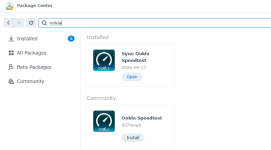
FYI for anyone who manually installed a previous version of my Syno Ookla Speedtest package.

Because I changed the name of the package, Package Center will see the installed version and the available version as 2 different packages (so no Upgrade button shows). You'll need to uninstall the old version then install the latest version.
1776670389847.png
 
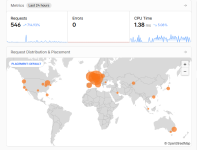
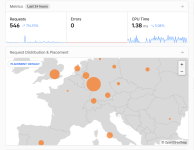
I posted about my Synology package repository here and on reddit. Surprisingly Germans are using, or trying it, more than all the other countries. For Australia, the larger dot would be from all the testing I've done. It's nice to see that people or trying the repository. I've also noticed the downloads for all the packages (except autorun) has increased in the last 10 hours.

1776726344548.png
1776726379116.png
 
Nice work :)
Im gonna add it on the weekend when I have time to do so and to test, then there's another point on the German map ^^

Short question:
You've made so much scripts to help others, HDD_database, nvme_enable, smart data etc.

Would it be possible to add them as packages?
I have some friends that somehow don't like scripts they don't understand but have no problems to add/install packages they don't know ^^

I can't imagine they are the only ones acting like this.

Would be nice if you can say: "add my repository and install package xy".
Instead of writing manuals in how to add scripts to the taskplanner.
 
Thanks a lot Dave - I appreciate your effort(s) !
 

Additional post fields


Kaffeautomat

Wenn du das Forum hilfreich findest oder uns unterstützen möchtest, dann gib uns doch einfach einen Kaffee aus.

Als Dankeschön schalten wir deinen Account werbefrei.

:coffee:

Hier gehts zum Kaffeeautomat