

Anzeige für Firmware-Update verschwindet nicht

  • Ab sofort steht euch hier im Forum die neue Add-on Verwaltung zur Verfügung – eine zentrale Plattform für alles rund um Erweiterungen und Add-ons für den DSM.

    Damit haben wir einen Ort, an dem Lösungen von Nutzern mit der Community geteilt werden können. Über die Team Funktion können Projekte auch gemeinsam gepflegt werden.

    Was die Add-on Verwaltung kann und wie es funktioniert findet Ihr hier

    Hier geht es zu den Add-ons

Status
Für weitere Antworten geschlossen.

Oeche_100

Benutzer
Registriert
12. Mai 2016
Beiträge
7
Reaktionspunkte
0
Punkte
0
Hallo!

Seit dem Update auf DSM 6 zeigt meine DS415+ in der Benutzeroberfläche permanent an, dass ein Systemupdate verfügbar ist (siehe Bild). Es ist aber die aktuelle Version installiert.
Als das letzte Update erschienen ist, zeigte sie statt der "1" eine "2" an. Ich habe schon einen Neustart versucht. Die Anzeige verschwindet nicht.
Hat jemand eine Idee woran dies liegen könnte?

Gruß,
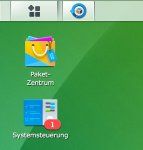
Synology.jpg
 
Hallo,
seit Release DSM 6.0 sind 6 critical Updates erschienen. Hast Du denn mal geschaut was Dir dort angeboten wird?

Gruß Götz
 
Die habe ich alle installiert. Jedesmal wenn ein Update verfügbar war, wurde mir eine "2" angezeigt. Die "1" blieb nach dem jeweiligen Update dann trotzdem stehen. Wird dort neben dem Systemupdate vielleicht noch etwas anderes angezeigt?
 
Hallo,

evtl. sind noch Überbleibsel liegen geblieben unter

/volume1/@autoupdate

dort kannst du mal nachschauen, der sollte nach dem Update leer sein.
Dann hab ich heute morgen auf meiner DS415+ das „micro“ Update 7 eingespielt , du auch ?

Du müsstest dich per SSH Anmelden und folgen code absetzen:

Rich (BBCode):
cat /etc.defaults/VERSION

Gruß
Bob
 
Hallo!

Als Version wird mit unter SSH folgendes ausgegeben (Update 7 ist installiert):

majorversion="6"
minorversion="0"
productversion="6.0"
buildphase="release"
buildnumber="7321"
smallfixnumber="7"
builddate="2016/05/12"
buildtime="11:48:23"

@autoupdate existiert bei mir nicht (auch nicht auf dem Volume1).
 
Mhh :confused: … schon danach gesucht?

Rich (BBCode):
sudo -i

Rich (BBCode):
cd /

Rich (BBCode):
find -name @autoupdate

Ergebnis bei mir: ./volume1/@autoupdate

Rich (BBCode):
cd /volume1/@autoupdate

Rich (BBCode):
ls -l

Ergebnis bei mir: total 0
 
Was wird dir im DSM Protokoll Center angezeigt dazu?

Es gibt noch eine updater log synoupdate.log unter /var/log/

such mal folgende Zeile
Upgrade from version 5.2.0.xxx to version 6.0.0.xxx

gibt’s hier Auffälligkeiten errors o.ä.?

das gleiche unter /var/log/synolog/synosys.log

Gruß
Bob
 
Im DSM Protokoll Center steht dazu leider nichts. Anscheinend geht das Protokoll nicht soweit zurück.

Im synoupdate.log steht dazu folgendes:

2016/01/22 20:25:51 start critical update to buildnumber: 5644 original smallfixnumbre: 2 new_smallfixnumber: 3 build date: 2016/01/22
2016/01/22 20:25:52 Start of the update...
2016/01/22 20:25:56 Congratulations!! The update has been completed!!
2016/01/22 20:25:57 Finished update before reboot!
2016/01/22 20:28:06 Finished critical update!!!
2016/02/19 08:57:32 start critical update to buildnumber: 5644 original smallfixnumbre: 3 new_smallfixnumber: 5 build date: 2016/02/18
2016/02/19 08:57:38 Finished update before service restart!
2016/03/25 08:59:52 Start of the update...
2016/03/25 08:59:52 Failed to accomplish the update! (errno = 20)
2016/03/25 15:43:20 Start of the update...
2016/03/25 15:43:20 Failed to accomplish the update! (errno = 20)
2016/03/25 19:19:47 Start of the update...
2016/03/25 19:19:47 Failed to accomplish the update! (errno = 20)
2016/03/25 19:26:09 Start of the update...
2016/03/25 19:26:09 Upgrade from version 5.2.0.5644 to version 6.0.0.7321
2016/03/25 19:26:52 Congratulations!! The update has been completed!!
2016/03/25 19:29:34 Update Config Event: rootfs_ready
2016/03/25 19:29:34 Update Type: upgrade
2016/03/25 19:30:08 Update Config Event: volume_ready
2016/03/25 19:30:09 Update Type: upgrade
2016/03/25 19:30:12 Update Config Event: share_ready
2016/03/25 19:30:12 Update Type: upgrade
2016/04/19 19:06:24 start critical update to buildnumber: 7321 original smallfixnumber: 0 new_smallfixnumber: 2 build date: 2016/04/15
2016/04/19 19:06:41 Finished apply small update!
2016/04/19 19:07:34 Finished update after restart services!
2016/04/22 09:01:09 start critical update to buildnumber: 7321 original smallfixnumber: 2 new_smallfixnumber: 3 build date: 2016/04/21
2016/04/22 09:01:09 Start of the update...
2016/04/22 09:01:13 Congratulations!! The update has been completed!!
2016/04/22 09:01:14 Finished apply small update!
2016/04/22 09:01:14 Finished update before reboot!
2016/04/22 09:04:05 Finished critical update!!!
2016/05/06 09:03:16 start critical update to buildnumber: 7321 original smallfixnumber: 3 new_smallfixnumber: 5 build date: 2016/05/04
2016/05/06 09:03:19 Finished apply small update!
2016/05/06 09:03:19 Finished update before reboot!
2016/05/06 09:06:16 Finished critical update!!!
2016/05/06 15:41:39 start critical update to buildnumber: 7321 original smallfixnumber: 5 new_smallfixnumber: 6 build date: 2016/05/06
2016/05/06 15:41:41 Finished apply small update!
2016/05/06 15:41:41 Finished update after restart services!
2016/05/13 09:01:20 start critical update to buildnumber: 7321 original smallfixnumber: 6 new_smallfixnumber: 7 build date: 2016/05/12
2016/05/13 09:01:22 Finished apply small update!
2016/05/13 09:01:22 Finished update after restart services!

Scheinbar wurde das DSM 6 Update erst im vierten Anlauf installiert.
 
Im synosys.log steht zum DSM 6 Update folgendes:

info 2016/03/25 08:59:20 admin: Start install [DSM 6.0-7321] automatically.
info 2016/03/25 08:59:33 SYSTEM: [Cloud Sync] service was stopped.
info 2016/03/25 08:59:40 SYSTEM: System successfully stopped [Log receiving (BSD)].
info 2016/03/25 08:59:47 SYSTEM: System successfully stopped [Network Backup].
info 2016/03/25 08:59:47 SYSTEM: System successfully stopped [Log receiving (IETF)].
info 2016/03/25 08:59:48 SYSTEM: System successfully stopped [Apple file service].
info 2016/03/25 08:59:49 SYSTEM: System successfully stopped [Network Backup Volume Destination].
info 2016/03/25 08:59:51 SYSTEM: System successfully stopped [Local log archiving].
info 2016/03/25 08:59:52 SYSTEM: System successfully stopped [Windows file service].
info 2016/03/25 08:59:53 admin: System successfully started [Log receiving (BSD)].
err 2016/03/25 08:59:55 admin: Automatically install [DSM 6.0-7321] failed.
info 2016/03/25 08:59:56 admin: System successfully started [Network Backup].
info 2016/03/25 08:59:56 admin: System successfully started [Log receiving (IETF)].
info 2016/03/25 08:59:57 admin: System successfully started [Apple file service].
info 2016/03/25 08:59:57 admin: System successfully started [Network Backup Volume Destination].
info 2016/03/25 09:00:00 admin: System successfully started [Local log archiving].
info 2016/03/25 09:00:01 admin: System successfully started [Windows file service].
info 2016/03/25 09:00:09 admin: [Cloud Sync] service was started.
err 2016/03/25 09:00:17 admin: Failed to update the server.
info 2016/03/25 15:41:30 admin: Download task for [/volume1/@autoupdate/DSM_DS415%2B_7321.pat] finished.
info 2016/03/25 15:43:01 SYSTEM: [Cloud Sync] service was stopped.
info 2016/03/25 15:43:07 SYSTEM: System successfully stopped [Log receiving (BSD)].
info 2016/03/25 15:43:13 SYSTEM: System successfully stopped [Network Backup].
info 2016/03/25 15:43:14 SYSTEM: System successfully stopped [Log receiving (IETF)].
info 2016/03/25 15:43:15 SYSTEM: System successfully stopped [Apple file service].
info 2016/03/25 15:43:16 SYSTEM: System successfully stopped [Network Backup Volume Destination].
info 2016/03/25 15:43:18 SYSTEM: System successfully stopped [Local log archiving].
info 2016/03/25 15:43:19 SYSTEM: System successfully stopped [Windows file service].
info 2016/03/25 15:43:20 admin: System successfully started [Log receiving (BSD)].
info 2016/03/25 15:43:22 admin: System successfully started [Network Backup].
info 2016/03/25 15:43:23 admin: System successfully started [Log receiving (IETF)].
info 2016/03/25 15:43:23 admin: System successfully started [Apple file service].
info 2016/03/25 15:43:23 admin: System successfully started [Network Backup Volume Destination].
info 2016/03/25 15:43:26 admin: System successfully started [Local log archiving].
info 2016/03/25 15:43:27 admin: System successfully started [Windows file service].
info 2016/03/25 15:43:35 admin: [Cloud Sync] service was started.
err 2016/03/25 15:43:43 admin: Failed to update the server.
info 2016/03/25 16:36:54 admin: Full name of the user [plex] was changed to [Plex User].
info 2016/03/25 16:36:54 admin: E-mail address of the user [plex] was changed to [ ].
info 2016/03/25 16:36:54 admin: Access right of the shared folder [Plex] was set.
info 2016/03/25 16:36:58 admin: Package [Plex Media Server] has been successfully updated.
info 2016/03/25 16:41:11 admin: Download task for [/volume1/@autoupdate/DSM_DS415%2B_7321.pat] finished.
info 2016/03/25 19:19:19 SYSTEM: [Cloud Sync] service was stopped.
info 2016/03/25 19:19:27 SYSTEM: System successfully stopped [Log receiving (BSD)].
info 2016/03/25 19:19:37 SYSTEM: System successfully stopped [Network Backup].
info 2016/03/25 19:19:37 SYSTEM: System successfully stopped [Log receiving (IETF)].
info 2016/03/25 19:19:43 SYSTEM: System successfully stopped [Apple file service].
info 2016/03/25 19:19:45 SYSTEM: System successfully stopped [Network Backup Volume Destination].
info 2016/03/25 19:19:46 SYSTEM: System successfully stopped [Local log archiving].
info 2016/03/25 19:19:47 SYSTEM: System successfully stopped [Windows file service].
info 2016/03/25 19:19:47 admin: System successfully started [Log receiving (BSD)].
info 2016/03/25 19:19:49 admin: System successfully started [Network Backup].
info 2016/03/25 19:19:49 admin: System successfully started [Log receiving (IETF)].
info 2016/03/25 19:19:50 admin: System successfully started [Apple file service].
info 2016/03/25 19:19:50 admin: System successfully started [Network Backup Volume Destination].
info 2016/03/25 19:19:53 admin: System successfully started [Local log archiving].
info 2016/03/25 19:19:54 admin: System successfully started [Windows file service].
info 2016/03/25 19:19:59 admin: [Cloud Sync] service was started.
err 2016/03/25 19:20:06 admin: Failed to update the server.
info 2016/03/25 19:25:31 admin: Download task for [/volume1/@autoupdate/DSM_DS415%2B_7321.pat] finished.
info 2016/03/25 19:25:50 SYSTEM: [Cloud Sync] service was stopped.
info 2016/03/25 19:25:55 SYSTEM: System successfully stopped [Log receiving (BSD)].
info 2016/03/25 19:26:01 SYSTEM: System successfully stopped [Network Backup].
info 2016/03/25 19:26:01 SYSTEM: System successfully stopped [Log receiving (IETF)].
info 2016/03/25 19:26:03 SYSTEM: System successfully stopped [Apple file service].
info 2016/03/25 19:26:04 SYSTEM: System successfully stopped [Network Backup Volume Destination].
info 2016/03/25 19:26:08 SYSTEM: System successfully stopped [Local log archiving].
info 2016/03/25 19:26:09 SYSTEM: System successfully stopped [Windows file service].
info 2016/03/25 19:26:52 admin: Update was complete.
info 2016/03/25 19:26:54 admin: System started counting down to reboot.
info 2016/03/25 19:29:41 SYSTEM: System started to boot up.
info 2016/03/25 19:29:53 SYSTEM: Local UPS was plugged in.
info 2016/03/25 19:44:38 SYSTEM: Server started counting down to shutdown.
info 2016/03/25 19:44:46 SYSTEM: [Cloud Sync] service was stopped.
info 2016/03/25 19:48:32 SYSTEM: Local UPS was plugged in.
 
Ja, lässt sich sehr gut nachstellen;

2016/03/25 08:59:52 Start of the update...
2016/03/25 08:59:52 Failed to accomplish the update! (errno = 20)
2016/03/25 15:43:20 Start of the update...
2016/03/25 15:43:20 Failed to accomplish the update! (errno = 20)
2016/03/25 19:19:47 Start of the update...
2016/03/25 19:19:47 Failed to accomplish the update! (errno = 20)
2016/03/25 19:26:09 Start of the update...
2016/03/25 19:26:09 Upgrade from version 5.2.0.5644 to version 6.0.0.7321

err 2016/03/25 09:00:17 admin: Failed to update the server.
err 2016/03/25 15:43:43 admin: Failed to update the server.
err 2016/03/25 19:20:06 admin: Failed to update the server.

Hier kannst du zumindest einsehen das auch bei dir das Update unter /volume1/@autoupdate lag..

info 2016/03/25 19:25:31 admin: Download task for [/volume1/@autoupdate/DSM_DS415%2B_7321.pat] finished.

Leider weiß ich noch nicht genau wo die Anzeige der Systemsteuerung die Information her-nimmt ...
evtl. kann hier ein Syno-Gott ;) unterstützen?
 
Du bist allerdings nicht alleine;
Hier im forum.synology.com gibt es ebenfalls Anwender die bereits unter DSM 5 dieses Phänomen beschreiben. Es gibt aber auch dort keine Lösung.

Du solltest evtl. eine Ticket beim Hersteller aufmachen.
 
Mittlerweile habe ich auch eine Antwort von Synology auf mein Support-Ticket erhalten. Es scheint sich wohl um ein bekanntes Problem mit DSM 6 zu handeln und wird mit einem der nächsten Updates behoben. Alternativ lässt sich das Problem auch über die Kommandozeile wie folgt beheben:

ssh admin@x.x.x.x
sudo -i
synoappnotify -c SYNO.SDS.AdminCenter.Application @administrators -f SYNO.SDS.AdminCenter.CMS.Main -u 0

Danach war es bei mir weg.
 
Danke für die Information!
 
Das freut mich; auch von mir danke fürs Feedback!
 
Status
Für weitere Antworten geschlossen.
 

Kaffeautomat

Wenn du das Forum hilfreich findest oder uns unterstützen möchtest, dann gib uns doch einfach einen Kaffee aus.

Als Dankeschön schalten wir deinen Account werbefrei.

:coffee:

Hier gehts zum Kaffeeautomat





