

Hallo,
neue Version: batch25... (mit Fortschrittsanzeige progress...)
Anhang anzeigen batch25a.cmd.txt und Anhang anzeigen progress23x.cmd.txt
Beide umbenennen zu .cmd und in ein Verzeichnis speichern. Config (in batchXX) anpassen - los gehts. Non Destructive für Originalfotos. Achtung: Genug Plattenspeicher sollte auf dem Target schon vorhanden sein. KEINE Sonderzeichen in den Bild/Pfadnamen und bitte nur Dateien die Irfanview tatsächlich öffnen kann (d.h. keine defekten Bilder) - sonst bricht die aktuelle (4.33) Version leider einfach ab (und macht nicht weiter)...
Noch eine kleine Aussage zur Performance... Hier der Output einer Umwandlung: 31999 Thumbs in zweieinhalb Stunden! (Ich habe nicht nur diesen Netzwerkzugriff in der Zeit auf das NAS - d.h. es könnte wohl noch schneller und mein Rechner ist doch schon älter)
Olaf
neue Version: batch25... (mit Fortschrittsanzeige progress...)
Anhang anzeigen batch25a.cmd.txt und Anhang anzeigen progress23x.cmd.txt
Beide umbenennen zu .cmd und in ein Verzeichnis speichern. Config (in batchXX) anpassen - los gehts. Non Destructive für Originalfotos. Achtung: Genug Plattenspeicher sollte auf dem Target schon vorhanden sein. KEINE Sonderzeichen in den Bild/Pfadnamen und bitte nur Dateien die Irfanview tatsächlich öffnen kann (d.h. keine defekten Bilder) - sonst bricht die aktuelle (4.33) Version leider einfach ab (und macht nicht weiter)...
Noch eine kleine Aussage zur Performance... Hier der Output einer Umwandlung: 31999 Thumbs in zweieinhalb Stunden! (Ich habe nicht nur diesen Netzwerkzugriff in der Zeit auf das NAS - d.h. es könnte wohl noch schneller und mein Rechner ist doch schon älter)
-------------------------------------------------------------------------------
I Quickly create thumbnails for your Synology DiskStation I
I I
I created by Olaf Noehring, http://www.team-noehring.de I
I version: 2012-09-17 I
-------------------------------------------------------------------------------
Edit/adjust the values in the Configuration area of this file only!
If you have special characters in your file-/pathnames (e.g. öäüß) the irfanview
4.33 version will stop working because it can not access the correct file/path!
I have contacted Irfan (the irfanview programmer) about a special commandline p
arameter for this but have not received an answer.
Speed tip: I suggest you set the source to your /photo (or a subdirectory), but
the target to a local (on your PC) directory. This will read the image data only
once from the network which (this script reads the thumbnails after the creatio
n of the first thumbnail) should for the 2nd...5th thumbnail result in a VERY la
rge speed increase: Files will be read and written from/to local directory = muc
h faster. Afterwards simply transfer (copy) the created @eaDir to your DiskStati
on.
You can start multiple instances (you MUST change the source (obviously).
Each instance uses unique names for temporary files and a unique subdir in your
target directory.
Still: This will make more use of your network capacity in combination with CPU
speed as your CPU and network will be more busy at all times.
PS: Use at your own risk!
Drücken Sie eine beliebige Taste . . .
Please check the settings that will be used:
- Source (subdirectories will also be treated):
z:\something
- Target (unique so you can start this batch file multiple times)(subdirectories
will be created):
h:\y\2007
- JPQ quality is (100 = very good ... 10 = very fast): 80
- Extraquality is (NULL = quicker or /resample = better quality): /resample
- Sizes (long sides): 1280, 800, 640, 320, 120
The following is for information only and can not be changed by the user:
- Unique (random) ID of this instance (prefix for filenames): 2007
If this is correct, please press any key. If this is wrong, stop this script wit
h the keycombination CRTL-C (or STRG-C) right now!
Drücken Sie eine beliebige Taste . . .
-------------------------------------------------------------------------------
Reading JPG files in z:\something and it's subdirectories
..filelist created in: 0:0:5.00 (5.00s total)
-------------------------------------------------------------------------------
Counting files... 33515 thumbnails should be created (6703 files * 5 thumbs each
)
..finished in: 0:0:0.00 (0.00s total)
(If time-taken is 24+ hours, calculated result will be wrong. Same below.)
Now let's start...
-------------------------------------------------------------------------------
Creating XL version (1280 / something) thumbs (1 of 5)
This step will take the longest time, each of the following will be quicker.
Have patience - really! And ... I mean it! Really ... do not stop here - give it
time!
..finished in: 1:39:29.00 (5969.00s total)
-------------------------------------------------------------------------------
Creating L version (800 / something) thumbs (2 of 5) ... please wait
.counting XL thumbnails... all 6703 found..creating L size ..finished in: 0:22:4
1.00 (1361.00s total)
-------------------------------------------------------------------------------
Creating B version (640 / something) thumbs (3 of 5) ... please wait
.counting L thumbnails... all 6703 found..creating B size ..finished in: 0:11:4.
00 (664.00s total)
-------------------------------------------------------------------------------
Creating M version (320 / something) thumbs (4 of 5) ... please wait
.counting B thumbnails... all 6703 found..creating M size ..finished in: 0:5:11.
00 (311.00s total)
-------------------------------------------------------------------------------
Creating S version (120 / something) thumbs (5 of 5) ... please wait
.counting M thumbnails... all 6703 found..creating S size ..finished in: 0:9:7.0
0 (547.00s total)
.counting S thumbnails (final count)... only 5187 found (6703 expected)
-------------------------------------------------------------------------------
Cleaning up (removing temporary files)... done
-------------------------------------------------------------------------------
Thumbnails of your 6703 images in z:\something (and it's subdirectories) shou
ld have been created (with quality: 80).
Size : Count
-----------------
1280 : 6703
800 : 6703
640 : 6703
320 : 6703
120 : 5187
Total : 31999
Error?! Mismatch of expected and created thumbs!
It should have been: 33515!
One or more errors occured. Probably cause: Special characters exist in folder-
and filenames! You may rename directories and files before, rename them back aft
erwards - this should avoid the error.
Your results are in h:\y\2007 (and it's subdirectories)
Complete conversion took: 2:28:02.00 (8882.00s total)
Olaf
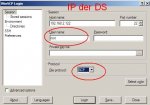
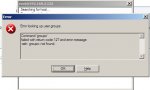
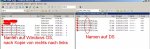

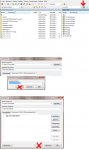
 Ich muß wirklich WinSCP benutzen und die original (Script) Files von Olaf. Der Speedcommander muß wohl die Dateien verändern oder macht irgendwas mit den Dateien und die DS kann sie nicht lesen.






