Synology OpenSpeedTest

System Tasks Synology OpenSpeedTest 1.0.5

Keine Rechte zum Download
  • Ab sofort steht euch hier im Forum die neue Add-on Verwaltung zur Verfügung – eine zentrale Plattform für alles rund um Erweiterungen und Add-ons für den DSM.

    Damit haben wir einen Ort, an dem Lösungen von Nutzern mit der Community geteilt werden können. Über die Team Funktion können Projekte auch gemeinsam gepflegt werden.

    Was die Add-on Verwaltung kann und wie es funktioniert findet Ihr hier

    Hier geht es zu den Add-ons

DaveR

Benutzer
Sehr erfahren
Add-on Developer
Registriert
30. März 2022
Beiträge
1.285
Reaktionspunkte
2.248
Punkte
229
DaveR submitted a new resource:

Synology OpenSpeedTest - Synology package to install OpenSpeedTest and run it in a GUI to test your LAN speed

Description​

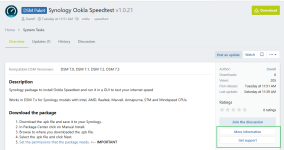
Synology package to install OpenSpeedTest and run it in a GUI to test your LAN speed

Download the package​

  1. Download the .spk file and save it to your Synology.
  2. In Package Center click on Manual Install.
  3. Browse to where you downloaded the .spk file.
  4. Select the .spk file and click Next.

Screenshots​

Anhang anzeigen 111436
[ATTACH type="full"...

Read more about this resource...
 
Thank you Dave !!!!

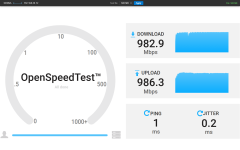
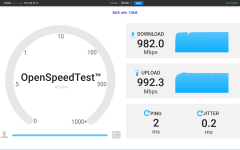
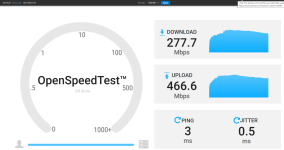
I test / play around with it. In my network with 1GB Lan connetions it works reliable. Download shows perhaps 960 Mb/s. That is physicaly my max speed. My DS220+ is connected with a bond on the 2 Lan-Ports and i get the same speed with 2 clients querying at the same time!
This tool may be very usefull for future forum querys of poor LAN-Connects.
 
I've updated my Asustor version of the same package so you can change the test file size and click Apply, or just click Apply, to run another test without needing to refresh the page. I'll update this Synology package soon.

I've also found I get higher upload speeds when in an incognito browser window (without any add blocker extension slowing it down).
 
  • Like
Reaktionen: ctrlaltdelete

Anhänge

  • 1774806598223.png
    1774806598223.png
    81,9 KB · Aufrufe: 8
  • Like
Reaktionen: ctrlaltdelete
Shame on me! :ROFLMAO:
But either way, the latest releases being reported on GitHub and Synology forum already diverged to each other. Does it make sense to maintain both sources since your GitHub repository is the source of truth?
 
the latest releases being reported on GitHub and Synology forum already diverged to each other. Does it make sense to maintain both sources since your GitHub repository is the source of truth?

It takes me a day or 2 to update the Add-on post here. I'd prefer to just link to the GitHub repo for for people to download from but @Marc prefers the Add-on forum here to be a self contained repository so if my GitHub account gets stolen or deleted users can still download them from here.
 
  • Like
Reaktionen: Benie
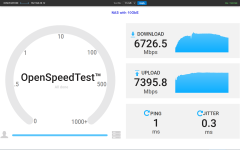
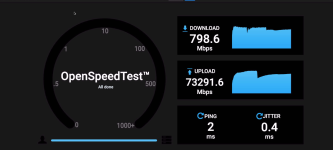
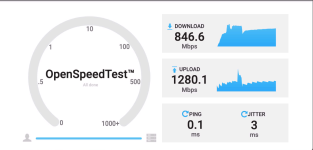
I have this over a 1Gb line (NAS and the computer connected directly to the switch), but I think the upload values are too high... 😆
 

Anhänge

@yasmin_k
  • What browser? A browser with certain extensions (ad blockers, VPNs, traffic monitors) could interfere with timing.
  • What DSM version?
  • Are you on the same LAN or going through a router/firewall that might RST the connection early?
  • Does it happen consistently or just occasionally? A one-off could be a timing fluke where the XHR completes near-instantly for an unrelated reason.
  • Is your computer also connected via 1GbE?
  • Is your Synology or computer using IPv6?
On a Synology with a 1GbE connection I get the results what I expect to get.
1775162001470.png
 
Yes, something must be this causing.
Browser is Vivaldi
AdGuard is installed and default DNS
DSM 7.3.2-86009 Update 3
I'm getting a similar strange value between the NAS and a WiFi connected Mac, so, not only via a LAN cable.
IPv6 is active, yes.

Same happens on the second NAS (the 218), so probably it's something in the combination of the things I'm using here.

Update: Just tested it with Safari, that looks good! So, it must be Vivaldi.
 
  • Like
Reaktionen: Synchrotron und DaveR
  • Like
Reaktionen: Synchrotron
Hi Dave,
just tried 1.0.8.

1775215501536.png

and these are the results with iperf3
Code:
D:\Download\iPerf>iperf3 -c ds1522
Connecting to host ds1522, port 5201
[  4] local 192.168.0.10 port 26525 connected to 192.168.0.71 port 5201
[ ID] Interval           Transfer     Bandwidth
[  4]   0.00-1.00   sec  39.2 MBytes   329 Mbits/sec
[  4]   1.00-2.00   sec  40.8 MBytes   342 Mbits/sec
[  4]   2.00-3.00   sec  33.4 MBytes   280 Mbits/sec
[  4]   3.00-4.00   sec  39.2 MBytes   329 Mbits/sec
[  4]   4.00-5.00   sec  41.2 MBytes   346 Mbits/sec
[  4]   5.00-6.00   sec  40.6 MBytes   340 Mbits/sec
[  4]   6.00-7.00   sec  40.6 MBytes   341 Mbits/sec
[  4]   7.00-8.00   sec  40.1 MBytes   336 Mbits/sec
[  4]   8.00-9.00   sec  40.2 MBytes   338 Mbits/sec
[  4]   9.00-10.00  sec  40.9 MBytes   343 Mbits/sec
- - - - - - - - - - - - - - - - - - - - - - - - -
[ ID] Interval           Transfer     Bandwidth
[  4]   0.00-10.00  sec   396 MBytes   332 Mbits/sec                  sender
[  4]   0.00-10.00  sec   396 MBytes   332 Mbits/sec                  receiver

iperf Done.

D:\Download\iPerf>iperf3 -R -c ds1522
Connecting to host ds1522, port 5201
Reverse mode, remote host ds1522 is sending
[  4] local 192.168.0.10 port 26534 connected to 192.168.0.71 port 5201
[ ID] Interval           Transfer     Bandwidth
[  4]   0.00-1.00   sec  23.2 MBytes   195 Mbits/sec
[  4]   1.00-2.00   sec  23.4 MBytes   197 Mbits/sec
[  4]   2.00-3.00   sec  23.0 MBytes   193 Mbits/sec
[  4]   3.00-4.00   sec  23.3 MBytes   196 Mbits/sec
[  4]   4.00-5.00   sec  22.1 MBytes   186 Mbits/sec
[  4]   5.00-6.00   sec  23.7 MBytes   199 Mbits/sec
[  4]   6.00-7.00   sec  23.1 MBytes   194 Mbits/sec
[  4]   7.00-8.00   sec  22.4 MBytes   188 Mbits/sec
[  4]   8.00-9.00   sec  23.3 MBytes   196 Mbits/sec
[  4]   9.00-10.00  sec  23.4 MBytes   196 Mbits/sec
- - - - - - - - - - - - - - - - - - - - - - - - -
[ ID] Interval           Transfer     Bandwidth       Retr
[  4]   0.00-10.00  sec   232 MBytes   194 Mbits/sec  387             sender
[  4]   0.00-10.00  sec   231 MBytes   194 Mbits/sec                  receiver

iperf Done.
So it seems, that the Upload-Speed is still to high.
 
  • Like
Reaktionen: Synchrotron
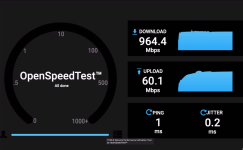
I have installed 1.08 and did the test on the same machine with Vivaldi, Safari and LibreWolf.
 

Anhänge

  • Vivaldi.png
    Vivaldi.png
    166,9 KB · Aufrufe: 1
  • Safari.png
    Safari.png
    260,7 KB · Aufrufe: 1
  • LibreWolf.png
    LibreWolf.png
    185,3 KB · Aufrufe: 1
Hi Dave, I really appreciate your work and dedication to the community. So I couldn't help to test the SpeedTest.

Now I have a weird one:

Setup MacBook Pro M2 Max, 32GB, latest MacOS 26.4, QNAP Thunderbolt 10GbE SFP+ adapter, Zyxel Switch 1250-12, Synology 1522+ with original 10 GbE card, 40GB of ECC RAM, 2x 4TB Lexar NVME RAID1, latest DSM 7.3.2-86009 ver3. For the test I unplugged the 1 Gigabit cable on the DS, leaving the 10GbE as only option. On the Mac WiFi was off, leaving the TB adapter as only network connection.

Just copied a zip-File of 6.05 GB with Finder from the Mac to the DS in less than 15 seconds, from the DS back to the Mac in little more than 5 seconds. So I assume everything ins real life works as expected.

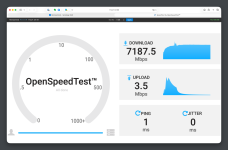
But when I use Safari and Open Speedtest (v 1.0.8) I get THIS :oops: :

1775224737438.png

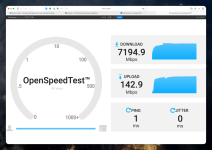
I tried the same file ZIP 6,05GB from my Mac mini M1 16GB, with build in 10GbE Ethernet. 12 seconds upload from the Mac to the DS, 7 seconds download to the Mac, both using Finder and SMB. When I run the same test from my Mac mini, I get THIS:

1775224892011.png

Upload doesn't plain breaks down, but it doesn't go up as expected.

In real life I experience no problems. File transfer speeds (SMB) are in the expected range taking into account the PCIe bottleneck on the DS.
 

Additional post fields


Kaffeautomat

Wenn du das Forum hilfreich findest oder uns unterstützen möchtest, dann gib uns doch einfach einen Kaffee aus.

Als Dankeschön schalten wir deinen Account werbefrei.

:coffee:

Hier gehts zum Kaffeeautomat