OpenVPN Split-Tunnel

  • Ab sofort steht euch hier im Forum die neue Add-on Verwaltung zur Verfügung – eine zentrale Plattform für alles rund um Erweiterungen und Add-ons für den DSM.

    Damit haben wir einen Ort, an dem Lösungen von Nutzern mit der Community geteilt werden können. Über die Team Funktion können Projekte auch gemeinsam gepflegt werden.

    Was die Add-on Verwaltung kann und wie es funktioniert findet Ihr hier

    Hier geht es zu den Add-ons

Alex1234sdfwer

Benutzer
Registriert
08. Okt. 2023
Beiträge
7
Reaktionspunkte
0
Punkte
1
Liebes Forum

Ich habe Probleme bei meinem OpenVPN Split-Tunnel. Der Full-Tunnel funktioniert einwandfrei.
Aber bei dem Split-Tunnel bekomme ich die Fehlermeldung: Connection Timeout, Connection failed to establish within given time.
Wie kann ich dieses Problem lösen?
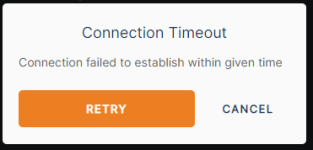
 

Anhänge

  • Screenshot 2024-05-11 132030.png
    Screenshot 2024-05-11 132030.png
    10,4 KB · Aufrufe: 14
Vielleicht durch mehr informationen zu deiner VPN-Konfiguration ?
 
Du meinst ich habe zu wenige Information gegeben?
Betreibsystem: Windows 10 und IOS.
NAS: DS224+
OpenVPN
Ich habe die gleiche Config.-Datei mit und ohne # vor Zeile 20 geschrieben und ausprobiert.
(#)redirect-gateway def1

Ein Leerzeichen hat auch nichts geholfen.
(#)redirect-gateway def1

Ich habe aus Sicherheitsgründen den Port geändert und die Weiterleitung im Router eingerichtet und im DSM.
Ich habe mich mit einem User angemeldet, der kein Admin ist.
OpenVPN ohne "#" funktioniert. Also Full-Tunnel
Open VPN mit "#" funktioniert nicht. Also Split-Tunnel
Brauchst du noch mehr Infos?

Config Datei:
dev tun
tls-client

remote (....)

# The "float" tells OpenVPN to accept authenticated packets from any address,
# not only the address which was specified in the --remote option.
# This is useful when you are connecting to a peer which holds a dynamic address
# such as a dial-in user or DHCP client.
# (Please refer to the manual of OpenVPN for more information.)

#float

# If redirect-gateway is enabled, the client will redirect it's
# default network gateway through the VPN.
# It means the VPN connection will firstly connect to the VPN Server
# and then to the internet.
# (Please refer to the manual of OpenVPN for more information.)

#redirect-gateway def1

# dhcp-option DNS: To set primary domain name server address.
# Repeat this option to set secondary DNS server addresses.

#dhcp-option DNS DNS_IP_ADDRESS

pull

# If you want to connect by Server's IPv6 address, you should use
# "proto udp6" in UDP mode or "proto tcp6-client" in TCP mode
proto udp

script-security 2


comp-lzo

reneg-sec 0

# Clients running OpenVPN 2.4 and higher will automatically upgrade from AES-256-CBC to AES-256-GCM without any configuration changes.
cipher AES-256-CBC
auth SHA512

auth-user-pass
client-cert-not-required
<ca>
 
# ist ein Kommentarzeichen,d.h. alles was danach kommt wird vom Programm nicht beachtet.
versuch mal:
Code:
# redirect-gateway def1
route 192.168.1.0 255.255.255.0
push "route 192.168.1.0 255.255.255.0"
192.168.1.0 musst du natürlich durch dein Privates Netz ersetzen
 
Vielen Dank für deine Hilfe. Du meinst so oder?:

Config Datei:
dev tun
tls-client

remote (....)

# The "float" tells OpenVPN to accept authenticated packets from any address,
# not only the address which was specified in the --remote option.
# This is useful when you are connecting to a peer which holds a dynamic address
# such as a dial-in user or DHCP client.
# (Please refer to the manual of OpenVPN for more information.)

#float

# If redirect-gateway is enabled, the client will redirect it's
# default network gateway through the VPN.
# It means the VPN connection will firstly connect to the VPN Server
# and then to the internet.
# (Please refer to the manual of OpenVPN for more information.)

# redirect-gateway def1
route 192.168.1.0 255.255.255.0
push "route 192.168.1.0 255.255.255.0"

# dhcp-option DNS: To set primary domain name server address.
# Repeat this option to set secondary DNS server addresses.

#dhcp-option DNS DNS_IP_ADDRESS

pull

# If you want to connect by Server's IPv6 address, you should use
# "proto udp6" in UDP mode or "proto tcp6-client" in TCP mode
proto udp

script-security 2


comp-lzo

reneg-sec 0

# Clients running OpenVPN 2.4 and higher will automatically upgrade from AES-256-CBC to AES-256-GCM without any configuration changes.
cipher AES-256-CBC
auth SHA512

auth-user-pass
client-cert-not-required
<ca>
 
Genau, wenn wie gesagt 192.168.1.0 dein Netz ist.
 
Ich habe leider wieder eine Fehlermeldung erhalten. Siehe Anhang.
Ich habe es auch nochmal mit meiner eigenen IP-Adresse und der DDNS-Adresse probiert, aber es hat beides bei Spilt-Tunnel nicht geklappt. DDNS klappt aber bei Full-Tunnel.
Du meinst bei 192.168.1.0 kommt die IP-Adresse der NAS im Heimnetz oder? Das habe ich so eingetragen. Kann es daran liegen, wie meine Firewall konfiguriert ist?
Ich habe bei meinem Internetprovider angerufen und ich habe sowohl eine IPv4 als auch eine IPv6 Adresse, aber dynamische. Deswegen würde ich gerne schaffen, dass es mit der DDNS-Adresse funktioniert.
Screenshot 2024-05-27 095629.png
 

Additional post fields


Kaffeautomat

Wenn du das Forum hilfreich findest oder uns unterstützen möchtest, dann gib uns doch einfach einen Kaffee aus.

Als Dankeschön schalten wir deinen Account werbefrei.

:coffee:

Hier gehts zum Kaffeeautomat