

-
Ab sofort steht euch hier im Forum die neue Add-on Verwaltung zur Verfügung – eine zentrale Plattform für alles rund um Erweiterungen und Add-ons für den DSM.
Damit haben wir einen Ort, an dem Lösungen von Nutzern mit der Community geteilt werden können. Über die Team Funktion können Projekte auch gemeinsam gepflegt werden.
Was die Add-on Verwaltung kann und wie es funktioniert findet Ihr hier
Du verwendest einen veralteten Browser. Es ist möglich, dass diese oder andere Websites nicht korrekt angezeigt werden.
Du solltest ein Upgrade durchführen oder einen alternativen Browser verwenden.
Du solltest ein Upgrade durchführen oder einen alternativen Browser verwenden.
- Status
- Für weitere Antworten geschlossen.
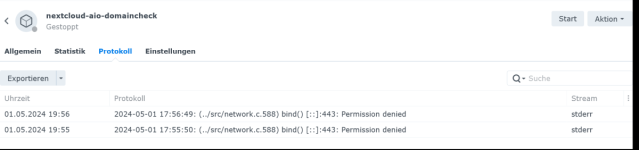
Hier die Anleitung:
https://github.com/nextcloud/all-in-one#how-to-properly-reset-the-instance
Edit:
https://github.com/nextcloud/all-in-one#how-to-properly-reset-the-instance
Edit:
Code:
root@DS:~# sudo docker volume ls --filter "dangling=true"
DRIVER    VOLUME NAME
local     nextcloud_aio_apache
local     nextcloud_aio_backup_cache
local     nextcloud_aio_database
local     nextcloud_aio_database_dump
local     nextcloud_aio_elasticsearch
local     nextcloud_aio_mastercontainer
local     nextcloud_aio_nextcloud
local     nextcloud_aio_redis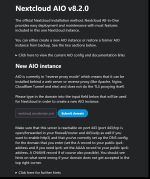
Fehler:
The domain is not reachable on Port 443 from within this container. Have you opened port 443/tcp in your router/firewall? If yes is the problem most likely that the router or firewall forbids local access to your domain. You can work around that by setting up a local DNS-server.
Was mache ich da noch falsch?
Ja, ich arbeite auch auf dem Synology remote!
Das dürfte eher eine Sache von Einstellungen sein, zb Reverse Proxy o.ä.
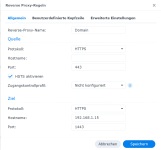
Wie muss ich Router und ReverseProxy konfigurieren?
Wenn ich cloud.meinedomain.xx 443) aufrufe Nextcloud geladen wird und das der Domainchecker auch läuft?
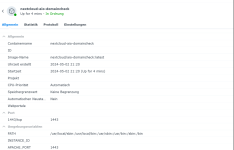
APACHE_PORT: 1443 ????
Das dürfte eher eine Sache von Einstellungen sein, zb Reverse Proxy o.ä.
YAML:
    ports:
      #- 9080:80 # Can be removed when running behind a web server or reverse proxy (like Apache, Nginx, Cloudflare Tunnel and else). See https://github.com/nextcloud/all-in-one/blob/main/reverse-proxy.md
      - 8448:8080
      #- 8443:8443 # Can be removed when running behind a web server or reverse proxy (like Apache, Nginx, Cloudflare Tunnel and else). See https://github.com/nextcloud/all-in-one/blob/main/reverse-proxy.md
    environment: # Is needed when using any of the options below
      ....
      APACHE_PORT: 443 # Is needed when running behind a web server or reverse proxy (like Apache, Nginx, Cloudflare Tunnel and else). See https://github.com/nextcloud/all-in-one/blob/main/reverse-proxy.md
      # APACHE_IP_BINDING: 127.0.0.1 # Should be set when running behind a web server or reverse proxy (like Apache, Nginx, Cloudflare Tunnel and else) that is running on the same host. See https://github.com/nextcloud/all-in-one/blob/main/reverse-proxy.md
Wie muss ich Router und ReverseProxy konfigurieren?
Wenn ich cloud.meinedomain.xx
443) aufrufe Nextcloud geladen wird und das der Domainchecker auch läuft?APACHE_PORT: 1443 ????
Zuletzt bearbeitet:

- Registriert
- 25. Apr. 2023
- Beiträge
- 4.364
- Reaktionspunkte
- 1.926
- Punkte
- 214

In der conf musst du vor der Zeile das # entfernen
- APACHE_PORT=11000 # Is needed when running behind a web server or reverse proxy (like Apache, Nginx, Cloudflare Tunnel
darüber hast du den Zugang auf die nextcloud
über der anderen port ( 8448 ), richtest du deine nc ein / Da GUI hast du ja schon )
https://nextcloud.deinedomain -> geht auf Port 11000 ( https auf http )
Ist schon was länger her wo ich das getestete habe, aber so sollte es gehen
- APACHE_PORT=11000 # Is needed when running behind a web server or reverse proxy (like Apache, Nginx, Cloudflare Tunnel
darüber hast du den Zugang auf die nextcloud
über der anderen port ( 8448 ), richtest du deine nc ein / Da GUI hast du ja schon )
https://nextcloud.deinedomain -> geht auf Port 11000 ( https auf http )
Ist schon was länger her wo ich das getestete habe, aber so sollte es gehen
Ist 11000 zwingend oder kann der beliebig gesetzt werden?
In dem Falle meinst du 443?https://nextcloud.deinedomain -> geht auf Port 11000 ( https auf http )
Fehler:
The domain is not reachable on Port 443 from within this container. Have you opened port 443/tcp in your router/firewall? If yes is the problem most likely that the router or firewall forbids local access to your domain. You can work around that by setting up a local DNS-server.
Irgendetwas mach ich noch immer falsch....
The domain is not reachable on Port 443 from within this container. Have you opened port 443/tcp in your router/firewall? If yes is the problem most likely that the router or firewall forbids local access to your domain. You can work around that by setting up a local DNS-server.
Irgendetwas mach ich noch immer falsch....

- Registriert
- 13. Mai 2021
- Beiträge
- 2.831
- Reaktionspunkte
- 861
- Punkte
- 154
Ich weiß nicht was du da machst.... Ist dein Reverse Proxy richtig eingerichtet?
Löst die Domain die du da angibst auch richtig auf und der Reverse Proxy greift?
Sorry, aber ohne weitere Informationen kann man dir auch nicht wirklich helfen. Und du solltest dich auch mal bisschen in die Basics vielleicht einlesen.
Löst die Domain die du da angibst auch richtig auf und der Reverse Proxy greift?
Sorry, aber ohne weitere Informationen kann man dir auch nicht wirklich helfen. Und du solltest dich auch mal bisschen in die Basics vielleicht einlesen.
YAML:
    environment: # Is needed when using any of the options below
      AIO_DISABLE_BACKUP_SECTION: true # Setting this to true allows to hide the backup section in the AIO interface. See https://github.com/nextcloud/all-in-one#how-to-disable-the-backup-section
      APACHE_PORT: 1443 # Is needed when running behind a web server or reverse proxy (like Apache, Nginx, Cloudflare Tunnel and else). See https://github.com/nextcloud/all-in-one/blob/main/reverse-proxy.md
APACHE_IP_BINDING: 127.0.0.1 # Should be set when running behind a web server or reverse proxy (like Apache, Nginx, Cloudflare Tunnel and else) that is running on the same host. See https://github.com/nextcloud/all-in-one/blob/main/reverse-proxy.md- Status
- Für weitere Antworten geschlossen.


Kaffeautomat
Wenn du das Forum hilfreich findest oder uns unterstützen möchtest, dann gib uns doch einfach einen Kaffee aus.
Als Dankeschön schalten wir deinen Account werbefrei.




