Hi,
macht jemand von Euch ein HyperBackup auf Dropbox? Wäre super, wenn mir jemand sagen könnte, wie ich das Problem löse.
Ich nutze eine DS923+ und die Dropbox ist ein Abomodell mit 3TB.
Ich hab das heute versucht einzurichten, bekomme aber immer Probleme mit der Oauth Redirect wenn ich bei dropbox auf App erlauben und danach bei synology auch auf agree gehe.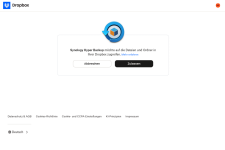
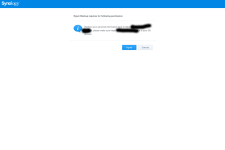
Ich habe es auch mit der lokalen IP statt der Domain über den ReverseProxy versucht, als auch über die quickconnect-Adresse. Leider auch ohne Erfolg..
Wenn ich es auf GoogleDrive testweise probiere, funktioniert es problemlos. Hab genau die gleichen Schritte gemacht.
Der Versuch auf Dropbox zu sichern, hab ich auf Linux mit originalem Browser, Firefox und Chrome probiert, außerdem auf Windows mit Chrome.
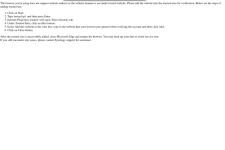
Die Meldung sagt:
The browser you're using does not support website redirect or the website domain is not under trusted website. Please add the website into the trusted sites for verification. Below are the steps of adding trusted site.
Click on Start.
Type inetcpl.cpl, and then press Enter.
Internet Properties window will open. Select Security tab.
Under Trusted Sites, click on Sites button.
In the Add this website to the zone box, type in the website that your browser just opened when verifying the account and then click Add.
Click on Close button.After the trusted site is successfully added, close Microsoft Edge and reopen the browser. You may back up your data to cloud service now.If you still encounter any issues, please contact Synology support for assistance.

macht jemand von Euch ein HyperBackup auf Dropbox? Wäre super, wenn mir jemand sagen könnte, wie ich das Problem löse.
Ich nutze eine DS923+ und die Dropbox ist ein Abomodell mit 3TB.
Ich hab das heute versucht einzurichten, bekomme aber immer Probleme mit der Oauth Redirect wenn ich bei dropbox auf App erlauben und danach bei synology auch auf agree gehe.
Ich habe es auch mit der lokalen IP statt der Domain über den ReverseProxy versucht, als auch über die quickconnect-Adresse. Leider auch ohne Erfolg..
Wenn ich es auf GoogleDrive testweise probiere, funktioniert es problemlos. Hab genau die gleichen Schritte gemacht.
Der Versuch auf Dropbox zu sichern, hab ich auf Linux mit originalem Browser, Firefox und Chrome probiert, außerdem auf Windows mit Chrome.
Die Meldung sagt:
The browser you're using does not support website redirect or the website domain is not under trusted website. Please add the website into the trusted sites for verification. Below are the steps of adding trusted site.
Click on Start.
Type inetcpl.cpl, and then press Enter.
Internet Properties window will open. Select Security tab.
Under Trusted Sites, click on Sites button.
In the Add this website to the zone box, type in the website that your browser just opened when verifying the account and then click Add.
Click on Close button.After the trusted site is successfully added, close Microsoft Edge and reopen the browser. You may back up your data to cloud service now.If you still encounter any issues, please contact Synology support for assistance.