1812+ Bootet nicht mehr / Suche DOM-Image 1812+/1813+

  • Ab sofort steht euch hier im Forum die neue Add-on Verwaltung zur Verfügung – eine zentrale Plattform für alles rund um Erweiterungen und Add-ons für den DSM.

    Damit haben wir einen Ort, an dem Lösungen von Nutzern mit der Community geteilt werden können. Über die Team Funktion können Projekte auch gemeinsam gepflegt werden.

    Was die Add-on Verwaltung kann und wie es funktioniert findet Ihr hier

    Hier geht es zu den Add-ons

Naras

Benutzer
Registriert
09. Okt. 2025
Beiträge
5
Reaktionspunkte
1
Punkte
3
Ich grüße euch,
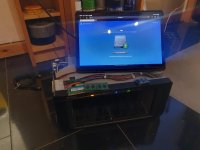
Ich bin im Bekannten/Freundeskreis so der typische Ansprechpartner wenns die Hardware nicht mehr das tut was sie mal sollte. Und so ist mir nun eine 1812+ ins Haus geflogen, welche nur noch endlos blau blinkt, und nicht mehr hochfährt.

Ich hatte bisher wenig Berührung mit Synology Systemen gehabt, aber ich habe den DOM Chip im Verdacht - da ist scheinbar schon mal irgendwann ein neuer rein gekommen, zumindest steht auf diesen "USB Flash 1.3" und hat auch ein kleinen Mini USB Anschluss, wo dieser dann als USB Massenspeicher von der Windows Kiste erkannt wird - scheint im Original nicht so zu sein ?

Hätte jemand zufällig ein passendes Image rumfliegen, in der Theorie sollte auch ein Image der 1813+ gehen, nach dem man die Serien-Nr/Mac Adresse angepasst hat.
 
Oh wow, good question. I guess i will take all 3.
The first one seems to be the raw image with all partions ?


Thank you, and now its time for coffee. ☕
 
IT´S ALIVE ! 🥺
Thank you very much.


Next step is looking for an 1813+ Image for DSM 7, and sleep. ;-)
 

Anhänge

  • dc37dd4a-e14e-4743-a5dd-dc1ef41b770b.jpg
    dc37dd4a-e14e-4743-a5dd-dc1ef41b770b.jpg
    104,2 KB · Aufrufe: 21
  • Like
Reaktionen: DaveR
I am a little bit lost i found a lot of different threads and guidance to install an newer DSM on a unssupported DS. Also for different DSM Version.

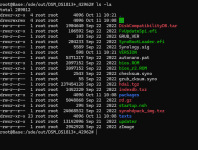
I manged to unpack the PAT with your tool (thanks for that, but also the GUI Version did work for me "Failed to sudo"; if u want i can look into it, and make a "bug-report" maybe its was something wrong with my maschine).

Anyway, i change the Buildnumber in "VERSION" to a lower number, and they i am lost. I need to change somewhere the Mac and serial no i guess ?

I hope i dont anoying you, if u dont want to waste more time on me, its fine, thank you anyway. U safe the Nas :)
 

Anhänge

  • 1760175814525.png
    1760175814525.png
    90,4 KB · Aufrufe: 11
Comparing DSM from a DS1812+ to a DS1813+ it looks like you might only to edit GRUB_VER in synoboot1 to change
Code:
MODEL="DS1812+"
to
Code:
MODEL="DS1813+"
Then when you boot the NAS and find it with Synology Assistant it should ask if you want to migrate the drives.

There is another way where you don't have to edit synoboot. You would just need to adapt the following steps to suit the DS1812+/DS1813+ and your DSM version. See https://www.reddit.com/r/synology/comments/1o3iu8a/412_update_into_dsm_7_finally_made_it/
 
  • Like
Reaktionen: Naras
DSM 7 runs great; for me, it's way faster than DSM 6.
To be fair, I only used and set up DSM 6 for a couple of hours, and it was still processing images and other things.

The only big issue I have with DSM 7 is that I cannot log into my Synology account or use QuickConnect. Maybe someone had an idea ?

P.S. I just changed changed the model name in /etc.defaults/synoinfo.conf via Telnet after the error when trying to update to DSM 7.

/e I see my synology shows in the Info-Center no serialno. 🤔
 
Zuletzt bearbeitet:

Additional post fields


Kaffeautomat

Wenn du das Forum hilfreich findest oder uns unterstützen möchtest, dann gib uns doch einfach einen Kaffee aus.

Als Dankeschön schalten wir deinen Account werbefrei.

:coffee:

Hier gehts zum Kaffeeautomat