

synOCR synOCR - GUI für OCRmyPDF

  • Ab sofort steht euch hier im Forum die neue Add-on Verwaltung zur Verfügung – eine zentrale Plattform für alles rund um Erweiterungen und Add-ons für den DSM.

    Damit haben wir einen Ort, an dem Lösungen von Nutzern mit der Community geteilt werden können. Über die Team Funktion können Projekte auch gemeinsam gepflegt werden.

    Was die Add-on Verwaltung kann und wie es funktioniert findet Ihr hier

    Hier geht es zu den Add-ons

Ohne dem Zurückspielen eines ebenfalls fehlerhaften Backups sollte eine Neueinrichtung problemlos funktionieren.

Falls der Fehler dennoch auftritt, würde ich mir die Konfigurations-DB gern einmal ansehen.
 
Es gibt mal wieder eine neue Beta (v1.5.99.3).

Downlaod synOCR BETA
  • Es wurde ein Fehler behoben, der verhinderte, dass ein & in der YAML-Umbenennungssyntax verwendet werden konnte
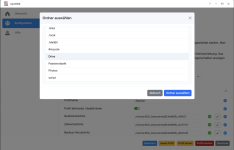
  • Endlich konnte ein FolderPicker eingebaut werden. Das macht die Einrichtung wesentlich Anwenderfreundlicher und sicherer.
    (Es werden nur die Ordner angeboten, auf die der eingeloggt User Zugriff hat.)
Bildschirmfoto 2026-04-28 um 00.44.18.png
 

❓Ich suche Tester mit ARM-CPU (aarch64) ❓


synOCR lief ja bis Version 1.4.5 bereits auf diesen Geräten. In Version 1.5 gab es aber eine Inkompatibilität, die ich jetzt hoffentlich auflösen konnte.
Mit einem kurzes Feedback, ob es mir dieser Version wieder läuft, könntet ihr mich sehr unterstützen (ich habe leider keine passende DS).

Wichtig beim Testen ist, dass ihr nicht nur das SPK installiert, sondern auch ein PDF verarbeiten lasst. Erst dabei wird sich der Erfolg zeigen.

Hier das entsprechende SPK.

Vielen Dank 🤗
 
  • Like
Reaktionen: anmi4345 und kshb
I just installed Container Manager and synOCR on my DS218 which is aarch64. There's a lot I like about the UI - I might even copy of some it for my future packages :). A few thoughts I had were it would be nice if:

  1. The folder picker allowed creating the required subfolders (I had to leave the UI and open File Station to create the folders).
  2. Instead of the folder picker showing "Select the folder" it showed "Select the input folder" or "Select the output folder" etc depending on which button was clicked in the UI.
  3. If the "synOCR Running..." page showed which file it was currently processing. For me it should be processing 3 files: 27MB, 50KB and 1.7MB and I can't tell if it's stuck or still processing. The "wait icon" froze after a few revolutions (due to a browser plugin I have that lets gif files only play once). Okay, as I typed all this it has just finished processing - without any errors in the UI.
file_processing.log shows it failed on the 27MB pdf file:
Code:
[2026-05-14_10-40-36] SOURCE: Smashing Photoshop CS5.pdf
                      ➜ unsuccessful

And (the attached) synOCR_2026-05-14_10-40-35.log shows it never even tried to process the other 2 pdf files.

EDIT I just got an email saying:
Code:
Container synOCR in Container Manager stopped unexpectedly. Please select synOCR on the Container page, click the Details button, and go to the Log tab for details.

From DS218
but there is no synOCR container in Container Manager.


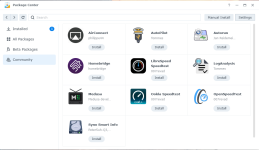
Curiously synOCR didn't show in the community section of package center. But I'm yet to figure out if that's an issue with my package server or the INFO file in the synOCR spk file.

EDIT2 I see the problem. This noarch BETA_v1.5.99.5 spk file is not stored on your GitHub repo.

1778720333232.png

1778720458495.png
 

Anhänge

Zuletzt bearbeitet:
The folder picker allowed creating the required subfolders (I had to leave the UI and open File Station to create the folders).
That's true, that would be consistent. I'll have to think about that. In that case, it should only be optional.

Instead of the folder picker showing "Select the folder" it showed "Select the input folder" or "Select the output folder" etc depending on which button was clicked in the UI.
Good idea 👍

Container synOCR in Container Manager stopped unexpectedly. Please select synOCR on the Container page, click the Details button, and go to the Log tab for details.
Have a look here: https://github.com/geimist/synOCR/issues/67

If the "synOCR Running..." page showed which file it was currently processing. For me it should be processing 3 files: 27MB, 50KB and 1.7MB and I can't tell if it's stuck or still processing. The "wait icon" froze after a few revolutions (due to a browser plugin I have that lets gif files only play once). Okay, as I typed all this it has just finished processing - without any errors in the UI.
I'd never thought of that before, since synOCR usually runs in the background (ideally triggered by inotify).
That would definitely be nice—I'll add it to the list.

And (the attached) synOCR_2026-05-14_10-40-35.log shows it never even tried to process the other 2 pdf files.
Please try installing Python 3.9 as well. I just noticed in the code that there was a different requirement for aarch64.
(was fixed in v1.4.2)

Perhaps preinst would be a good place to look into this further and inform the aarch64 user.

Curiously synOCR didn't show in the community section of package center. But I'm yet to figure out if that's an issue with my package server or the INFO file in the synOCR spk file.
Maybe because this version is now marked as noarch again?
I just wanted to know if it works with aarch64 now. If so, the next beta will be uploaded to GitHub as noarch.
 
I've added a test to preinst and preupgrade: synOCR_DSM7_local_BETA_v1.5.99.6.spk
Please try it again (and make sure to install Python version 3.9 or later).

If it works, I'll upload the build to GitHub.

Thank you very much for testing.
 

Additional post fields


Kaffeautomat

Wenn du das Forum hilfreich findest oder uns unterstützen möchtest, dann gib uns doch einfach einen Kaffee aus.

Als Dankeschön schalten wir deinen Account werbefrei.

:coffee:

Hier gehts zum Kaffeeautomat





