VMM mit Skript sichern

  • Ab sofort steht euch hier im Forum die neue Add-on Verwaltung zur Verfügung – eine zentrale Plattform für alles rund um Erweiterungen und Add-ons für den DSM.

    Damit haben wir einen Ort, an dem Lösungen von Nutzern mit der Community geteilt werden können. Über die Team Funktion können Projekte auch gemeinsam gepflegt werden.

    Was die Add-on Verwaltung kann und wie es funktioniert findet Ihr hier

    Hier geht es zu den Add-ons

Berlon

Benutzer
Registriert
06. Dez. 2020
Beiträge
41
Reaktionspunkte
5
Punkte
8
Hallo,
Ich betreibe Proxmox Backup Server in der VM von Synology.
Dieser wird von Hyper Backup nicht mitgesichert.
Habe aber gelesen, das ich in der VMM das exportieren kann.
Dazu muss ich aber 1. alles von Hand machen und 2. Die VM anhalten.

plang.pl hat hier geschrieben, das mit dem Skript ein anhalten nicht mehr notwendig ist.
Ich habe nur ein Volume (/volume1).

Hier das Skript:
Code:
/volume2/@appstore/Virtualization/bin/vmm_backup_ova --dst=ORDNER_DER_DS --batch=1 --guests="VM-Name"
#Bereinigung
find /volume1/VMM_Export/pbs -name "*.ova" -mtime +14 -exec rm {} \;

Im Script muss ich noch ein paar angeben machen:
aus /volume2 in der ersten Zeile würde bei mir /volume1 werden?
--dst=ORDNER_DER_DS dann --dst=VMM (Name des Ordners in der Filestation in der die *.ova liegen?
Der Name meiner VM lautet Proxmox Backup Server = --guests="Proxmox Backup Server"?

Die 2. Zeile kann ich so übernehmen?

Gruß
Bernd
 
Nimm alternativ den universellen verlinkten Pfad (volume1 ist auch in Ordnung, wenn dort der VMM installiert ist):
/var/packages/Virtualization/target/bin/vmm_backup_ova --dst=ORDNER_DER_DS --batch=1 --guests="VM-Name"

Zu den anderen Fragen:
Mit diesem Befehl wird die VM jitsi-meet in den Gemeinsamen Ordner Backup gesichert (scheinbar kann man nur auf die 1. Ebene von Gemeinsamen Ordnern sichern, es wird aber ein Unterordner mit dem Namen der VM erstellt / das Volume wird nicht mit angegeben):
/var/packages/Virtualization/target/bin/vmm_backup_ova --dst=Backup --batch=1 --guests="jitsi-meet"

Die letzte Zeile löschte alle Dateien mit der Endung ova im Ordner /volume1/VMM_Export/pbs (anzupassen), die älter als 14 Tage sind.
Für das Backup wird nur die erste Zeile benötigt.
 
Zuletzt bearbeitet:
  • Like
Reaktionen: DaveR
/var/packages/Virtualization/target/bin/vmm_backup_ova --dst=Backup --batch=1 --guests="jitsi-meet"

I was wondering how vmm_backup_ova knew which volume the Backup shared folder was on... until I had a look at vmm_backup_ova and saw it is a bash script that uses:
synoshare --get Backup | tr '[]' '\n' | sed -n "9p" which for me returns /volume1/Backup.

It seems strange that Synology didn't use synoshare --get-real-path Backup which is simpler. Maybe older versions of synoshare didn't have the --get-real-path option so vmm_backup_ova uses synoshare --get Backup | tr '[]' '\n' | sed -n "9p" for backward compatibilty.

EDIT The --get-real-path option was added to synoshare in DSM 7.2.1
 
  • Like
Reaktionen: geimist
Hallo,
ich nochmal.
Habe das Script im Aufgabenplaner angelegt und händisch ausgeführt.
CPU ging für ca. 30 Sek auf ca. 90%

Code:
/var/packages/Virtualization/target/bin/vmm_backup_ova --dst=VMM_Export --batch=1 --guests="Proxmox Backup Server"
find /volume1/VMM_Export/Proxmox -name "*.ova" -mtime +14 -exec rm {} \;

In der VMM gibt es auch Einträge:
Code:
Information,2024/11/28 18:55:12,SYSTEM_ADMIN (BerlonNAS),The virtual machine [Proxmox_Backup_Server_d14d7b3c4b_bak] begins to be exported.
Information,2024/11/28 18:55:17,SYSTEM_ADMIN (BerlonNAS),The virtual machine [Proxmox_Backup_Server_d14d7b3c4b_bak] has been successfully cloned from the virtual machine [Proxmox Backup Server].
Information,2024/11/28 20:32:31,SYSTEM_ADMIN (BerlonNAS),The virtual machine [Proxmox_Backup_Server_d14d7b3c4b_bak] has been successfully deleted.
Information,2024/11/28 20:37:56,SYSTEM_ADMIN (BerlonNAS),The virtual machine [Proxmox_Backup_Server_d14d7b3c4b_bak] begins to be exported.
Information,2024/11/28 20:37:57,SYSTEM_ADMIN (BerlonNAS),The virtual machine [Proxmox_Backup_Server_d14d7b3c4b_bak] has been successfully cloned from the virtual machine [Proxmox Backup Server].

Im Ordner VMM_EXPORT wurde der Ordner Proxmox angelegt.
Ich finde aber nirgends die exportierte Datei. Auch über die Filstation Suche wird keine *.ova Datei gefunden.
Wo schiebt das Skript die Datei hin??

Gruß
Bernd
 
FYI you don't need the 2nd line as the vmm_backup_ova script can take an option to keep only X number of backups of each exported VM

So you can replace this:
Code:
/var/packages/Virtualization/target/bin/vmm_backup_ova --dst=VMM_Export --batch=1 --guests="Proxmox Backup Server"
find /volume1/VMM_Export/Proxmox -name "*.ova" -mtime +14 -exec rm {} \;

with this, which would keep only the latest 2 exports:
Code:
/var/packages/Virtualization/target/bin/vmm_backup_ova --dst=VMM_Export --batch=1 --guests="Proxmox Backup Server" --retent=2

The default for --retent is 3 so even without the --retent option only the latest 3 exports would be kept.
Code:
/var/packages/Virtualization/target/bin/vmm_backup_ova --dst=VMM_Export --batch=1 --guests="Proxmox Backup Server"
 
  • Like
Reaktionen: Benares und geimist
--retent=2: Yes, I had also seen that in the help, but had not tested it and therefore did not write it.

But obviously there are problems if a VM has spaces in its name (this can also be seen from the fact that only the folder /volume1/VMM_Export/Proxmox is created instead of /volume1/VMM_Export/Proxmox Backup Server). Therefore, simply rename the VM accordingly - e.g. Proxmox_Backup_Server).
 
Zuletzt bearbeitet:
@Berlon

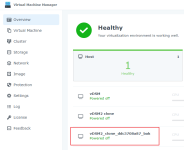
I just cloned vDSM to "vDSM2 clone" and tried to export "vDSM2 clone".
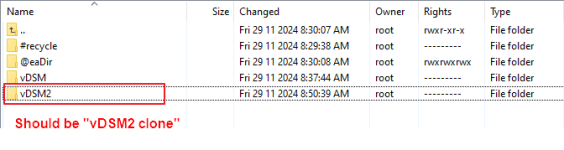
  1. It created a folder named "/volume1/VMM_Export/vDSM2" instead of "/volume1/VMM_Export/vDSM2 clone".
  2. vmm_backup_ova created a backup file but failed to move to "/volume1/VMM_Export/vDSM2 clone".
  3. After it failed it deleted the backup file.
1732832313582.png

1732832161784.png

I tried --guests="vDSM2\ clone" and got a jq Invalid escape error.

I tried --guests='vDSM2 clone' and got the same result as --guests="vDSM2 clone".


CONCLUSION:
Synology VMM really should NOT allow people to create a VM name with spaces or fix vmm_backup_ova so it works with VM names with spaces.


I am currently editing /var/packages/Virtualization/target/bin/vmm_backup_ova to fix Synology's mistakes and will report back once I have it working. I'll also inform Synology on how to fix this bug.
 

Additional post fields


Kaffeautomat

Wenn du das Forum hilfreich findest oder uns unterstützen möchtest, dann gib uns doch einfach einen Kaffee aus.

Als Dankeschön schalten wir deinen Account werbefrei.

:coffee:

Hier gehts zum Kaffeeautomat