

Hallo Leute,
Habe auf meinen Synology 214play eine Mysql4 Datenbank für meine Buchhaltung
aufgesetzt.
Anleitung:
http://www.synology-forum.de/showthread.html?4948-...
Das hat jetzt lange (1/2 Jahr) funktioniert.
Leider hat ein Stromausfall meinen NAS hart vom Netz genommen.
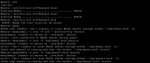
Nun habe ich das Fehlerbild im Anhang.
Die Datenbank will nicht mehr starten.
Leider bin ich auf Linux eine Voll 0.
Gibt es irgendein Logfile, welches ich einsehen kann?
Wenn ja. Wo ist das und wie kann ich es einsehen.
Gibt es eine Generallösung für dieses Problem?
Dankeschön für eure Antworten.
Meine My.cnf:
Habe auf meinen Synology 214play eine Mysql4 Datenbank für meine Buchhaltung
aufgesetzt.
Anleitung:
http://www.synology-forum.de/showthread.html?4948-...
Das hat jetzt lange (1/2 Jahr) funktioniert.
Leider hat ein Stromausfall meinen NAS hart vom Netz genommen.
Nun habe ich das Fehlerbild im Anhang.
Die Datenbank will nicht mehr starten.
Leider bin ich auf Linux eine Voll 0.
Gibt es irgendein Logfile, welches ich einsehen kann?
Wenn ja. Wo ist das und wie kann ich es einsehen.
Gibt es eine Generallösung für dieses Problem?
Dankeschön für eure Antworten.
Meine My.cnf:
Rich (BBCode):
# Unslung MySQL config file.
# Based on my-small.cnf
#
# This is for a system with little memory (<= 64M) where MySQL is only used
# from time to time and it's important that the mysqld daemon
# doesn't use much resources.
#
# You can copy this file to
# /opt/etc/my.cnf to set global options,
# mysql-data-dir/my.cnf to set server-specific options (in this
# installation this directory is /opt/var) or
# ~/.my.cnf to set user-specific options.
#
# In this file, you can use all long options that a program supports.
# If you want to know which options a program supports, run the program
# with the "--help" option.

# The following options will be passed to all MySQL clients
[client]
#password  = your_password
#port    = 3306
#socket    = /tmp/mysql.sock

# Here follows entries for some specific programs

# The MySQL server
[mysqld]
user    = root
datadir    = /opt/var/lib/mysql
port    = 3307
socket    = /tmp/mysql4.sock
skip-locking
key_buffer = 16K
max_allowed_packet = 1M
table_cache = 4
sort_buffer_size = 64K
read_buffer_size = 256K
read_rnd_buffer_size = 256K
net_buffer_length = 2K
thread_stack = 64K

# Don't listen on a TCP/IP port at all. This can be a security enhancement,
# if all processes that need to connect to mysqld run on the same host.
# All interaction with mysqld must be made via Unix sockets or namedpipes.
# Note that using this option without enabling named pipes on Windows
# (using the "enable-named-pipe" option) will render mysqld useless!
#
#skip-networking
server-id  = 1

# Uncomment the following if you want to log updates
#log-bin

# Uncomment the following if you are NOT using BDB tables
skip-bdb

# Uncomment the following if you are using InnoDB tables
#innodb_data_home_dir = /opt/var/
#innodb_data_file_path = ibdata1:10M:autoextend
#innodb_log_group_home_dir = /opt/var/
#innodb_log_arch_dir = /opt/var/
# You can set .._buffer_pool_size up to 50 - 80 %
# of RAM but beware of setting memory usage too high
#innodb_buffer_pool_size = 16M
#innodb_additional_mem_pool_size = 2M
# Set .._log_file_size to 25 % of buffer pool size
#innodb_log_file_size = 5M
#innodb_log_buffer_size = 8M
#innodb_flush_log_at_trx_commit = 1
#innodb_lock_wait_timeout = 50

[mysqldump]
quick
max_allowed_packet = 16M

[mysql]
no-auto-rehash
# Remove the next comment character if you are not familiar with SQL
#safe-updates

[isamchk]
key_buffer = 8M
sort_buffer_size = 8M

[myisamchk]
key_buffer = 8M
sort_buffer_size = 8M

[mysqlhotcopy]
interactive-timeout

[mysql.server]
user=root

[safe_mysqld]





