


- Registriert
- 30. März 2022
- Beiträge
- 1.153
- Reaktionspunkte
- 2.078
- Punkte
- 229
While running a script to get the size of Container Manager's folders I noticed the du command was taking a really long time to get the size of /volume1/@appdata/ContainerManager/all_shares so I had look in that folder and it has mounts for all my shared folders. Why Synology, why!?!?!

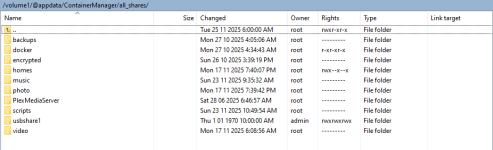
I found a post about the all_shares folder here: https://community.synology.com/enu/forum/11/post/192141
In that thread Synology Support replied:
Why is Synology adding features that nobody asked for?
If you want to remove these mount folders, you can do so using the following commands:
I think I'll add
I found a post about the all_shares folder here: https://community.synology.com/enu/forum/11/post/192141
In that thread Synology Support replied:
I have confirmed with our developers regarding the mount points at @appdata/ContainerManager/all_shares/. These are used as bind mounts for container-based packages, helping to prevent issues that may arise from mounting the root folder directly.
We do not use the mounts directly, they are meant to be used by third party docker based packages(outside of Container Manager itself). Though there's currently no package that uses them at this time.
Unmounting them will not prevent Container Manager from working nor would it interfere with any normal docker containers you run.
Why is Synology adding features that nobody asked for?
If you want to remove these mount folders, you can do so using the following commands:
Code:
sudo /var/packages/ContainerManager/target/tool/mount_share_helper --umount-all
sudo mv /var/packages/ContainerManager/target/tool/mount_share_helper /var/packages/ContainerManager/target/tool/mount_share_helper.disabled
I think I'll add
var/packages/ContainerManager/target/tool/mount_share_helper --umount-all to my Synology App Mover script.
Zuletzt bearbeitet:







